Perfect365 Makeup Photo Editor

Perfect365 Makeup Photo Editor
Beauty editor for flawless selfies with virtual makeup
Screenshots


Perfect365 Makeup Photo Editor Overview
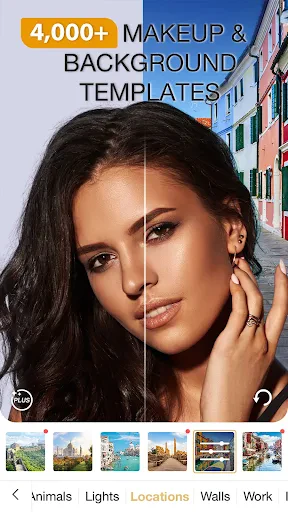
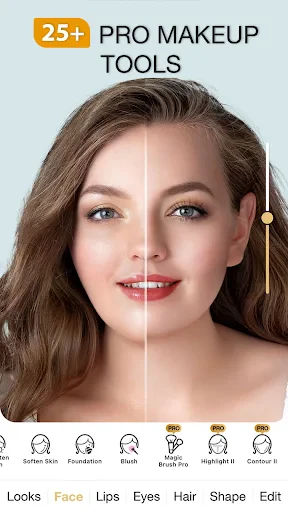
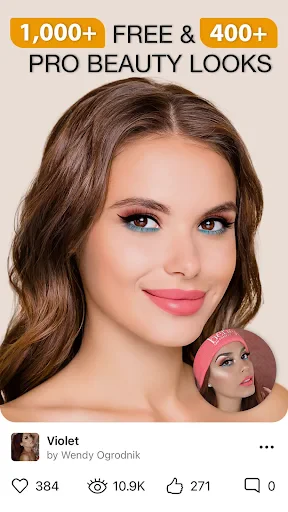
Perfect365 Makeup Photo Editor is a mobile application designed for virtual makeup try-on and photo retouching. It uses facial recognition technology to allow users to apply a wide range of makeup effects, including foundation, lipstick, eyeshadow, and eyeliner, directly onto their photos. The app also offers tools for skin smoothing, blemish removal, and reshaping facial features, enabling users to achieve a polished look without physical products. With a library of pre-designed looks and customizable options, it serves both casual users seeking quick enhancements and those exploring new makeup styles.
Chapter 1: Function
The core function of Perfect365 is its real-time facial mapping and makeup simulation technology. Users upload or capture a photo, and the app automatically detects facial landmarks such as eyes, lips, and cheekbones. It then allows precise application of virtual cosmetics, including over 100 shades of lip color, multiple eye shadow palettes, and contouring tools for nose and jawline. Additional features include teeth whitening, eye brightening, and hair color changes. The app supports layering and intensity adjustments, enabling users to fine-tune each effect. A comparison mode lets viewers see before-and-after results side by side, while the look library provides one-tap application of complete styles like natural, glamorous, or bridal makeup. These functions combine to give users full creative control over their digital appearance.
Chapter 2: Value
Perfect365 delivers significant value by eliminating the cost and time associated with physical makeup trials. It allows users to experiment with hundreds of looks without purchasing products, making it an economic and environmental alternative to traditional cosmetics. For makeup enthusiasts and beginners alike, the app serves as a risk-free learning tool for understanding color combinations and application techniques. Its precision tools cater to professionals seeking quick client previews, while the skin enhancement features offer confidence boosts for social media profiles and personal photos. The app also benefits users with limited access to makeup stores or those who prefer virtual try-ons due to hygiene concerns. By storing favorite looks and supporting offline access to installed styles, Perfect365 ensures convenience and speed, reducing the decision-making process for daily makeup choices. Its ability to morph features subtly or dramatically gives users control over their self-representation in digital spaces, addressing diverse aesthetic preferences.
Chapter 3: Scenarios
The primary target user groups include fashion-conscious individuals aged 16 to 35, beauty bloggers, and occasional social media users. Everyday use cases involve preparing profile pictures for dating apps, LinkedIn, or Instagram, where users seek a polished but natural appearance. Teenagers and young adults use the app to experiment with bold trends before adopting them in real life. It is also utilized by event attendees, such as brides or partygoers, to preview full makeup looks tied to specific outfits. Professionals like makeup artists employ the app to demonstrate potential results to clients or to create digital portfolios. Additionally, individuals with sensitive skin who cannot test physical products benefit from the virtual try-on feature. The app is frequently used during shopping trips to compare virtual lipstick shades alongside real products in stores, bridging offline and online beauty experiences.
Advantages
- real-time AR makeup preview before capture
- 200+ beauty looks adjustable by intensity slider
- one-tap skin smoothing with pore-level precision
- face shape contouring via 3D mesh mapping
- offline editing works without internet connection
Disadvantages
- heavy app size due to bundled AR models
- some advanced filters require in-app purchase
- low-light photos cause alignment drift in mapping
- export resolution capped at 1080p for free tier
- no batch editing mode for multiple selfies
Frequently Asked Questions
Q: What is Perfect365 Makeup Photo Editor?
A: Perfect365 is a beauty and photo editing app that applies virtual makeup to selfies and portraits using facial recognition technology. It offers thousands of makeup looks, including foundation, lipstick, eyeshadow, and eyeliner, alongside skin retouching tools like blemish removal and skin smoothing. No manual editing is required; the app automatically detects facial features for one-tap application.
Q: Is Perfect365 free to use or does it have in-app purchases?
A: Perfect365 is free to download and use, with basic makeup looks and retouching tools accessible without payment. However, premium features, such as exclusive makeup collections, advanced filters, and ad removal, require a subscription or one-time in-app purchase. The app operates on a freemium model, and users can choose to pay for additional content.
Q: Does Perfect365 work on both iOS and Android devices?
A: Perfect365 is available for both iOS and Android platforms. It supports most smartphones and tablets running iOS 11.0 or later and Android 5.0 (Lollipop) or higher. The app is optimized for front-facing cameras and works best on devices with at least 2GB of RAM. It does not require additional external equipment like a ring light.
Q: How accurate is Perfect365's facial recognition for different skin tones?
A: Perfect365 uses facial landmark detection to map makeup onto a user's face regardless of skin tone, gender, or age. Its makeup library includes a wide range of shades for diverse skin tones, but subtle variations in lighting or extreme angles may reduce alignment precision. The app offers manual adjustment sliders to fine-tune makeup position and opacity for better results.
Q: Can I save or share edited photos without a watermark in Perfect365?
A: Yes, Perfect365 allows users to save edited photos to their device gallery and share them directly to social media platforms like Instagram and Facebook. Free users may see a small watermark on some premium looks, but standard makeup effects and retouching tools produce watermark-free outputs. Removing all watermarks typically requires a premium subscription.
Technical Information
Recommended for You

Driver Pulse by Tenstreet

GEICO Mobile - Car Insurance

Human Health Tracker

HolMe Dating app: Meet People

AE + Aerie

All Email Connect

Bose Connect

DamonSX2 Pro - PS2 Emulator

PixShift: BackGround Changer

djay - DJ App & Mixer

ID.me Authenticator

Weather Complications: Wear OS

Beauty Camera -AI Photo Editor

Scratch

Musicolet Music Player

Aqara Home

Messages: SMS Messaging

Bitwarden Password Manager
AI Photo Editor - Polish

Lift: Reels & Stories Maker

Qibla Finder Compass 100%

Pregnancy Calculator: Due Date

Empower®