Aqara Home

Aqara Home
Smart home control for automation enthusiasts
Screenshots
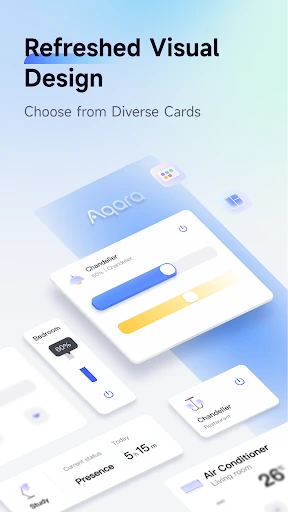
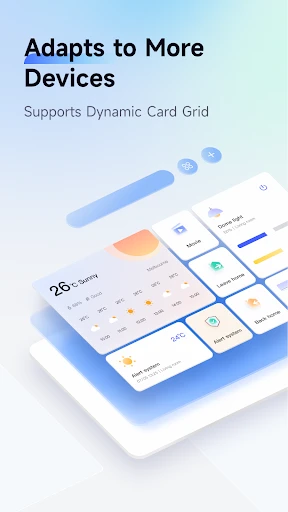
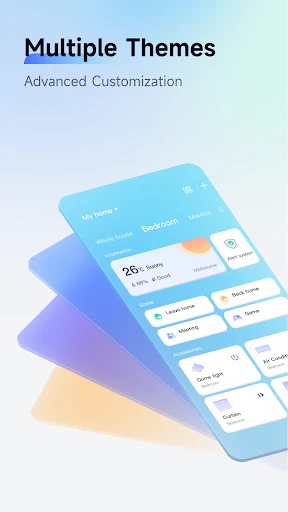

Aqara Home: Seamless Smart Living Control Hub
Aqara Home is a comprehensive smart home application designed to centralize the control and automation of Aqara brand smart devices. It serves as the primary interface for managing a wide ecosystem of sensors, switches, lights, curtains, and security devices. The app leverages the Zigbee 3.0 protocol and Matter compatibility to ensure stable, low-power connectivity. Users can create complex automations, monitor real-time device status, and control their home environment remotely. Its key focus is on bridging the gap between intelligent hardware and user-friendly operation, offering a unified dashboard for personalized, responsive home management without relying on multiple separate applications.
Chapter 1: Function
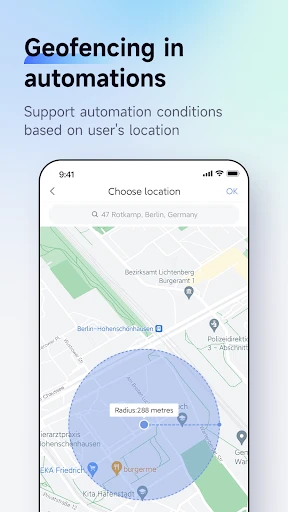
The core function of Aqara Home is device management and automation orchestration. It enables users to add, configure, and group a diverse range of sensors, including temperature, humidity, motion, door/window, and vibration sensors. Through a visual scene editor, users can create conditional triggers, such as turning on lights when motion is detected or adjusting the thermostat based on ambient temperature. The app supports scheduled actions, location-based geofencing, and voice control integration with Amazon Alexa, Google Assistant, and Apple HomeKit. Real-time notifications and device status monitoring are central, allowing users to check security camera feeds, control smart blinds, and set alarm system parameters from the app dashboard, ensuring a responsive and intuitive control loop.
Chapter 2: Value
The value proposition of Aqara Home lies in its ability to deliver a truly interconnected and adaptive living environment. Its primary advantage is interoperability, supporting both the native Zigbee ecosystem and the emerging Matter standard, which allows devices to work seamlessly with other smart home platforms. The app’s powerful automation engine reduces manual intervention, saving time and energy. For example, a user can set curtains to close at sunset and thermostat to adjust when leaving the house, directly lowering utility costs. Security is another cornerstone; the app provides real-time intrusion alerts, camera recording review, and remote lock management, offering peace of mind. The system's reliability is enhanced by local processing capabilities, minimizing cloud dependency and ensuring fast response times even during network interruptions. Furthermore, the app’s intuitive interface reduces the learning curve for new users, while advanced users can access detailed sensor logs and fine-tune automation parameters, making it a versatile tool for both novices and smart home enthusiasts. The integration of energy monitoring features also empowers users to track consumption patterns and optimize device usage, contributing to a more sustainable household.
Chapter 3: Scenarios
Aqara Home is designed for homeowners, renters, and tech-savvy individuals seeking to automate daily routines and enhance home security. Its primary target users include families wanting to control lighting and climate from a single app, busy professionals who value remote monitoring and geofencing to lock doors or adjust lights when away, and elderly individuals or caregivers who rely on sensor-based alerts for fall detection or door open status. Common use cases include turning off all lights and appliances with a single goodnight scene, receiving a smartphone notification when a child returns home via door sensor triggers, or automatically watering plants based on soil moisture sensor readings. The app is also ideal for people experimenting with smart home technology, as its gradual learning curve allows for starting with a single sensor and expanding to a full house automation system over time. It supports both apartment dwellers with limited device needs and large home owners requiring multi-room, multi-device coordination.
Advantages
- matter-compatible hubless local automation for multi-brand devices
- zigbee 3.0 and thread dual-protocol reduces latency under 200ms
- offline scene execution via on-device edge computing no cloud required
- one-tap adaptive calibration for curtain position and light sensor thresholds
- energy consumption breakdown per device with hourly granularity
Disadvantages
- initial sensor pairing requires holding reset button with needle tool
- no native support for zwave devices limits existing smart home migration
- geofencing triggers fail if phone gps drifts near boundary areas
- child lock for touch screens hides behind three-layer menu navigation
- firmware updates over zigbee mesh may stall if one repeater is offline
Frequently Asked Questions
Q: What is Aqara Home used for?
A: Aqara Home is a smart home control app that manages Zigbee and Wi-Fi devices from Aqara and select partners. It enables device pairing, automation creation, remote monitoring, and voice assistant integration. The app supports local automation via hubs for offline reliability and works with Apple HomeKit, Google Home, and Alexa. No subscription is required for core functions.
Q: Is Aqara Home free to use or require in-app purchases?
A: The app is free to download and use. Core features like device control, automation, and scene setting do not require payments. Some advanced features, such as cloud video storage for cameras or third-party service integrations, may involve optional in-app purchases or subscriptions. No additional hardware is needed beyond Aqara devices and a compatible hub.
Q: Does Aqara Home work with non-Aqara smart devices?
A: Aqara Home primarily supports Aqara-branded devices and select Matter-compatible products. It does not natively control non-Aqara Zigbee or Wi-Fi devices from other brands unless they are explicitly listed as compatible. For broad cross-brand control, users must rely on voice assistants like Apple HomeKit or Alexa as intermediaries.
Q: How can I fix devices disconnecting frequently?
A: Frequent disconnections often stem from weak Zigbee signal or hub placement. Ensure the hub is centrally located and within 10 meters of devices without thick walls. Update the hub firmware in the app under 'Settings > Firmware Update'. For Wi-Fi devices, check router compatibility (2.4 GHz required) and avoid network congestion. Reboot hub and devices if issues persist.
Q: Can I control Aqara Home without internet access?
A: Yes, local control works without internet for automations and scenes processed through the Aqara Hub (e.g., M2, M3). Devices communicate via Zigbee, and automations run locally on the hub. Remote control via app, voice assistants, or notifications require internet. Local control coverage depends on hub model; check specifications for offline automation limits.
Technical Information
Recommended for You

Nomad Sculpt

Minute Money

Oportun: Finances made simple

Screen Recorder Video Recorder

Praktika – AI Language Tutor

LibriVox Audio Books

AI Passport & ID Photo Maker

Triller: Social Video Platform

Auto Sync for Android/Car Play

BeSoccer - Soccer Live Score

Ghostcom™ Radar Pro Messages

Bitmoji

Falou - Fast language learning

Phone Tracker

Type Machine

Real Wrestling Rumble Fight

Glam AI

IO Cleaner - Phone Cleaner

RadarX: Weather Radar/Forecast

Dutch Bros

Pashto short stories پښتو قیصی

Mark - AI Logo Generator

Parcel Pending
