Nomad Sculpt

Nomad Sculpt
3D sculpting made simple for artists and designers
Screenshots
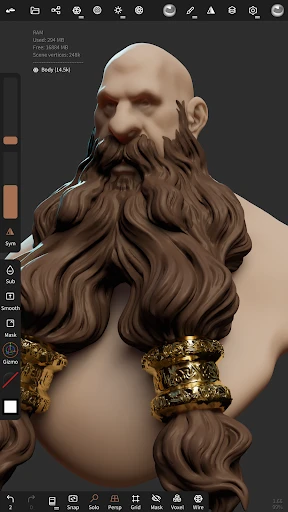
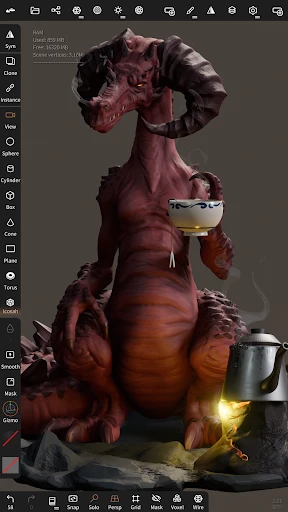
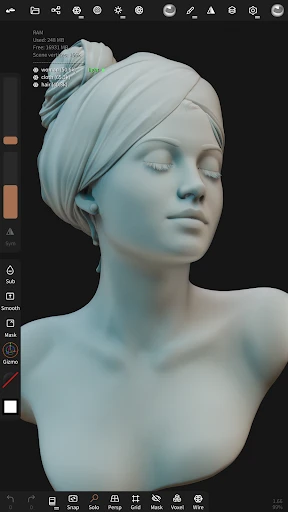
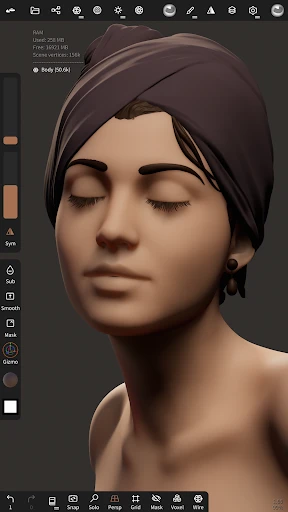
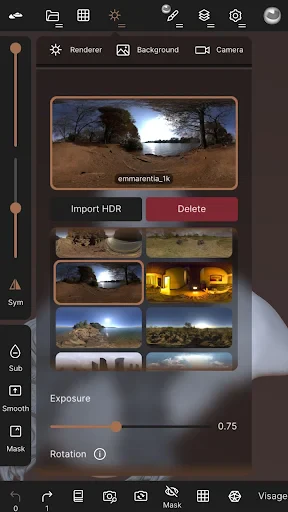
Nomad Sculpt - About App Feature
Nomad Sculpt is a powerful 3D sculpting application designed for mobile devices, offering artists and hobbyists a comprehensive set of tools for digital clay modeling. It combines the portability of a tablet or smartphone with the depth of professional desktop software, enabling users to create detailed sculptures, characters, and objects on the go. The app supports high-resolution sculpting, intuitive brush controls, and advanced rendering, making it a versatile solution for creative work.
Chapter 1: Function
Nomad Sculpt provides a full-featured 3D sculpting environment with core functions including dynamic subdivision surfaces, multiresolution sculpting, and a wide range of customizable brushes such as clay, crease, and move. Users can manipulate geometry with symmetry options, apply layers for non-destructive editing, and utilize masking tools for precise control. The app also supports importing and exporting common 3D file formats like OBJ, STL, and GLB, along with PBR texture painting for realistic materials. Real-time rendering with adjustable lighting, shadows, and camera controls allows users to visualize their work accurately. Additional features include vertex painting, poseable mannequins, and boolean operations for combining shapes.
Chapter 2: Value
Nomad Sculpt offers significant value by bridging the gap between mobile convenience and professional-grade 3D creation. Its key advantage lies in its optimized performance on touchscreens, allowing artists to sculpt intutitively with gestures similar to physical clay modeling, without requiring a powerful desktop workstation. The app supports high polygon counts and layered workflows, enabling complex projects while maintaining responsiveness. It provides a cost-effective alternative to desktop software, with a one-time purchase model rather than subscriptions. Its compatibility with industry-standard formats ensures seamless integration into broader pipelines for game development, 3D printing, or animation. The inclusion of PBR materials and advanced rendering enhances presentation quality, making it useful for client previews or portfolio pieces. Furthermore, regular updates and an active community provide ongoing learning resources and feedback. For professionals, it serves as a portable sketchpad for rapid prototyping; for beginners, its intuitive interface reduces the learning curve, making 3D sculpting accessible. Unlike lighter mobile apps, Nomad Sculpt does not sacrifice depth of features, offering tools like dynamic subdivision and support for multi-threading, which ensures smooth performance even on older devices.
Chapter 3: Scenarios
Nomad Sculpt targets a diverse user base including 3D artists, game developers, hobbyists, and educators. Primary target user groups are independent creators who need a mobile solution for concept art and character design, as well as professionals in game studios who rely on rapid sculpting during field research or travel. Everyday use cases include sculpting character prototypes on a tablet during commutes, refining 3D models for 3D printing at home, and creating assets for VR or AR projects. Educators use it to teach digital sculpting fundamentals in classrooms without requiring expensive hardware. Hobbyists leverage it for customizing figurines or designing jewelry. The app also suits users who prefer tactile control over mouse-based tools, making it ideal for artists transitioning from traditional clay sculpting. Real-world scenarios involve a game designer blocking out a monster model while on set, or an architect quickly prototyping a decorative element for a client meeting. The apps offline capability ensures productivity without internet reliance, which is beneficial for travel or remote environments.
Advantages
- exports directly to Blender
- Maya
- and Unity formats without conversion
- uses Vulkan API for 60fps sculpting on mid-range tablets
- multi-resolution dynamic tessellation adapts to device RAM limits in real time
- supports 16-bit depth brush alpha import for precise displacement maps
- undo stack persists across app restarts via native file caching
Disadvantages
- requires ARM64 iOS/Android device running Metal 3 or Vulkan 1.2
- no PBR material layering system
- only basic color and roughness sliders
- non-destructive boolean operations crash on meshes above 8 million vertices
- retopology export limited to 16-bit STL
- no quad-dominant remeshing
- clay polish brush leaves visible artifacts at low tessellation levels
Frequently Asked Questions
Q: What is Nomad Sculpt used for?
A: Nomad Sculpt is a mobile 3D sculpting app designed for creating detailed digital sculptures on tablets and smartphones. Its core function is to provide a full-featured sculpting studio with tools like brushes, symmetry, and dynamic topology. It supports importing and exporting models in common formats like OBJ and STL, making it suitable for artists, hobbyists, and 3D printing enthusiasts who need portable modeling capabilities without a desktop computer.
Q: Does Nomad Sculpt require a subscription?
A: Nomad Sculpt is a one-time purchase app with no recurring subscription fees. You pay once to download and own the full version, which includes all current features and basic updates. There are no in-app purchases for additional brushes or tools. However, future major version upgrades may require a separate purchase, but minor updates and bug fixes are free within the same version.
Q: Is Nomad Sculpt compatible with iPad and Android tablets?
A: Yes, Nomad Sculpt works on both iPad and Android tablets. On iOS, it requires iPadOS 13.0 or later and supports Apple Pencil for pressure sensitivity. On Android, it requires version 7.0 or later and works with active styluses like the S Pen. It is not optimized for phones due to screen size limitations. The app supports 64-bit devices only and does not run on older 32-bit hardware.
Q: Can I export models from Nomad Sculpt for 3D printing?
A: Yes, you can export models for 3D printing. Nomad Sculpt supports exporting in STL and OBJ formats, which are standard for most slicer software. The app allows you to adjust model resolution and export as a watertight mesh to minimize errors. However, it does not include built-in slicer or repair tools, so you may need separate software to fix non-manifold edges before printing.
Q: How does Nomad Sculpt handle undo and layer management?
A: Nomad Sculpt provides unlimited undo steps during a session, limited only by device memory. It supports a layer system similar to desktop sculpting apps, allowing you to organize different parts of your model on separate layers. Each layer can be hidden, locked, or merged. Undo history is cleared when you close the app or load a new project, so save your work frequently if you need to revert later.
Technical Information
Recommended for You

Shazam: Find Music & Concerts

eBay online shopping & selling

Bitwarden Password Manager

ZBD: Earn Bitcoin Rewards

Love's Connect

Oportun: Finances made simple

Govee Home

Regions Bank

Real Messenger

Drugs.com Medication Guide

SelfComic: Super Saiyan Photo

Money Well - Games for rewards

Yogiyo - Food Delivery

Authenticator App - SafeAuth

زخرفة الكتابة بكل انواع الخطوط

Magic Fluids

favorited

MSN

FiMe: Find Phone By Clap Hand

Plenty of Fish Dating App

Nice Miner: Bitcoin Miner Hash
Magic Cross Stitch: Pixel Art

Official E-ZPass NY