Musicolet Music Player

Musicolet Music Player
Musicolet plays music offline with multiple queues for focused listeners
Screenshots
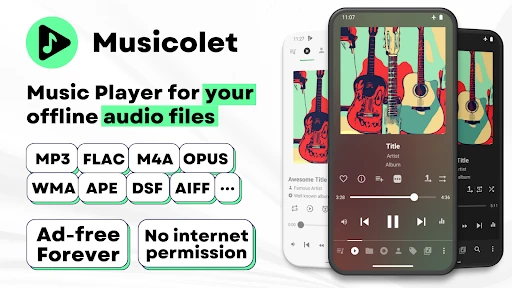
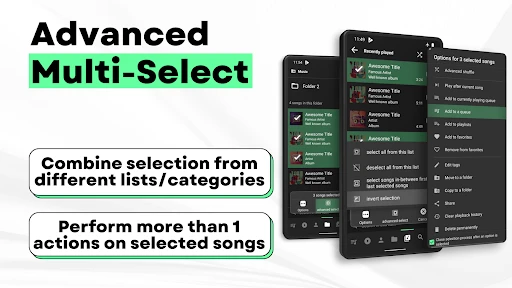
Musicolet Music Player: A Lightweight, Feature-Rich Offline Music Manager
Musicolet Music Player is a free, ad-free Android app designed for users who prioritize local music playback over streaming services. It offers a powerful yet straightforward interface for organizing, managing, and enjoying audio files stored on a device. Unlike many modern players, Musicolet focuses on offline functionality, multiple queues, and advanced tag editing, making it a go-to choice for audiophiles and offline music collectors who value control and privacy.
Chapter 1: Function
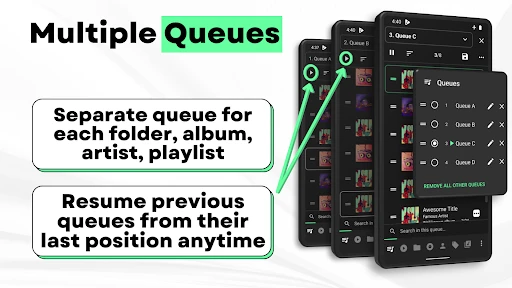
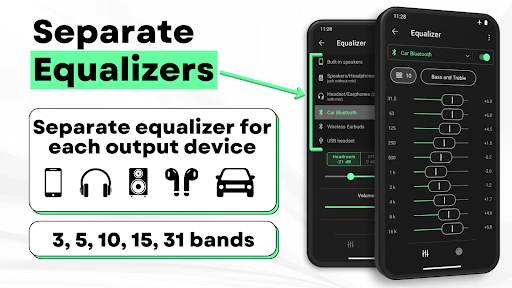
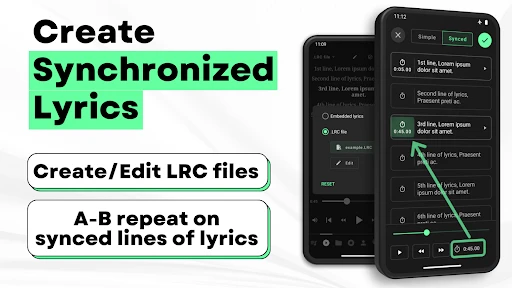
Musicolet Music Player provides a comprehensive set of core functions for managing and playing local music files. The app supports a wide range of audio formats including MP3, FLAC, AAC, OGG, and WAV, ensuring compatibility with most music libraries. Its standout feature is the ability to manage multiple independent queues simultaneously, allowing users to create separate playlists for different moods or activities without interfering with each other. The built-in tag editor enables users to modify metadata such as artist, album, genre, and cover art directly from the app. Additional functions include a 10-band equalizer with presets, gapless playback for seamless transitions between tracks, sleep timer, folder-based browsing, and a powerful search tool that filters by song, album, or artist. The app also supports lyrics display and playback speed control, catering to users who learn or enjoy music in different ways.
Chapter 2: Value
The primary value proposition of Musicolet Music Player lies in its emphasis on user privacy, offline accessibility, and granular control over the listening experience. Unlike streaming apps that require internet connectivity and often collect user data for advertising, Musicolet operates entirely offline, ensuring no data is shared and no ads interrupt playback. This makes it an ideal choice for users in areas with limited connectivity or those concerned about digital privacy. The app’s key advantage is its multi-queue system, which provides unmatched flexibility for organizing music on the fly. Users can have a queue for workout songs, another for relaxation, and a third for learning lyrics, all saved and independent. Additionally, the app’s lightweight design consumes minimal system resources and battery, making it suitable for older devices or long listening sessions. The advanced tag editor eliminates the need for separate software to clean up messy music libraries, saving time and effort. For users who value customization, the 10-band equalizer offers precise sound shaping without relying on streaming platform algorithms. Overall, Musicolet combines professional-grade features with a respectful, ad-free experience, setting it apart from bloated or data-hungry alternatives.
Chapter 3: Scenarios
Musicolet Music Player is primarily intended for users who maintain a personal collection of local music files, such as downloaded albums, podcasts, or audiobooks. Its primary target user groups include audiophiles who require support for high-resolution audio formats like FLAC, offline listeners who travel frequently or have limited mobile data, and individuals who prefer to avoid streaming subscriptions and targeted advertising. Everyday use cases include creating separate queues for gym sessions, commuting, or studying without mixing playlists. Folder-based browsing is particularly useful for users who have organized their music by directory structure rather than metadata, such as DJs or collectors. The sleep timer is ideal for those who fall asleep to music, automatically stopping playback to save battery. Parents may find the app useful for loading a child’s device with curated local content without exposing them to online ads or inappropriate recommendations. Additionally, musicians and educators can use the playback speed control to learn songs or analyze tracks at slower tempos. The app’s offline-only nature also makes it a reliable tool for use during flights, in remote areas, or in environments with strict data usage limits.
Advantages
- no ads or trackers in the entire experience
- queues and playlists work fully offline
- multiple independent queues for different folders
- tag-based auto-sorting with zero cloud dependency
- lightweight apk under 5 MB
- no permissions abuse
Disadvantages
- no chromecast or bluetooth metadata sync
- lacks gapless playback for live albums
- no built-in equalizer or audio effects
- interface feels dated with minimal visual polish
- no cross-device sync or backup of playlists
Frequently Asked Questions
Q: What core features does Musicolet Music Player offer?
A: Musicolet is a free, offline-only music player for Android that provides multi-queue management, tag editing, gapless playback, sleep timer, and folder-based browsing. It supports MP3, FLAC, OGG, WAV, and M4A formats with no ads or internet permissions required.
Q: Is Musicolet completely free with no in-app purchases?
A: Yes, Musicolet is entirely free with no in-app purchases, subscriptions, or ads. All features, including multiple queues, equalizer, and tag editor, are unlocked without any payment. The app relies on no hidden costs or premium tiers.
Q: Does Musicolet work on Android Auto or iOS devices?
A: Musicolet is only available for Android devices (version 5.0+). It supports Android Auto integration but does not have an iOS version or desktop client. No additional equipment is required beyond a standard Android phone or tablet.
Q: How does Musicolet handle multiple playback queues?
A: Musicolet allows users to create and manage up to 20 independent playback queues simultaneously. Each queue can be named, reordered, and saved separately. Queues persist across app restarts, and users can switch between them without interrupting other queues.
Q: What should I do if Musicolet crashes or fails to load music files?
A: First, ensure your music files are stored locally and in supported formats (MP3, FLAC, etc.). Clear the app cache from Android settings or reinstall the app. If the issue persists, report via the built-in feedback option—no official customer support or live chat is available.
Technical Information
Recommended for You

Citymapper

OKX: Buy Bitcoin BTC & Crypto

YouTube Music

Desygner: Graphic Design Maker

AI Chat・Ask Chatbot Assistant

Photo Recover-File Recovery

QR & Barcode Scanner Launcher

Recreation.gov

ABC 7 New York

PDF Reader: PDF Scanner & Edit

weather24: Forecast & Radar

Root: Better car insurance

EveryDollar: Budget Planning

Bible Launcher-KJV & Prayer

Fragrantica Perfumes

Sam’s Club: Shopping made easy

boohooMAN: Shop Men’s Clothing

Paint

WPS Office-PDF,Word,Sheet,PPT

Starfall
EasyTether Pro

CryAnalyzer - baby translator

YTV Player Pro