Scratch

Scratch
Visual coding for kids to create stories games
Screenshots

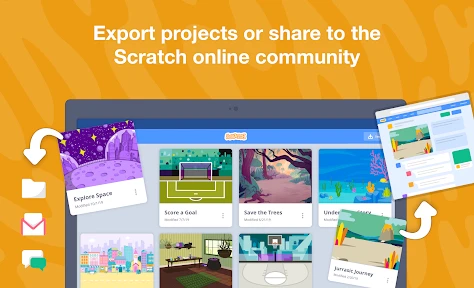
Scratch: Learn to Code Through Creative Play
Scratch is a free, block-based visual programming language and online community developed by the MIT Media Lab. It is designed primarily for young learners aged 8 to 16, but is used by people of all ages. The app eliminates the need for complex text-based syntax by allowing users to snap together colorful code blocks to create interactive stories, games, animations, and simulations. Scratch serves as both an educational tool and a creative platform, fostering computational thinking, problem-solving, and collaboration in a safe, moderated environment. Users can browse millions of shared projects for inspiration or remix existing ones to learn how they work.
Chapter 1: Function
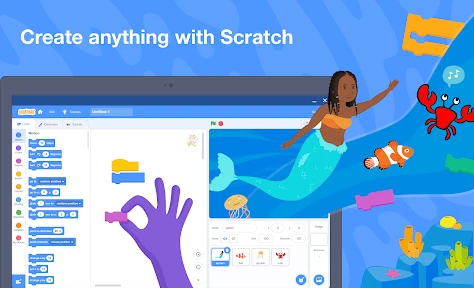
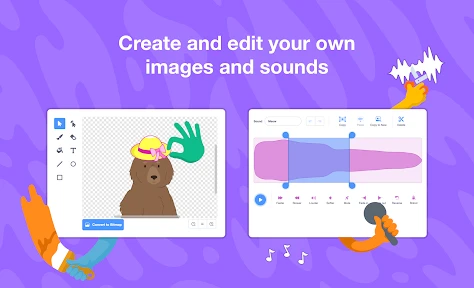
Scratch's core function is to make programming accessible and intuitive through a graphical coding interface. Instead of typing commands, users select from categories like Motion, Looks, Sound, Events, Control, Sensing, Operators, and Variables, then drag and snap blocks together to control sprites on a stage. This block-based system prevents syntax errors and teaches logical sequencing, loops, conditionals, and event-driven programming. The app includes a built-in sprite library, background editors, sound recording tools, and a paint editor, enabling full multimedia creation. Users can test their projects instantly, pause execution to debug, and share their work directly to the Scratch online community, where others can view, like, comment, or remix projects under Creative Commons licenses. This functional design lowers the barrier to entry for coding education while providing enough depth for advanced concepts like cloning, message broadcasting, and custom block creation.
Chapter 2: Value
Scratch offers profound educational and developmental value. Its primary advantage is making abstract computational concepts tangible: children learn variables by controlling a character's score, learn coordinates by moving sprites on a grid, and learn parallelism by running multiple scripts simultaneously. This hands-on approach builds computational thinking skills, including decomposition, pattern recognition, abstraction, and algorithmic design. Beyond technical skills, Scratch cultivates creativity and self-expression. Users can design characters, write stories, animate scenes, and compose soundtracks, blending art with technology. The online community adds immense social value by providing a global audience for peer feedback, collaboration, and inspiration. Moderated by the Scratch Team, it remains a safe space for positive interaction, teaching digital citizenship and respectful critique. Another key advantage is accessibility: it is free, available on web and mobile platforms (ScratchJr for younger children), and translated into over 70 languages. Schools worldwide integrate Scratch into STEM curricula because it aligns with educational standards and supports differentiated learning. For advanced users, Scratch bridges to real-world coding through Python and JavaScript conversion tools, ensuring a smooth transition to text-based languages. The app also promotes resilience through iterative debugging, turning mistakes into learning opportunities. Overall, Scratch empowers young people by giving them the tools to become creators, not just consumers, of technology.
Chapter 3: Scenarios
Scratch primarily targets children aged 8 to 16, including beginners with no prior coding experience. Typical use cases include classroom settings where teachers assign projects like an animated greeting card for holidays, a math quiz game to practice multiplication, or a simple physics simulation for science class. Outside school, children use Scratch at home or in coding clubs to pursue personal interests: a young gamer might clone a favorite platformer to learn game mechanics, an artist might create an interactive comic strip, or a storyteller might build a choose-your-own-adventure narrative. The app also serves educators and parents who use Scratch as a teaching tool for workshops, homeschool curricula, or after-school programs. Informal learning scenarios include library coding camps, scouting badge activities, and family coding nights. Additionally, Scratch benefits teenagers exploring intermediate programming concepts; they can build multi-level games, use lists for data management, or create tools for other community members. The mobile app version the Scratch JR targets children aged 5 to 7, focusing on simple cause-and-effect programming. Overall, Scratch fits any scenario where non-technical users need to learn programming logic through creative, self-directed projects without fear of syntax errors.
Advantages
- block-based coding removes syntax errors for beginners
- vast online gallery of 100M+ remixable projects
- runs entirely in browser with zero install
- real-time visual feedback for every code block
- child-friendly interface with age-appropriate content moderation
Disadvantages
- limited performance on complex 3D or physics simulations
- no offline editing on mobile devices without internet
- exported projects require separate player app to run
- vector editor lacks advanced drawing tools like layers
- text-based language transition gap absent for advanced learners
Frequently Asked Questions
Q: What is Scratch and who is it for?
A: Scratch is a free visual programming language and online community designed for children ages 8 to 16 to create interactive stories, games, and animations. It uses a block-based drag-and-drop interface, eliminating the need for prior coding experience. The platform is maintained by the MIT Media Lab and emphasizes creative learning, collaboration, and sharing projects publicly within its moderated community.
Q: Is Scratch completely free or does it have in-app purchases?
A: Scratch is entirely free with no in-app purchases, subscriptions, or hidden fees. All features including the project editor, tutorials, community sharing, and remixing are accessible without payment. However, the Scratch app requires an internet connection for accessing the online community and saving projects to the cloud. Offline editors are available as a separate free download for Windows, macOS, and ChromeOS.
Q: What devices and systems are compatible with Scratch?
A: Scratch works on desktops and tablets via web browsers (Chrome, Firefox, Edge, Safari) on Windows, macOS, ChromeOS, and Android 6.0+. The official Scratch app supports Windows 10+ and macOS 10.13+. It does not support iOS/iPadOS native app. For mobile phones, the web editor may have limited usability. A microphone and speaker are recommended but not required for sound features in projects.
Q: Can I download and use Scratch projects offline without internet?
A: Yes, Scratch offers a free offline editor for Windows, macOS, and ChromeOS that allows creating and editing projects without an internet connection. Downloaded projects in .sb3 format can be opened and modified locally. However, sharing projects to the online community, accessing tutorials, and using cloud variables require internet. The offline editor does not support saving projects directly to cloud storage.
Q: How do I troubleshoot when Scratch projects run slowly or crash?
A: Common causes include too many sprites, high-resolution images, or complex scripts. Reduce graphic effects, limit clones to under 300, and avoid infinite loops without wait blocks. Use the turbo mode checkbox (under Edit) to speed up performance. For crashes, clear browser cache or reinstall the offline app. Scratch does not officially support extensions or third-party plugins; remove any unofficial add-ons if issues persist.
Technical Information
Recommended for You

Daily News: Local & Alerts

ArriveCAN
Weather app - Radar & Widget

Deep Think - AI Seek Chatbot

Photo Video Maker - InSlide
Garmin Drive™

Chamet - Live Video Chat

OptumRx

AI Video - AI Video Generator

ExtraMile Rewards®

Eurofirms – Ofertas de trabajo

Mileage Tracker by Everlance

ComicScreen - PDF, ComicReader

TripView

Obd Mary – Car Scanner for ELM

Hot Topic: Pop Culture Fashion

PadSplit: Rooms for rent

WhatsApp Messenger

Burner: Second Phone Number

MoshUp

Current: The Future of Banking

Tomorrow's Affairs

WalletPasses | Passbook Wallet