Spirit Airlines

Spirit Airlines
Spirit Airlines App Book Low Fares Fly Affordable
Screenshots

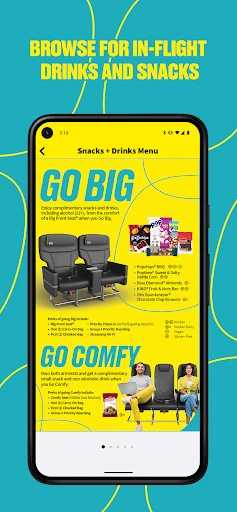


Spirit Airlines App: Effortless Ultra-Low-Cost Travel Management
The Spirit Airlines app is the official mobile companion for one of the leading ultra-low-cost carriers in the United States. Designed to streamline the entire travel experience, the app puts essential flight management tools directly into the user's hand. It enables passengers to book flights, check in, access boarding passes, track flight status, and manage their itinerary with ease. The app focuses on transparency and speed, helping users understand and navigate Spirit’s unique a la carte pricing model. By integrating payment systems for baggage, seat selection, and other add-ons, the app aims to reduce airport counter wait times and provide a smoother, more efficient journey for budget-conscious travelers.
Chapter 1: Function
The app’s core functions center on itinerary management and access to Spirit’s low-cost services. Users can search for and book flights directly, viewing unbundled fares that separate base seats from extras. The primary feature is the digital wallet and boarding pass system, which allows passengers to check in 24 hours before departure and store passes offline. Additionally, the app facilitates real-time flight status tracking, gate change alerts, and push notifications for delays. A crucial functional element is the seamless purchase of add-ons: users can buy carry-on and checked baggage, select seats with extra legroom, and add the “Shortcut Security” option. The app also integrates $9 Fare Club membership management, enabling members to access exclusive deals. By consolidating booking, check-in, and boarding into one platform, the app reduces reliance on printed documents and airport kiosks.
Chapter 2: Value
The app’s primary value proposition lies in its ability to save users time and money while maximizing control over their travel expenses. For a carrier where every add-on incurs a cost, the app provides complete price transparency before reaching the airport. Passengers can visually compare seat prices, bag fees, and bundle options, avoiding surprise charges at the gate. The digital boarding pass eliminates paper waste and reduces stress, as travelers can bypass check-in counters entirely if they have no bags to check. Push notifications for gate changes and delays offer proactive trip management, minimizing missed flights. Another key advantage is the streamlined booking experience for $9 Fare Club members, who can access hidden discount fares directly within the app. By offering a centralized hub for all pre-flight tasks, the app also shortens airport dwell time, which is especially valuable for business travelers and families managing tight connections. Furthermore, the app’s design supports the carrier’s operational efficiency by encouraging self-service, which aligns with the ultra-low-cost model and helps maintain lower overall ticket prices for consumers. Ultimately, the app empowers users to navigate Spirit’s unique pricing structure with confidence and clarity.
Chapter 3: Scenarios
The primary target users are cost-conscious leisure travelers who prioritize low base fares and are willing to customize their experience by paying only for what they need. This includes budget-savvy families planning vacations to Florida or Las Vegas, where Spirit operates numerous routes. Another significant user group is young solo travelers or backpackers who value digital convenience and have flexible schedules; they often use the app to monitor flash sales and book one-way trips. Business travelers on tight budgets also benefit, using the app to quickly check in and retrieve digital passes for early morning flights. Everyday use cases include a family of four using the app to pre-purchase two checked bags and select adjacent seats during booking, thereby avoiding airport counter fees. Another scenario involves a traveler delayed in Detroit: the app alerts them to a gate change and provides a digital re-accommodation option, reducing stress. Frequent “$9 Fare Club” members rely on the app to unlock secret promo fares not available on the website, making spontaneous trips more affordable. The app is also essential for travelers connecting through Spirit hubs like Fort Lauderdale and Orlando, enabling them to quickly view connecting gate information and monitor flight status en route.
Advantages
- ultra-low base fares enable last-minute spontaneous trips
- unbundled pricing lets you pay only for what you use
- buy-on-board menu includes fresh-made mozzarella sticks
- airbus fleet with slimline seats maximizes legroom per inch
- point-of-sale system streamlines check-in to under 90 seconds
Disadvantages
- bag fee often exceeds ticket cost for carry-on rollaboards
- assigned seating algorithm separates traveling groups by default
- no power ports or wifi on entire narrowbody fleet
- customer service phone line averages 40-minute hold during irrops
- seat recline locked at 2 degrees with non-adjustable headrests
Frequently Asked Questions
Q: What does Spirit Airlines app do for travelers?
A: The Spirit Airlines app allows users to book flights, manage reservations, check in, and access boarding passes. It provides real-time flight status updates, baggage tracking, and access to Spirit’s unbundled fare options, including seat selection and add-ons like carry-on bags. No unique features beyond standard airline app functionality are advertised.
Q: Is the app free to use and what purchases are required?
A: The app is free to download and use for booking and flight management. However, all flights and add-ons (e.g., seat assignments, carry-on bags, checked bags, priority boarding) are paid services. No in-app subscription or additional equipment is required, but users need a valid payment method for any purchases within the app.
Q: What devices and systems are compatible with this app?
A: The app supports iOS and Android devices. For iOS, it requires version 15.0 or later; for Android, it requires version 9.0 or later. It is not compatible with Windows phones, tablets without mobile OS, or desktop computers. Availability also depends on regional app stores, but it is generally accessible in the US and international markets.
Q: Can I use the app to change or cancel my booking?
A: Yes, the app allows changes and cancellations for existing bookings, subject to Spirit’s fare rules and fees. Changes to flights, dates, or passenger names can be made directly, but refunds are typically issued as travel credits for non-refundable fares. Same-day flight changes are also available for an additional fee.
Q: How do I get help if the app has a technical issue?
A: For technical issues, users can contact Spirit Airlines customer service via the app’s help section, phone, or social media channels. The app does not offer live chat or in-app troubleshooting guides. There’s no external maintenance service; common problems like login errors or payment failures often require clearing cache or reinstalling.
Technical Information
Recommended for You

Remote Play Controller for PS

Files by Google

Dog Scanner: Breed Recognition

iHeart: Music, Radio, Podcasts

Lufthansa

BlockSite: Block Apps & Sites

Xbox

Trucker Path: Truck GPS & Fuel

Splitwise

SONIC Drive-In - Order Online

Symbolab: AI Math Solver

Norton360 Antivirus & Security

Amazon Freevee: Free Movies/TV

Smart TV Cast: Screen Share

Wahy (Holy Quran)

QuickBooks Online Accounting

TonalEnergy Tuner & Metronome

phyphox

Wifi Password Show: Master Key

Vivint

MyDyson™

Sky Map

MP3 Cutter and Ringtone Maker