BlockSite: Block Apps & Sites
BlockSite: Block Apps & Sites
Block focus boost for distracted professionals seeking productivity
Screenshots
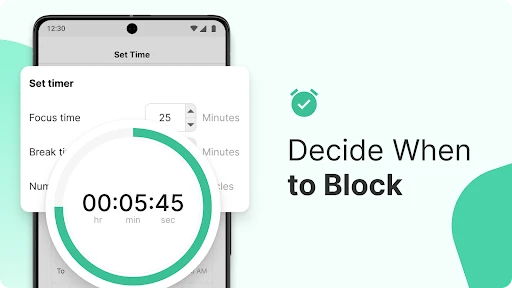


BlockSite: Block Apps and Sites Overview
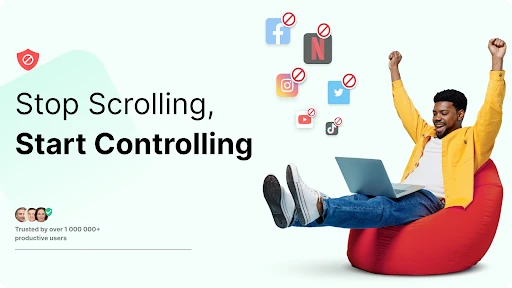
BlockSite is a productivity and digital wellness application designed to help users minimize distractions by blocking access to specific apps and websites. Available on both Android and iOS, it provides a comprehensive set of tools for managing screen time, enforcing focus periods, and maintaining a healthy digital balance. The app supports customizable block lists, scheduling, and password protection to prevent bypassing restrictions. It is widely used by individuals seeking to reduce procrastination, as well as by parents and educators aiming to control content access. BlockSite integrates with device settings to ensure blocks are effective even in the background, making it a robust solution for curbing unwanted digital habits.
Chapter 1: Function
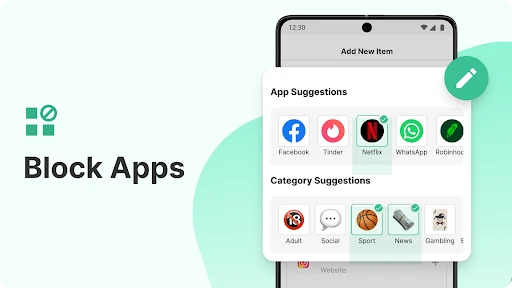
The core functions of BlockSite revolve around granular control over digital access. Users can create custom block lists for specific websites, app categories, or individual applications, whether for social media, gaming, or news sites. The app offers a flexible scheduling system, allowing blocks to activate during work hours, study sessions, or bedtime. A strict mode prevents users from modifying or disabling blocks without a preset password, ensuring accountability. Additionally, BlockSite provides usage statistics that track blocked attempts and time saved, offering insights into behavior patterns. For families, the app includes parental controls that allow remote monitoring and restriction of a child's device. On iOS, it uses Safari content blocking and screen time integration, while on Android, it leverages accessibility services to enforce blocks across all apps and browsers. The focus timer feature further enhances productivity by combining timed work intervals with automatic block activation, creating a structured approach to task completion.
Chapter 2: Value
BlockSite delivers significant value by addressing the growing challenge of digital distraction in both personal and professional contexts. Its primary advantage is the ability to reclaim lost time—studies indicate that the average person checks their phone over 100 times daily, with many interruptions stemming from addictive apps. By blocking these triggers, users report increased focus, reduced stress, and improved task completion rates. For remote workers, the app serves as a virtual assistant that enforces discipline during deep work sessions, reducing the temptation to browse social media or news sites. For students, it creates a conducive study environment by restricting entertainment apps and websites, which is particularly beneficial during exam preparation. Parents value the app for its robust parental controls, including the ability to set time limits and block inappropriate content across devices, all managed through a single dashboard. The app also contributes to mental health by curbing compulsive checking behaviors, promoting mindful usage of technology. Compared to similar tools, BlockSite stands out for its cross-platform support, deep integration with system settings, and the strict mode that prevents easy bypassing. Additionally, its free tier offers substantial functionality, while the premium version unlocks advanced features like syncing across devices and detailed analytics. This combination of practical utility and behavioral science makes BlockSite a trusted solution for millions seeking to regain control over their digital lives.
Chapter 3: Scenarios
BlockSite caters to a diverse range of user groups, primarily individuals struggling with digital self-discipline, parents managing children's screen time, and professionals in high-focus environments. Common scenarios include: a student using the app to block YouTube, Instagram, and gaming apps during study sessions, scheduling blocks from 8 AM to 6 PM on weekdays; a remote worker who enables strict mode during a four-hour focus window to avoid checking social media or news websites, with blocking enforced across both phone and tablet; a parent setting up a child profile that restricts access to TikTok and Chrome after bedtime, using the password-protected dashboard to preview activity logs; a freelancer who uses the focus timer in 25-minute increments to maintain productivity while tracking the number of blocked distractions per day; a digital detox enthusiast who activates a 24-hour block on all entertainment apps every Sunday to promote offline activities. The app is also used in academic settings by teachers who encourage students to install it during exams, and by therapists recommending it as part of digital minimalism routines. Its adaptability makes it effective for any scenario where reducing digital noise is the goal.
Advantages
- blocks apps and websites with one tap
- works offline without background data
- customizable block lists for specific domains
- strict scheduling prevents bypass during focus time
- lightweight extension with minimal system impact
Disadvantages
- requires manual setup for each new site
- no built-in password or unlock override feature
- limited to browser-level blocking on mobile
- occasional false positives on harmless domains
- sync across devices only with premium version
Frequently Asked Questions
Q: What does BlockSite block beyond websites?
A: BlockSite blocks both websites and mobile apps across browsers and installed applications. It extends to content filtering by categories like gambling or adult content, and allows custom URL or app blocking. No hardware is required; it functions through a VPN-based service on your device.
Q: Is BlockSite free to use with all features?
A: BlockSite offers a free version with basic blocking for a limited number of sites and apps. Full features, including unlimited blocks, schedule settings, and detailed usage reports, require a paid subscription. No additional equipment is needed, but in-app purchases unlock the premium tier.
Q: Does BlockSite work on iOS and Android devices?
A: BlockSite is compatible with both iOS and Android smartphones and tablets. It also offers a browser extension for desktop Chrome and Firefox. System permissions like VPN configuration are required on mobile, and the extension needs browser access. No support for Windows or Mac standalone apps.
Q: How does BlockSite handle blocked pages on apps?
A: When an app is blocked, BlockSite instantly closes the app and prevents it from launching until the block period ends. For websites, it shows a customizable block page. Blocks operate in real-time but may have a slight delay on some app switches. It cannot block system-level apps on iOS.
Q: Can I schedule blocking times with BlockSite?
A: Yes, BlockSite allows you to set specific time schedules for blocking. You can create recurring daily or weekly block periods, such as during work hours or bedtime. This feature is available in the premium subscription. The schedule applies to both sites and apps simultaneously.
Technical Information
Recommended for You

Google Meet

NIV Bible version, Offline app

MyWalmart

New Era Cap

Bluesky

Pregnancy + | Tracker App

Gusto Mobile

Empower Personal Dashboard™

HomeWAV

Remixlive - Make Music & Beats

3D Battery Charging Animation
Ringtone Maker: Music Cutter

Tagged - Meet, Chat & Dating
Print Photo - Print to Size

Handshake Jobs & New Careers

10bii Financial Calculator

QR Scanner: Barcode Scanner

Photo Lab Picture Editor & Art

Widgeet-Color Widgets(Widget)

CheapOair: Cheap Flight Deals

Mirror App - Beauty Mirror

FNBT & FCB Mobile

EveryPlate: Cooking Simplified