Splitwise

Splitwise
Splitwise simplifies shared expenses for groups and couples
Screenshots


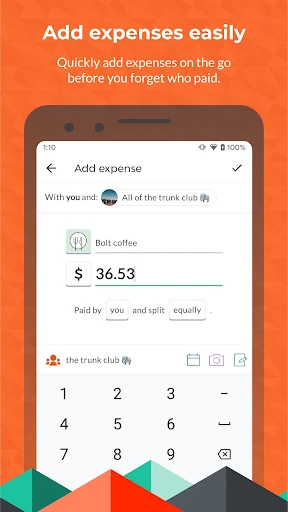

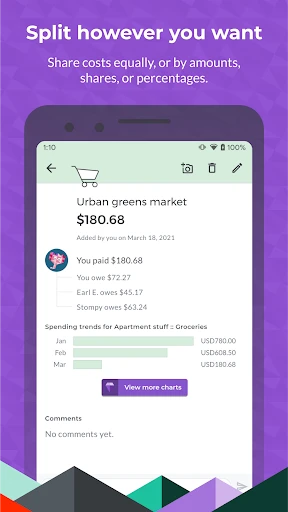
Splitwise Simple Group Expense Splitting
Splitwise is a financial management application designed to simplify the process of splitting expenses among groups of people. It eliminates the complexity of tracking who owes whom by automatically calculating balances and suggesting the fewest transactions to settle debts. The app supports multiple currencies, receipt scanning, and integration with payment platforms, making it an essential tool for roommates, travelers, and friends managing shared costs.
Chapter 1: Function
Splitwise’s core function is to streamline expense sharing. Users can create groups for specific trips, households, or events, then log each expense with details like amount, payer, and participants. The app automatically divides the cost equally or by custom percentages, updates individual balances, and tracks all transactions in real time. It offers a “Simplified Debts” feature that condenses multiple owed amounts into a single net payment between each pair of users. Additionally, users can attach photos of receipts, add notes to expenses, and reconcile balances via integrated payment services like Venmo or PayPal. The app also handles recurring bills, such as rent or utilities, by allowing monthly expense templates. With robust multi-currency support, it calculates exchange rates for international trips, ensuring accuracy across different denominations. Overall, Splitwise eliminates manual calculations and spreadsheets, providing a clear ledger of shared finances.
Chapter 2: Value
The primary value of Splitwise lies in its ability to reduce financial friction and interpersonal tension. By automating expense tracking and debt simplification, it fosters transparency and fairness among groups. Users no longer need to rely on memory or messy spreadsheets; the app acts as an impartial record keeper, ensuring every expense is accounted for and no one overpays. Key advantages include time savings, as a lunch bill or shared Uber ride can be logged in seconds, and conflict prevention, because clear records eliminate disputes over “I paid last time.” The app also promotes habit formation around financial honesty, as users are more likely to log the cost of a shared pizza when it takes only a tap. For travelers, Splitwise offers peace of mind by handling currency conversions and keeping a running total of each person’s share. For roommates, it enables automated monthly settlement reminders, making bill splitting effortless. Furthermore, the app’s export feature allows users to download expense reports for personal budgeting or reimbursement purposes. Its cross-platform sync means all participants see updated balances instantly, reducing the need for passive-aggressive texts about unpaid debts. By optimizing the settlement process—suggesting the fewest transactions to zero out balances—Splitwise saves users both time and bank transfer fees. Ultimately, the app transforms the chore of dividing costs into a frictionless, nearly invisible process, strengthening relationships by removing money as a source of stress.
Chapter 3: Scenarios
Splitwise is tailored for any group that shares costs regularly. Primary target users include college roommates splitting rent, utilities, and groceries, where the app ensures each person pays the exact share each month. Travel companions form another core group, as they can log shared expenses like flights, accommodation, dining, and activities, with the app handling currency conversions for international trips. Friends organizing social events—such as group dinners, bar tabs, or weekend getaways—benefit from quick expense logging and instant balance checks to avoid awkward conversations about who owes what. Couples managing joint finances for vacations or shared household items also use Splitwise to maintain equal contributions. Additionally, small work teams or clubs use it to track shared costs for office supplies, team lunches, or project materials. Everyday use cases include splitting a grocery bag after a shopping trip, dividing a restaurant bill among multiple diners, calculating shared taxi fares, and managing deposits for group rental houses. The app’s notification system reminds users to log expenses promptly, ensuring records remain up-to-date. Whether for a single dinner check or a year-long lease, Splitwise adapts to scenarios requiring impartial, accurate, and effortless expense distribution.
Advantages
- group bill splitting with receipt photo scanning
- settles debts via Venmo
- PayPal
- or cash directly
- tracks recurring expenses like rent or utilities monthly
- offline mode lets you add expenses without internet
Disadvantages
- no native currency conversion for international trips
- requires all group members to have the app installed
- manual categorization needed for detailed spending reports
- notification overload from every minor expense update
Frequently Asked Questions
Q: What is Splitwise used for?
A: Splitwise is a bill-splitting app that helps groups track shared expenses and settle debts. It automatically calculates who owes whom, supports multiple currencies, and integrates with payment apps like Venmo. Core functions include creating groups, adding expenses, splitting costs equally or by custom amounts, and viewing simplified balance summaries.
Q: Is Splitwise free to use?
A: Splitwise offers a free version with core features like expense tracking, group creation, and basic reports. A paid Pro version ($3.99/month or $39.99/year) adds receipt scanning by OCR, currency conversion, expense reminders, and no ads. No additional hardware or permissions are required beyond internet access and optional camera for scanning.
Q: Does Splitwise work offline?
A: Splitwise requires an internet connection to sync data across devices and send notifications. It does not support full offline mode—expenses added while offline will not be saved. All features, including adding expenses, editing, and viewing balances, depend on active network access. No local caching is available for offline use.
Q: How does Splitwise handle different currencies?
A: Splitwise supports over 100 currencies with real-time exchange rates updated daily. When you add an expense in a non-default currency, it automatically converts to your group's base currency. Pro users can view historic exchange rates. The conversion is based on market rates, and no manual adjustment is needed unless you prefer custom rates.
Q: Can I export data from Splitwise?
A: Yes, Splitwise allows users to export expense history. On the web version, go to Settings > Export Data to download a CSV file containing all transactions with dates, amounts, categories, and participants. The mobile app does not have a direct export button, but you can email yourself a summary report. No API is publicly available for automated exports.
Technical Information
Recommended for You

HolMe Dating app: Meet People

Oticon Companion

Google Wallet

Instabridge: WiFi Hotspot Map

PhotoApp - AI Photo Enhancer

Slim Chickens

Public – Stocks and Options

Magic Fluids

Thunderbird: Free Your Inbox

Facer Watch Faces

2025 Calendar

1.1.1.1 + WARP: Safer Internet

Noticias Locales

Apple TV

Avalanche Inclinometer

BuildCalc

myChevrolet

BMO Digital Banking

Download video no watermark

Fast Launcher

Polycam: 3D Scanner & Editor

Audiomack: Music Downloader

Zomato: Food Delivery & Dining