Polycam: 3D Scanner & Editor

Polycam: 3D Scanner & Editor
Polycam 3D scans reality for pro creators precise modeling
Screenshots

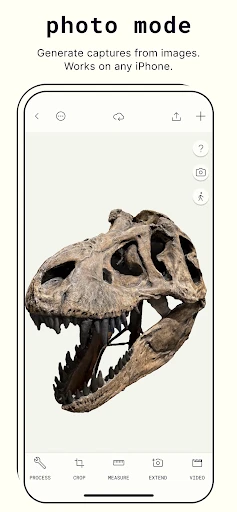


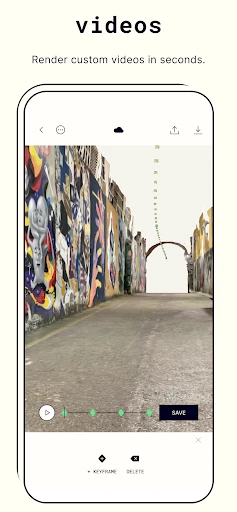
Polycam: 3D Scanner & Editor – Capture the World in 3D
Polycam is a powerful mobile application that transforms your smartphone or tablet into a professional-grade 3D scanning and editing tool. By leveraging advanced LiDAR and photogrammetry technologies, Polycam allows users to capture real-world objects, spaces, and environments with remarkable accuracy and detail. The app offers a comprehensive suite of editing features, enabling users to refine, measure, annotate, and export their 3D models for various applications, from architecture and design to gaming and e-commerce. Its intuitive interface and real-time processing capabilities make complex 3D creation accessible to both professionals and hobbyists, eliminating the need for expensive equipment or extensive technical expertise.
Chapter 1: Function
Polycam’s core functionality revolves around three primary scanning modes: LiDAR scanning, photogrammetry scanning, and room mode. LiDAR scanning, available on compatible Apple devices, uses the built-in depth sensor to instantly create accurate 3D models of indoor spaces and nearby objects, providing immediate results with minimal effort. Photogrammetry scanning allows users to capture objects and larger scenes by taking a series of overlapping photos, which the app then processes into a textured 3D mesh using cloud-based processing. Room mode is specifically designed for creating dimensionally accurate floor plans and room layouts, automatically generating 2D and 3D representations. After capture, the built-in editor offers tools for cropping, smoothing, adjusting lighting, and applying materials. Users can also take precise linear and area measurements directly on the model. The app supports multiple export formats including USDZ, GLTF, OBJ, and FBX, ensuring compatibility with other software like Blender, Unreal Engine, and SketchUp.
Chapter 2: Value
Polycam delivers exceptional value by democratizing 3D modeling and spatial capture, bringing professional-quality capabilities to a mobile platform at a fraction of the cost of traditional hardware. Its primary advantage is speed and accessibility: users can digitize a room or object in minutes, drastically reducing the time typically required for manual modeling. This efficiency translates into significant cost savings for industries like real estate, architecture, and construction, where quick and accurate spatial documentation is essential. For architects and interior designers, Polycam enables rapid site surveys and as-built documentation, allowing them to work from accurate real-world data rather than estimates. For contractors and builders, the app facilitates precise measurements and progress tracking without repeated site visits. In e-commerce, retailers can create interactive 3D product previews that increase buyer confidence and reduce return rates. The app’s ability to generate shareable links or embeddable models means stakeholders can review and collaborate remotely. Furthermore, Polycam’s continuous updates and integration with augmented reality frameworks enhance its utility as both a creative tool and a practical business asset, giving users a competitive edge through rapid, accurate, and professional 3D content generation.
Chapter 3: Scenarios
Polycam serves a diverse range of users across multiple industries. Real estate professionals and property managers are primary adopters, using the app to generate immersive virtual tours, floor plans, and accurate room measurements for listings, reducing the need for physical showings. Architects and interior designers rely on Polycam for on-site as-built capture, enabling them to overlay design concepts onto existing spaces and ensure precise fitments during renovations. Construction and renovation contractors use the app to document project progress, create accurate material takeoffs, and communicate site conditions with clients or subcontractors. Game developers and 3D artists employ Polycam to rapidly capture real-world objects and environments as reference assets or as base geometry for further creation in software like Blender or Maya. E-commerce sellers and product designers scan individual items to create spin-ready 3D product views for online stores, enhancing the shopping experience. Finally, educators and preservationists leverage the app to digitize artifacts, scientific specimens, or historical locations for study, archiving, or digital exhibition, making Polycam a versatile tool for both commercial and educational purposes.
Advantages
- captures full-color 3D models via LiDAR in seconds
- supports both photogrammetry and hardware-based scanning modes
- exports to multiple formats including OBJ
- GLTF
- and USDZ
- provides real-time mesh editing with cleanup tools built-in
- works offline for LiDAR capture without internet dependency
Disadvantages
- requires iPhone or iPad with LiDAR for fast scanning
- free tier limits export resolution and model count
- photogrammetry mode demands good lighting for accurate results
- large models cause noticeable lag on older devices
- no cross-platform sync between iOS and web editor
Frequently Asked Questions
Q: What does Polycam do as a 3D scanner?
A: Polycam uses LiDAR and photogrammetry to capture real-world objects and spaces, converting them into high-fidelity 3D models. It supports both indoor and outdoor scanning, offering precise measurements and textured meshes. Core features include LiDAR scanning for iOS Pro devices, photo-based reconstruction, and editing tools for mesh cleanup, export in formats like OBJ or USDZ, and sharing via cloud or AR.
Q: Is Polycam free to use or does it require a subscription?
A: Polycam offers a free tier with limited monthly exports and lower resolution captures. For unlimited exports, higher resolution, and advanced editing features like Pro tools, a subscription is required via Polycam Pro at $7.99/month or $49.99/year. No additional equipment is needed beyond a compatible device, though a LiDAR-equipped iPhone or iPad enhances scanning accuracy.
Q: Which devices and systems are compatible with Polycam?
A: Polycam is compatible with iOS 14.0 or later on iPhone and iPad, with optimal performance on devices featuring LiDAR sensors (iPhone 12 Pro and newer, iPad Pro 2020 and newer). Android support is limited to photogrammetry mode on certain high-end models with sufficient camera quality. No macOS app exists; desktop editing requires exporting via a web browser or third-party software.
Q: How accurate are the 3D scans from Polycam?
A: LiDAR scans achieve sub-centimeter accuracy, typically within 1-3 cm for room-scale environments, while photogrammetry accuracy depends on lighting and texture. Scanned models may have holes or noise in reflective or complex surfaces, requiring manual cleanup in the editor. For critical measurement tasks, verify with a tape measure, as Polycam is not certified for industrial tolerances.
Q: Can I export Polycam models to other 3D software?
A: Yes, Polycam supports export in OBJ, FBX, USDZ, GLTF, and PLY formats, compatible with Blender, Maya, Unity, and SketchUp. Free users have limited monthly export count, while Pro users get unlimited exports. Exported files retain texture maps but may need re-scaling or UV refinement in external tools. Cloud sharing via a public or private link is also supported.
Technical Information
Recommended for You

PredictionStrike: Sport Stocks

Gaia GPS: Offline Trail Maps

Vector Ink: SVG, Illustrator

what3words: Navigation & Maps

Super Simple - Kids Songs

EpicWalls

Themify: Theme & Icon Changer

Connected Wifi Info

Microphone Blocker - Anti Spy

Hoop - Make new friends

PDF Reader - PDF Converter

Translator Woman's Voice - TTS

TiviMate IPTV Player

Background Eraser

Music ringtones for android

Remover bg - Photo Editor

AR Drawing: Paint & Sketch Art

PetDesk - Pet Health Reminders

فیلتر شکن قوی پرسرعت Panther

RedAlert - צבע אדום

CarLink: MirrorLink & Car Play

Windy.com - Weather Forecast

Paramedic Protocol Provider
