myChevrolet

myChevrolet
MyChevrolet app control vehicle features manage service
Screenshots
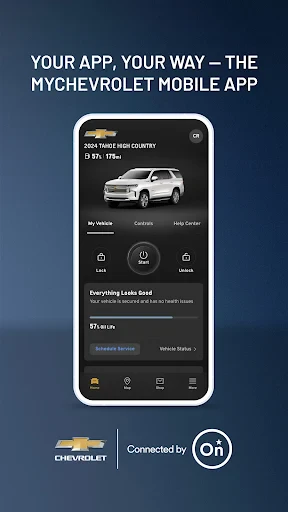
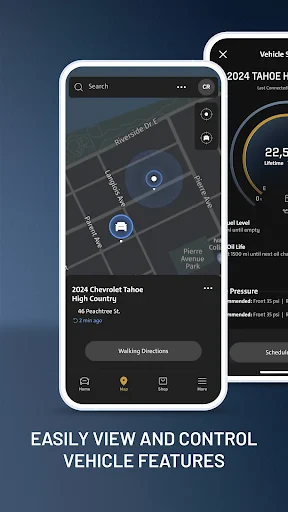
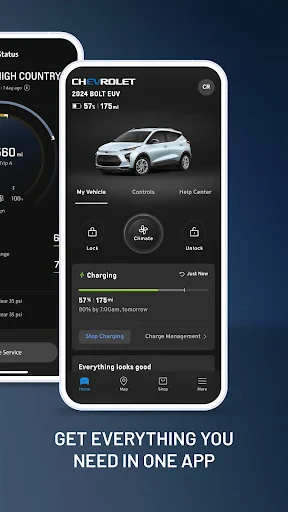
myChevrolet Overview and Utility Guide
The myChevrolet app is a comprehensive digital companion designed for Chevrolet vehicle owners. It serves as a centralized platform for managing vehicle functions, accessing service information, and enhancing the overall ownership experience. The app connects directly to compatible Chevrolet models, offering features such as remote start, door lock and unlock, and vehicle diagnostics. It also provides access to roadside assistance, service scheduling, and vehicle health reports. For electric vehicle owners, the app includes charging station locators and battery status monitoring. The myChevrolet app integrates with the vehicle's built-in connectivity system, allowing users to control and monitor their car from their smartphone. It aims to simplify vehicle management and improve convenience by putting essential controls and information at the user's fingertips. The app is available for download on both Google Play and the Apple App Store, and it requires a compatible Chevrolet vehicle and an active OnStar or connected services plan for full functionality.
Chapter 1: Function
The myChevrolet app core functions include remote vehicle management, where users can start or stop the engine, lock or unlock doors, and activate the horn or lights from a distance. It offers a vehicle status dashboard that displays tire pressure, oil life, fuel level, and maintenance reminders. For electric models, it provides battery charge level, estimated range, and charging status, along with the ability to schedule charging times. The app includes a navigation feature that sends destinations directly to the vehicle's infotainment system. It also enables users to locate their parked car using GPS, set speed and curfew alerts for teen drivers, and access a detailed vehicle diagnostic report. The service scheduling function allows users to book appointments at authorized Chevrolet dealerships. Additionally, the app provides direct access to roadside assistance, emergency services, and a digital owner's manual. These functions are designed to give drivers control, awareness, and peace of mind regarding their vehicle's condition and location.
Chapter 2: Value
The value proposition of the myChevrolet app lies in its ability to streamline vehicle ownership and provide tangible convenience, safety, and cost-saving benefits. The primary value is enhanced convenience, as users can remotely start their car to preheat or cool the cabin before entering, which is especially useful in extreme weather. The remote lock and unlock feature eliminates the worry of being locked out or leaving the car unlocked. The app promotes proactive maintenance by delivering real-time health alerts and service reminders, helping owners avoid expensive repairs by addressing issues early. For families, the teen driver monitoring feature provides peace of mind by setting boundaries and receiving alerts on speed and driving behavior. The app adds significant value for electric vehicle owners by simplifying charging logistics with location-based station finders and charge scheduling, ensuring the car is ready when needed. The integration with OnStar enhances safety through automatic crash response and emergency call capabilities directly from the app. The digital owner's manual and how-to videos reduce the learning curve for new features. By centralizing these capabilities, the myChevrolet app reduces time spent on vehicle management, lowers stress associated with maintenance, and increases the overall ownership satisfaction. It effectively transforms the smartphone into a powerful remote interface for the Chevrolet vehicle, making the ownership experience more responsive and personalized.
Chapter 3: Scenarios
The myChevrolet app is designed for a diverse range of target user groups. Primary users include current Chevrolet owners who want to leverage technology for greater control over their vehicle. A key scenario is a busy professional who uses the remote start feature on a cold winter morning to warm the car before commuting. Another scenario involves a family with a teenage driver; the parent uses the app to set curfew alerts and speed limit notifications to ensure safe driving habits. Electric vehicle owners such as Chevrolet Bolt EUV or Silverado EV drivers rely on the app to locate nearby charging stations during long trips, monitor battery charge level, and pre-condition the cabin while the car is plugged in. The app also serves older drivers who benefit from the straightforward vehicle status dashboard and easy access to roadside assistance without needing to fumble with physical buttons. Fleet managers or small business owners with Chevrolet work trucks use the app to check tire pressure and oil life across multiple vehicles, enabling more efficient fleet maintenance. Additionally, travelers who frequently park in unfamiliar areas use the app to find their parked car using the GPS locator. These everyday use cases demonstrate how the myChevrolet app serves both individual convenience-oriented users and those with specific safety or efficiency needs.
Advantages
- integrates remote start and lock via app
- real-time tire pressure and oil level monitoring
- schedules dealership service with stored VIN
- geofence alerts for unauthorized vehicle moves
- roadside assistance button with GPS location
Disadvantages
- requires continuous paid OnStar subscription
- app can take over 10 seconds to refresh status
- no support for older Chevrolet models before 2018
- voice commands often misinterpret commands while driving
- service booking shows only dealers in app network
Frequently Asked Questions
Q: What does myChevrolet app do?
A: The myChevrolet app serves as a digital companion for Chevrolet vehicle owners. It allows users to remotely start/lock/unlock their car, check fuel levels, tire pressure, and oil life, schedule service appointments, view vehicle diagnostics, and access roadside assistance. It also integrates with available in-vehicle Wi-Fi and supports certain GM vehicle features like vehicle location and parking reminders.
Q: Is the myChevrolet app free to use?
A: Yes, the myChevrolet app is free to download and use. However, some features require an active OnStar subscription or connected service plan, such as remote start/lock/unlock, vehicle diagnostics, and in-vehicle Wi-Fi. Basic functions like viewing owner’s manuals, scheduling service, and accessing roadside assistance are available without a subscription.
Q: Does myChevrolet app work on all Chevrolet models?
A: The app is compatible with most Chevrolet models from 2010 and newer, but full functionality depends on the vehicle’s built-in hardware and connected services. Older models may only support basic features like manual service logging. For precise adaptation, check your VIN within the app or visit the official compatibility list. The app is available on iOS and Android devices.
Q: How do I fix connection issues with myChevrolet app?
A: First, ensure your vehicle has an active OnStar subscription and cellular signal. Restart the app, then check your phone’s Bluetooth and Wi-Fi settings. On the vehicle side, confirm the infotainment system is updated and the vehicle is in an open area with no signal obstructions. If problems persist, uninstall and reinstall the app, or contact Chevrolet support for account or VIN verification.
Q: Can I get roadside assistance via myChevrolet app?
A: Yes, the app includes a roadside assistance button that connects you directly to Chevrolet’s roadside service. It automatically shares your vehicle’s GPS location and VIN for faster response. This feature is available on most models and does not require an active OnStar subscription, though emergency services may also be accessed through the app’s dedicated SOS function when available.
Technical Information
Recommended for You

Modivcare

Revive: Animation & AI Photos

National Car Rental
Microsoft 365 Copilot

Magic Earth Navigation & Maps

RateByFresh

Joymeet Dating App: Chat& Date

Phone Cleaner - AI Cleaner
Mega Pack r.485

Rebtel: Recharges And Calls

Clap to Find My Phone

Free Stuff

Bitcoin Miner Cloud

MyShake Earthquake Alerts

Hole19 Golf GPS & Range Finder

Magic Beauty Makeup Camera

Applied Ballistics Quantum

АЗС Татнефть

Red Lobster Dining Rewards App

Woot! Deals and Shenanigans

TMZ

Time Warp Scan - Face Scan

Adobe Capture: Illustrator,Ps