Garmin Golf

Garmin Golf
Garmin Golf tracks scores and connects golfers with challenges
Screenshots
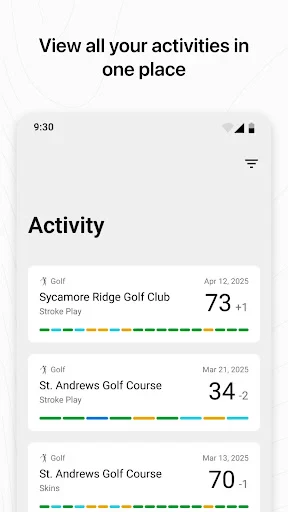
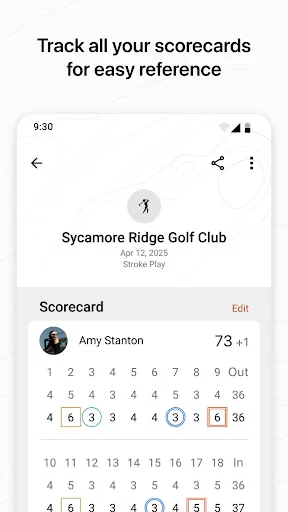


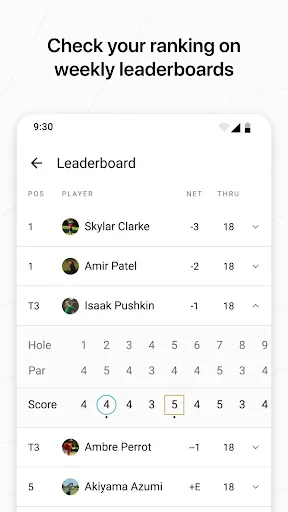
Garmin Golf - Elevate Your Game with Smart Analytics and Community Challenges
Garmin Golf is a comprehensive mobile application designed to enhance the golfing experience for players of all skill levels. It serves as both a personal scorecard and a social platform, offering detailed shot tracking, performance analytics, and access to over 43,000 courses worldwide. The app syncs seamlessly with Garmin golf wearables, such as the Approach series smartwatches, to provide precise GPS distances, auto-shot detection, and stat tracking. It also features a vibrant community where users can compete in weekly leaderboard challenges, compare scores on any course, and improve their game through data-driven insights.
Chapter 1: Function
The core functions of Garmin Golf revolve around accurate course mapping, shot tracking, and score management. Users can download detailed course maps for more than 43,000 golf courses globally, which include dynamic layups, hazards, and green views for precise club selection. The auto-shot detection feature, when paired with a compatible Garmin device, automatically records each shot’s distance, location, and club used, eliminating the need for manual input. Players can input scores manually or sync automatically from their watch, and the app calculates advanced statistics such as fairways hit, greens in regulation, putts per round, and handicap index. Additionally, the app supports round analysis with a shot dispersion map, allowing players to review their tendencies and identify strengths and weaknesses. The social layer enables users to create group challenges, track friends’ progress, and compare performance on specific holes or entire courses.
Chapter 2: Value
The value proposition of Garmin Golf lies in its ability to transform raw score data into actionable improvement insights, while fostering a sense of community and competition. For the avid golfer, the app eliminates guesswork by providing precise GPS yardages to front, center, and back of greens, as well as to hazards, reducing club selection errors. The auto-shot tracking, available on devices like the Approach S62 or Vivoactive series, records every swing without manual input, saving time and ensuring data accuracy. The subsequent analytics—such as strokes gained analysis, which compares your performance to a baseline—help users pinpoint specific areas for improvement, whether that’s driving accuracy, approach shots, or short game. For coaches or competitive players, the app exports data for deeper review. Beyond individual improvement, the weekly leaderboards and group challenges add a motivational layer, turning practice into a game-like experience. Users can compete with friends or strangers on the same course, from anywhere in the world, which encourages consistent play. The app’s offline mode ensures usability even on courses with weak cell signal. By combining professional-grade stat tracking with social engagement, Garmin Golf offers a unique blend of utility and enjoyment that justifies its value for both casual weekend players and serious tournament participants.
Chapter 3: Scenarios
Garmin Golf is designed for three primary user groups: tech-savvy amateur golfers, competitive club players, and fitness-focused individuals who use Garmin watches for daily activity. Amateur golfers benefit from the app’s ease of use—they can simply wear their Garmin watch, start a round, and receive automatic shot distances and club recommendations. For example, a weekend golfer might use the app to track their first putt distance, then later review a shot dispersion map to see a tendency to slice their driver. Competitive players, such as those in local leagues or tournaments, value the strokes gained feature to measure their performance against scratch golfers, helping them prioritize practice on approach shots versus putting. They also use the handicap tracker to maintain an official index. Finally, fitness-oriented users who already own a Garmin watch for running or swimming can add golf to their activity portfolio without a separate device. Common use cases include playing a solo round to collect data, joining a weekly “Closest to the Pin” challenge with friends, or using the app’s GPS on an unknown course to navigate hazards. The app is also used during travel, where golfers rely on offline course maps to play abroad without data roaming fees. Overall, Garmin Golf fits seamlessly into the daily life of anyone who owns a Garmin wearable and enjoys data-driven improvement.
Advantages
- integrates with Garmin watch GPS for automatic shot tracking
- provides 3D flyover views of over 43
- 000 courses worldwide
- offers club distance analysis based on real swing data
- includes live leaderboards for Garmin-hosted virtual tournaments
- syncs scores and stats offline with no cellular signal needed
Disadvantages
- requires a Garmin wearable for most automatic features
- limited social engagement compared to popular golf apps
- no integrated AI swing coach or video feedback analysis
- course map updates occasionally lag behind real green changes
- subscription required for advanced stat breakdowns beyond basics
Frequently Asked Questions
Q: What is Garmin Golf's core functionality?
A: Garmin Golf is a scoring and analysis app for golfers. It tracks scores, statistics, and GPS distances for over 43,000 courses worldwide. Users can view 3D course maps, compete in leaderboards, and sync data from Garmin devices or manually input scores. No additional equipment is required for basic use, but a compatible Garmin watch or handheld enhances automatic shot tracking.
Q: Is Garmin Golf free or does it require a subscription?
A: The app offers a free tier with basic score tracking, GPS distances, and limited course views. Premium features like advanced analytics, stroke analysis, and live leaderboards require a Garmin Golf Premium subscription. Free users can still access core scoring and stat tracking without payment. No one-time purchases are needed for standard functionality.
Q: Does Garmin Golf work on all smartphones and systems?
A: Garmin Golf is compatible with iOS 14.0 or later and Android 7.0 or later. It supports iPhone models from iPhone 6s onward and most modern Android phones. The app requires GPS and internet access for course downloads and live updates. Offline use is limited to previously downloaded courses and manual scoring.
Q: How accurate is Garmin Golf's GPS distance tracking?
A: GPS accuracy depends on your device's sensor quality. On compatible Garmin watches or phones with clear sky views, distance to green, front, and back of hazards is typically within 5-10 yards. The app uses course mapping data directly from Garmin, so accuracy may vary on newer or less maintained courses. Manual adjustment options are available for precise pin positions.
Q: Can I use Garmin Golf without a Garmin device?
A: Yes, you can manually enter scores and use basic GPS distance features on your phone. However, automatic shot tracking, swing metrics, and live leaderboard participation require a Garmin watch (e.g., Approach S62, Fenix series) or handheld. Manual entry is sufficient for stat tracking and course navigation but lacks automatic club detection.
Technical Information
Recommended for You

Video Home - Speed Play

Recover Deleted Messages App

Forya - Video Chat & Meet

BeFriend: make friends nearby

Trip.com: Book Flights, Hotels

Baby Buddy for Android

Goblin Tools

CDL Prep

Soccer Live Scores: SnapGoal

Floor Plan Creator Home Design

CreditWise from Capital One

The Official MTA App

PDG PROmote 2025+

Microsoft Designer

Samsung Find: Location Sharing

Affect: Addiction Recovery

Connecteam Team Management App

Arlo Secure: Home Security

AMarkets: Trade & Invest
Status Saver: Video Downloader

Find Phone Anti-theft No Touch

AI Video Generator : SelfyzAI

Taptap Send: Money Transfer
