Connecteam Team Management App

Connecteam Team Management App
Connecteam empowers teams with scheduling tasks communication
Screenshots
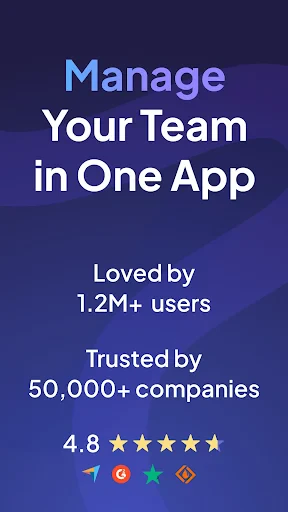


Connecteam Team Management App: Streamline Workforce Operations
Connecteam is a comprehensive team management application designed to simplify communication, scheduling, task management, and reporting for businesses with deskless or remote employees. It serves as an all-in-one platform that replaces multiple disparate tools, enabling managers and teams to stay connected and productive from any location. The app focuses on ease of use, robust functionality, and scalability, making it suitable for small to medium-sized enterprises across various industries such as retail, hospitality, construction, and healthcare.
Chapter 1: Function
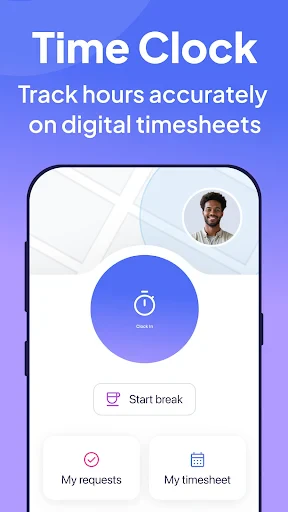
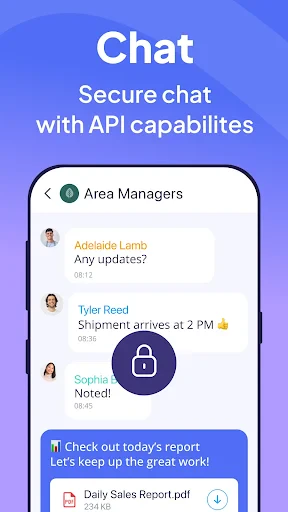
Connecteam provides a suite of core functions that centralize daily operations. Its scheduling feature allows managers to create, assign, and adjust shifts in real time, while employees can view schedules, swap shifts, and request time off directly through the app. The task management module enables the creation of checklists, recurring tasks, and project assignments with photo attachments and completion confirmations. Communication tools include a company news feed, group chats, one-on-one messaging, and push notifications for urgent updates. Additionally, the app offers time tracking with GPS verification, digital forms, and automated reporting for payroll and compliance. All data is synced across devices, ensuring that every team member has access to the latest information.
Chapter 2: Value
The primary value of Connecteam lies in its ability to increase operational efficiency and reduce administrative overhead. By consolidating scheduling, communication, and task management into a single interface, the app eliminates the need for paper-based processes or fragmented software solutions. Managers save significant time on shift planning and reporting, as automated reminders and templates reduce manual entry and errors. Employees benefit from greater flexibility and transparency, with shift swaps and schedule updates handled instantly. The GPS time tracking feature helps prevent time theft and ensures accurate labor cost allocation. Furthermore, the app enhances team engagement through instant feedback loops and recognition tools, which can improve retention and morale. Its secure data storage and compliance features mitigate risks related to labor laws and data privacy. Overall, Connecteam delivers a strong return on investment by streamlining workflows, lowering communication delays, and enabling data-driven decision-making for leaders.
Chapter 3: Scenarios
Connecteam is ideally suited for industries and roles where employees are frequently mobile or not tied to a desk. Primary target user groups include field service teams, such as electricians, plumbers, and maintenance crews, who need to receive job assignments, report progress, and check in with managers from remote locations. Retail and hospitality managers use the app to coordinate shift schedules, distribute daily tasks, and share company announcements with a distributed workforce. Construction site supervisors rely on Connecteam for safety checklists, incident reporting, and real-time updates on task completion. Healthcare facilities use it to manage staff rotations, training documents, and compliance tracking for remote workers. Daily use cases include morning check-ins via the app, submitting timesheets at a job site, requesting time off while on the go, and receiving instant notifications about schedule changes or urgent tasks. The app also serves as a centralized hub for onboarding new employees, distributing policy updates, and conducting surveys to gather feedback from the team.
Advantages
- manages shift swaps and time-off requests in one view
- offline mode syncs data when workers lose cellular signal
- replaces paper checklists with photo-verified task tracking
- in-app chat auto-translates messages across languages
- geofence clock-in prevents time theft at job sites
Disadvantages
- advanced scheduling features buried under three menu layers
- no integrated payroll export for non-US accounting systems
- push notifications delayed on Android when app is backgrounded
- free tier caps admin accounts
- limiting supervisor access
- task templates reset custom fields after each re-sync
Frequently Asked Questions
Q: What is Connecteam used for?
A: Connecteam is a mobile-first workforce management app designed for non-desk employees. It combines scheduling, time tracking, task management, and team communication into one platform. No additional hardware is required, and it supports shift planning, GPS clock-in, checklists, and instant messaging for real-time coordination.
Q: Is Connecteam free to use?
A: Connecteam offers a free plan for up to 10 users, which includes basic scheduling, time tracking, and communication features. Paid plans start at $29 per month for the first 30 users, adding advanced tools like alerts, custom reports, and geofencing. No in-app purchases exist, but paid plans require a subscription.
Q: Does Connecteam work offline?
A: Connecteam’s mobile app can log time and complete tasks offline. Data syncs automatically when the device reconnects to the internet. However, real-time messaging and live schedule updates require an active internet connection. Offline functionality is limited to actions that do not rely on server-side data.
Q: How does Connecteam handle employee GPS tracking?
A: Connecteam uses GPS tracking for clock-in and clock-out to verify employee location. Managers can set geofences that automatically trigger time entries when employees enter or leave a job site. Location data is only collected during work hours and not constantly monitored, with privacy controls available.
Q: Can Connecteam integrate with other payroll systems?
A: Connecteam integrates with popular payroll and accounting tools like QuickBooks, Gusto, and Xero. It exports time logs and attendance data directly into these systems to streamline payroll processing. For unsupported platforms, manual CSV export is available. API access is provided on higher-tier plans for custom integrations.
Technical Information
Recommended for You

Self - Credit Builder

GIMP

Talk to me Slimy: Talking Pet
Language Translator App

Mojo: Reels and Video Captions

Poppo Live- Live Stream

Citymapper

Yes Madam - Salon at Home

Mango: Lector de Manga Español

Samsung Smart Switch Mobile

Twitch: Live Streaming

Plantum - Plant Identifier

Reverb: Buy & Sell Music Gear

StarMaker: Sing Karaoke Songs

Learn to Read - Duolingo ABC

Messages - SMS, Chat Messaging

Azar: 1 on 1 Video Chat Online

Filter for Selfie

Duo Mobile

Sonos

365Scores: Live Scores & News

Turo — Car rental marketplace

Pokepix Color By Number