WFP 339 Ultra watch face

WFP 339 Ultra watch face
WFP 339 Ultra watch face rugged digital style for active men
Screenshots
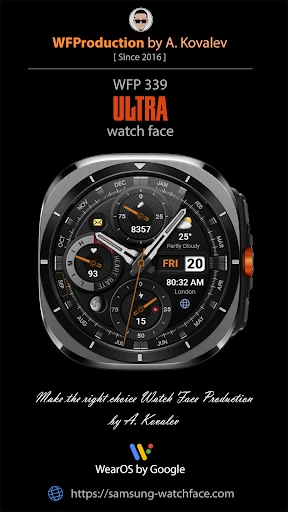
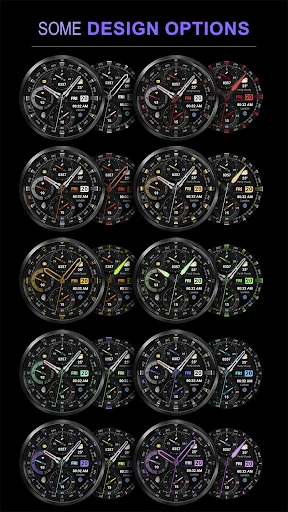
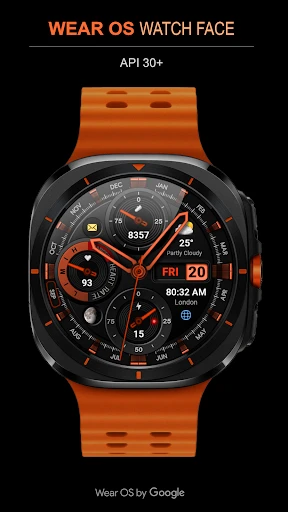
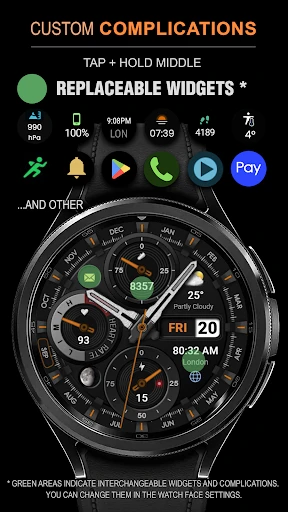

WFP 339 Ultra watch face - Customizable Digital Watch Face for Wear OS
WFP 339 Ultra is a digital watch face designed for Wear OS smartwatches. It focuses on providing a clear, customizable display that balances modern aesthetics with practical information. The design emphasizes readability and personalization, allowing users to adjust colors, complications, and styles to match their preferences. It is built for users who want a functional yet stylish digital interface for their smartwatch, avoiding unnecessary visual clutter while retaining essential data at a glance.
Chapter 1: Function
The core function of WFP 339 Ultra is to serve as a versatile digital watch face that presents time, date, and customizable data fields. It offers multiple digital time formats, including 12-hour and 24-hour options. Key complications include steps, heart rate, battery level, and calendar events, which users can assign to specific areas on the face. The watch face supports multiple color schemes for backgrounds, indices, and numbers, allowing for high personalization. It also includes an ambient mode that dims the display to save battery while still showing critical information like time and date. The interface responds to touch for quick access to the default watch settings or complications.
Chapter 2: Value
The primary value of WFP 339 Ultra lies in its balance of customization and clarity. Unlike many watch faces that overload the screen with data, it provides a clean layout where users can prioritize the information most important to them, such as health metrics or notifications. This reduces cognitive load during daily wear. Its aesthetic flexibility allows it to transition from a sporty look to a more professional appearance simply by changing color presets, making it suitable for different occasions without requiring a different watch face. The battery-efficient ambient mode ensures users can check the time without excessive power drain, a common issue with animated or highly detailed faces. For fitness users, the direct display of steps and heart rate encourages activity tracking without opening separate apps. For professionals, the ability to show calendar events and battery status keeps necessary information accessible during meetings. The watch face also adds a modern, ultra-tech feel to the device, enhancing the perceived value of the smartwatch itself. Its design respects the device’s hardware by avoiding overlapping elements with always-on display features, ensuring long-term reliability and visual consistency across different watch models.
Chapter 3: Scenarios
WFP 339 Ultra is designed for active individuals and professionals who need quick access to data without distraction. Primary target users include fitness enthusiasts who want to monitor steps, heart rate, and activity goals directly on the watch face during workouts or daily movement. Remote workers and office professionals benefit from the calendar complication, which shows upcoming appointments without needing to swipe through menus. Commuters find value in the battery level display, ensuring their watch is charged before a trip. It also suits users who enjoy personalizing their devices, as the multiple color and style options allow for frequent aesthetic changes. Everyday use cases include checking time and notifications during meetings, glancing at step count while walking, viewing heart rate during gym sessions, and quickly accessing the battery percentage before leaving home. The watch face performs well in both bright outdoor conditions (due to high contrast digital numbers) and low-light environments (due to adjustable brightness). It is also ideal for users who prefer digital over analog displays for speed of reading time.
Advantages
- syncs heart rate data via Bluetooth 5.3 instantly
- 339 customizable complications for quick glance access
- always-on AMOLED display with 1.43-inch 466x466
- battery lasts 14 days in power-saving mode
- on-device music storage for 500+ MP3 files
Disadvantages
- no standalone GPS
- requires phone connection
- watch face launcher app needed for full customization
- heart rate sensor lags during high-intensity intervals
- no water lock mode for swimming
- proprietary charger not compatible with USB-C
Frequently Asked Questions
Q: What is the core function of WFP 339 Ultra watch face?
A: WFP 339 Ultra is a digital watch face app for Wear OS smartwatches. Its core function provides customizable time display with date, battery status, steps count, and heart rate data. It features multiple color themes and always-on display support, using minimal battery resources through optimized rendering for OLED screens.
Q: Is the app completely free or includes in-app purchases?
A: The app offers a free basic version with limited color themes. Additional premium themes and advanced customization options require a one-time in-app purchase. No subscription is needed. No extra hardware or additional permissions beyond standard Wear OS sensor access are required for core functionality.
Q: What devices and systems are compatible with this watch face?
A: The app is compatible with Wear OS 2.0 and above, including Samsung Galaxy Watch 4/5/6, Pixel Watch, and Fossil Gen 6. It requires a smartwatch with a round or square screen and at least 320x320 resolution. Not compatible with Tizen-based watches or iOS-linked devices.
Q: Can I customize the data fields displayed on the watch face?
A: Yes, you can customize up to four complication slots, choosing from steps, heart rate, calendar events, weather, or sunset time. The always-on display shows a dimmed version with time and battery. Note: heart rate data updates every 10 minutes, not real-time, due to sensor sampling limits.
Q: How do I resolve issues like watch face not syncing or showing incorrect data?
A: First, ensure your watch and phone are connected via Bluetooth and Wear OS app. Re-sync by opening the watch face on your phone app and tapping 'Apply'. For incorrect data, go to watch settings, apps, find the watch face, and clear cache. Restart both devices if problem persists. No official customer support line is provided.
Technical Information
Recommended for You

FIXD OBD2 Scanner

Instabridge: WiFi Hotspot Map

Photo Scan App by Photomyne

DIY Cat Language Wallpaper

WeatherPulse (WxPulse)

Smarters Pro - Mobile

YouCam Makeup - Selfie Editor

Lingvano: Sign Language - ASL

Gboard - the Google Keyboard

TurboScan™ Pro: PDF scanner

Apple TV

Newegg - Tech Shopping Online

Video Compressor & Converter

Pengu - Virtual Pets

ABOUT YOU Online Fashion Shop

Bolt Driver: Drive & Earn

Cheshmak

ACleaner - Clean Phone

Highway Weather

Coda

Sticker Maker - WAStickers

Vivaldi Color Analysis

Microsoft Authenticator