AppSheet

AppSheet
AppSheet app no code apps for everyone
Screenshots


About AppSheet feature
AppSheet is a no-code development platform that enables users to create custom mobile and web applications directly from data sources such as Google Sheets, Excel, or SQL databases. Owned by Google Cloud, it empowers individuals and businesses to build functional apps without writing a single line of code. The platform leverages existing data structures to automatically generate app interfaces, workflows, and logic, making it accessible to non-technical users while still offering advanced customization for developers. AppSheet supports offline functionality, real-time updates, and integration with various third-party services, positioning itself as a versatile tool for digital transformation across industries.
Chapter 1: Function
AppSheet provides a comprehensive set of core functions for building and managing applications. First, it allows users to connect data from multiple sources, including spreadsheets, cloud databases like BigQuery, and APIs, automatically transforming them into app components. Second, it offers a drag-and-drop interface designer to create custom forms, views, and dashboards with minimal effort. Third, the platform includes automated workflow capabilities, such as sending email notifications, updating records, or triggering external actions based on specific conditions. Fourth, AppSheet supports offline access, enabling users to view and edit data without an internet connection, with seamless synchronization once connectivity is restored. Fifth, it provides role-based security and permissions, allowing administrators to control who can view, edit, or delete data within the app. Finally, the platform includes built-in reporting and analytics features to track app usage and data trends.
Chapter 2: Value
AppSheet delivers significant value by democratizing app development and accelerating digital agility within organizations. Its primary advantage is the dramatic reduction in development time and cost; users can create a fully functional app in hours rather than weeks, eliminating the need for specialized programming skills or extensive IT resources. This allows business analysts, project managers, and operational teams to directly address their specific workflow needs without waiting for developer backlogs. Another key benefit is the platform’s deep integration with existing data infrastructure. Since AppSheet works directly with live data sources, applications remain synchronized with underlying databases, ensuring accuracy and consistency across systems. The platform also promotes scalability; simple prototypes can evolve into enterprise-grade solutions with advanced automation, integration with Google Workspace, and support for complex business logic. Moreover, AppSheet’s offline capability ensures continuity of operations in field environments, such as inventory management or inspections, where internet access is unreliable. From a governance perspective, the platform offers robust security controls, including data encryption, identity management, and audit logs, helping organizations meet compliance requirements. Overall, AppSheet lowers the barrier to innovation, enabling faster problem-solving and more responsive operations while maintaining enterprise-level stability and control.
Chapter 3: Scenarios
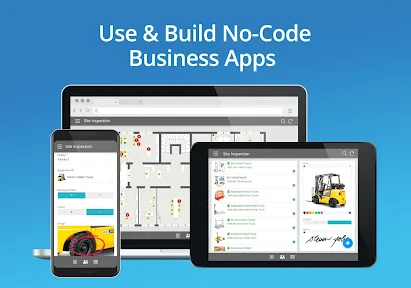
AppSheet serves a wide range of target users across various industries. Primary users include business operations managers, project coordinators, field service workers, and small business owners who need tailored solutions for data collection, tracking, and reporting. For example, a construction company can use AppSheet to build a site inspection app where foremen record safety checks and upload photos offline, with data syncing to a central database once connectivity returns. In healthcare, clinical coordinators can create patient intake forms that automatically update inventory records and send alerts for supply restocking. Retail managers often deploy AppSheet for inventory management, creating apps that scan barcodes, track stock levels across multiple locations, and generate reorder reports. Additionally, educational institutions utilize the platform to build student attendance systems or event registration apps. A common everyday use case is a field sales team using an AppSheet app to log customer visits, capture order details, and generate invoices on the go, all while staying connected to the company’s CRM. The platform’s flexibility makes it ideal for any scenario requiring customized data interaction, process automation, and mobile accessibility, without heavy technical overhead.
Advantages
- turns spreadsheets into mobile apps without coding
- syncs with Google Sheets
- Excel
- and SQL databases
- offline data access with automatic sync on reconnect
- customizable dashboards and forms for field workers
- built-in bot automates approval workflows
Disadvantages
- advanced features require a paid subscription plan
- performance lags with large datasets over 100k rows
- steep learning curve for non-developer users
- limited design flexibility compared to native coded apps
- mobile app crashes on low-end Android devices
Frequently Asked Questions
Q: What is AppSheet and what does it do?
A: AppSheet is a no-code development platform that allows users to create custom mobile and web applications using data sources like Google Sheets, Excel, or SQL databases. It enables building apps for task management, data collection, and business workflows without writing code.
Q: Is AppSheet free to use or does it require payment?
A: AppSheet offers a free plan with limited features, but full functionality requires a paid subscription. Pricing is based on the number of users and features needed. No additional equipment is required, but certain data sources may need permissions.
Q: What devices and systems are compatible with AppSheet?
A: AppSheet apps run on iOS, Android, and web browsers. Apps are accessible on smartphones, tablets, and desktop computers. No specific hardware is needed, but a stable internet connection is recommended for real-time data sync.
Q: Can AppSheet handle offline data entry?
A: Yes, AppSheet supports offline functionality. Users can enter data and capture images without internet access. Data is stored locally and automatically syncs to the backend when connectivity is restored. However, some features may be limited offline.
Q: How can I troubleshoot common issues or get support for AppSheet?
A: AppSheet provides a community forum and official documentation for troubleshooting. For paid plans, email support is available. Common issues include data sync errors, permission problems, and app design glitches, often resolved by checking app settings or data source connections.
Technical Information
Recommended for You

Guitar Pro

Copart - Online Auto Auctions

Canon PRINT

Upside: Cash Back - Gas & Food

SPYPOINT

FloatMe: Budget & Cash Advance

Manga Library - مكتبة المانجا

Photoroom AI Photo Editor

Weather watch face W6.5

3D Anatomy

Learn Coding/Programming: Mimo

Days To | Countdown

Board Game Stats

Sweet Beauty Camera Fillter

Mirror Link Car

Buenos días tardes y noches

Joketone-Air Horn Fart Sounds

OpenCPN

Live Street view 360

Life360: Stay Connected & Safe

Panda Express

ParentSquare

Stellarium Plus - Star Map