Canon PRINT
Canon PRINT
Canon PRINT lets you print scan and copy from your phone
Screenshots


Canon PRINT About App Feature Overview
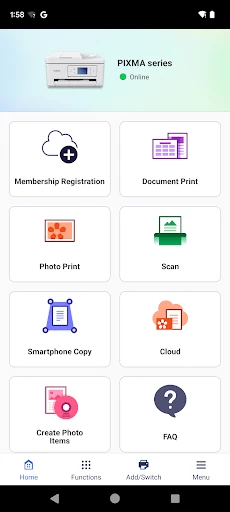
Canon PRINT is a mobile application designed to enhance the functionality of Canon printers by enabling direct wireless printing, scanning, and document management from smartphones or tablets. The app supports a wide range of Canon inkjet, laser, and multifunction printers, allowing users to print photos, documents, emails, and web pages without a computer. It integrates with cloud services like Google Drive and Dropbox, offers easy setup via Wi-Fi, and provides tools for printer maintenance, such as ink level checks and error notifications. The app aims to streamline printing tasks for personal and professional use, reducing complexity and increasing convenience.
Chapter 1: Function
Canon PRINT functions as a comprehensive mobile printing solution, allowing users to directly print and scan from their devices. Core functions include wireless printing of PDFs, images, and office documents, as well as scanning documents to your phone or tablet as JPEG or PDF files. The app supports automatic detection of Canon printers on the same network, simplifying setup. Users can also print web pages, emails, and cloud-stored files from Google Drive, Dropbox, or Evernote. Additional features include copying functions, adjusting print settings like paper size and color, and accessing printer status information, such as ink levels and paper jams. For supported models, the app enables firmware updates and maintenance tasks directly.
Chapter 2: Value
The value proposition of Canon PRINT lies in its ability to eliminate the need for a traditional computer in common printing tasks, delivering significant time savings and operational flexibility. Key advantages include seamless wireless connectivity via Wi-Fi or direct access point mode, which allows printing from anywhere within range. The app’s intuitive interface reduces the learning curve, making it accessible for all skill levels. It supports high-resolution printing for professional-quality photos and documents, and its integration with cloud services enhances workflow efficiency for users who manage digital files across multiple platforms. For businesses or home offices, Canon PRINT improves productivity by enabling quick, on-the-go printing from mobile devices, while its remote monitoring features help preempt maintenance issues, reducing downtime. The app also supports batch scanning and multi-page document creation, adding utility for organized archiving. Overall, it transforms mobile devices into powerful printing hubs, offering cost-effective and reliable performance.
Chapter 3: Scenarios
The primary target user groups for Canon PRINT include home users, students, remote workers, and small business owners who need convenient, high-quality printing without constant computer access. Everyday use cases include printing school assignments or homework directly from a tablet while studying in a dormitory. Home users can print family photos or recipes from their smartphone in the kitchen. Remote workers benefit by printing contracts, invoices, or travel documents while away from their desk, using only their phone. Small business operators can quickly print client presentations or shipping labels from a meeting room. The app is also ideal for scanning physical receipts or contracts into digital PDFs for record-keeping, especially during travel or field visits. Additionally, it supports printing from shared cloud folders in collaborative work environments, making it useful for teams.
Advantages
- direct wireless printing from canon cameras
- supports both ios and android devices
- cloud link access to google drive and dropbox
- scan documents via smartphone camera
- ink level monitoring without pc
Disadvantages
- limited to canon brand printers only
- no offline editing for scanned files
- initial wifi setup can be finicky
- cloud printing requires stable internet
- app interface feels outdated on android
Frequently Asked Questions
Q: What devices and systems does Canon PRINT support?
A: Canon PRINT is compatible with iOS and Android smartphones and tablets. Supported devices include Canon inkjet printers, laser printers, and multifunction models released after 2010. Requires Wi-Fi or direct connection via Canon’s wireless setup. No additional hardware is needed beyond a compatible printer.
Q: Is Canon PRINT free to download and use?
A: Yes, the app is free to download from official app stores. Basic functions like printing, scanning, and copying are free. Some advanced features, such as cloud printing or template editing, may require a Canon account or subscription. No in-app purchases are necessary for core printing tasks.
Q: How can I print photos directly from my phone?
A: Open Canon PRINT, select your printer from the device list, and choose the photo option. You can adjust layout, paper size, and quantity before printing. Supports JPEG, PNG, and HEIF formats. Ensure both devices are on the same Wi-Fi network or use Canon’s direct connection mode for quick setup.
Q: Can I scan documents using Canon PRINT?
A: Yes, the app allows scanning via your Canon printer’s scanner. Select the scan function, choose resolution (up to 600 dpi) and format (PDF or JPEG). Scanned files can be saved to your device or shared via email. Requires a compatible multifunction printer with scanning capabilities.
Q: What should I do if my printer is not detected?
A: Ensure the printer is powered on and connected to the same Wi-Fi network as your device. Restart both the printer and the app. If issues persist, check for firmware updates in the app’s settings or consult Canon’s online troubleshooting guide. For older printers, confirm compatibility with the app version.
Technical Information
Recommended for You

Hypic - Photo Editor & AI Art

Yandex Browser with Protect

HamStudy.org

Cupshe - Swimwear & Clothing

Videoleap: AI Video Editor App

TheGrint | Golf Handicap & GPS

Concora Credit

iNaturalist

Klover - Instant Cash Advance

AR Drawing - Trace Drawing App

Trucker Path: Truck GPS & Fuel

My Verizon

Travelocity Hotels & Flights

Circuit Route Planner

GIF Sticker & WAsticker

Video Player - AnyPlay

Deezer: Music & Podcast Player

YI IoT

Photoshop Express Photo Editor

Black Light

Fashion Design Sketches Book

MyQuest for Patients

Real Weather
