Photoroom AI Photo Editor

Photoroom AI Photo Editor
AI photo editor for pro backgrounds and removing objects
Screenshots

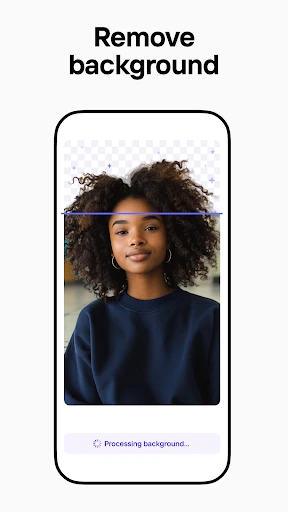

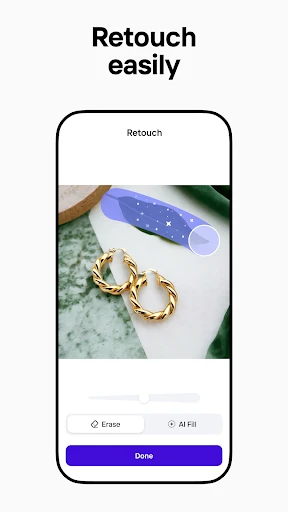
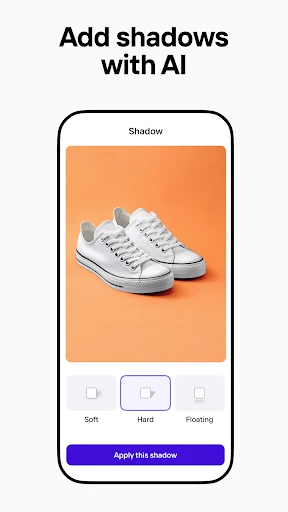
Photoroom AI Photo Editor: Streamlined Background Removal and Professional Image Editing
Photoroom AI Photo Editor is a mobile and desktop application designed to simplify photo editing, with a primary focus on background removal, product photography enhancement, and AI-powered image generation. The app leverages machine learning algorithms to automatically isolate subjects from their backgrounds, allowing users to replace, blur, or delete the background with minimal manual effort. It also includes features such as retouching, object removal, and template-based design for social media, e-commerce, and marketing materials. The application is available on both iOS and Android platforms, as well as through a web interface, offering a consistent user experience across devices. Its core value lies in reducing the time and skill required to produce professional-grade images, making it accessible to users without extensive graphic design expertise.
Chapter 1: Function
Photoroom AI Photo Editor provides a suite of editing functions centered on background manipulation. The core function is automatic background removal, where the AI accurately detects the edges of a subject—whether a person, product, or object—and separates it from the original backdrop. Users can then select from a library of preloaded backgrounds, upload their own images, or use solid colors and gradients. Beyond removal, the app includes a background eraser tool for manual refinement, allowing users to paint away unwanted elements. The application also integrates a retouching module that can smooth skin, whiten teeth, and adjust lighting on portrait subjects. Additional functionalities include a shadow and reflection generator to create realistic product shots, a resize tool for optimizing images for specific platforms like Etsy or eBay, and a text overlay feature for adding Watermarks, logos, or captions. The AI-powered object removal tool can eliminate stray items, blemishes, or extraneous details from an image, while the generative fill capability can extend backgrounds or add new elements based on text prompts.
Chapter 2: Value
The primary value of Photoroom AI Photo Editor is its ability to deliver professional-grade image editing results with a dramatic reduction in time and effort. For e-commerce sellers and small business owners, the application eliminates the need for a physical photo studio or expensive software like Adobe Photoshop. The AI background removal typically achieves high accuracy in seconds, which speeds up the workflow for listing hundreds of products. This efficiency translates into cost savings, as users avoid hiring external editors or investing in complex equipment. The application also ensures consistency across a product catalog by allowing users to apply uniform backgrounds, lighting effects, and aspect ratios. For social media content creators and influencers, Photoroom provides a streamlined workflow for creating branded visuals without requiring deep design skills. The template-driven approach enables the rapid generation of posts, stories, and ads that adhere to platform-specific dimensions. Furthermore, the app’s generative AI features offer a creative advantage, allowing users to ideate and produce unique backgrounds or visual elements from text descriptions, which can enhance engagement and differentiation in a crowded digital space. The offline mode and cloud sync features add reliability, allowing users to edit without an internet connection and access their projects across devices, which is particularly valuable for remote work or field photography.
Chapter 3: Scenarios
Photoroom AI Photo Editor is primarily used by e-commerce sellers, small business owners, social media managers, and content creators who require efficient, high-quality image editing. For an online store owner selling clothing or electronics, the app is used daily to remove messy room backgrounds from product photos and replace them with clean white or branded backdrops, ensuring listings meet marketplace standards. Social media managers use the application to create consistent visual content for Instagram or TikTok, applying filters, adding text overlays, and generating mockups for promotional posts. Freelance photographers and real estate agents utilize the object removal tool to eliminate clutter from property photos or retouch portrait shots for client presentations. Graphic designers who need quick background isolations for composite images also rely on the app to speed up their workflow. Additionally, marketing teams use Photoroom to produce A/B test images for ads, quickly generating variations with different backgrounds or text placements. The app is also adopted by hobbyists and individuals who want to edit personal photos for prints, invitations, or social media avatars, finding the AI tools intuitive enough for non-professional use. The application is particularly valuable during product launches, seasonal sales events, or any scenario requiring bulk image editing under tight deadlines.
Advantages
- removes backgrounds with single tap
- generates custom AI backgrounds from text prompts
- batch edits multiple photos simultaneously
- exports in 4K resolution without compression
- runs fully offline on device
Disadvantages
- watermark appears on free tier exports
- AI background sometimes misinterprets complex scenes
- high-res export requires paid subscription
- batch processing drains battery on older phones
- no vector layer support for graphic designers
Frequently Asked Questions
Q: What is the core function of Photoroom AI Photo Editor?
A: Photoroom AI Photo Editor is a mobile app focused on removing backgrounds from photos, creating professional product images, and generating AI-enhanced visuals. It uses machine learning for instant, accurate cutouts and supports adding custom backgrounds, shadows, and reflections. The app is designed for e-commerce sellers, marketers, and content creators needing polished images without manual editing.
Q: Is Photoroom free to use or does it require in-app purchases?
A: Photoroom offers a free version with basic features like background removal, preset backgrounds, and limited export resolution. Premium subscription unlocks advanced tools: batch editing, high-resolution exports, AI-generated backgrounds, no watermark, and team collaboration features. No additional equipment is needed beyond a smartphone with a camera. Subscription pricing is monthly or yearly.
Q: Which devices and operating systems are supported by Photoroom?
A: Photoroom supports iOS 13.0 or later and Android 7.0 (Nougat) or higher. It is optimized for smartphones but also works on tablets with appropriate screen sizes. The app requires internet access for AI processing and exporting. There is no desktop version, but users can access the web platform with limited features through a browser on laptop or desktop.
Q: Can Photoroom handle complex subjects like hair or fur accurately?
A: Yes, Photoroom uses AI-based segmentation that performs well on complex edges like hair, fur, transparent objects, and fine details. Results depend on the contrast between the subject and background—higher contrast yields sharper cuts. For very challenging cases, the app includes manual refinement tools (brush and eraser) to adjust edges. Accuracy is generally high for e-commerce typical use.
Q: How do I export or share my edited images from Photoroom?
A: After editing, tap the export icon to save the image as PNG (with transparency) or JPEG (with background). Free version limits export to 1080x1080 pixels; Premium allows up to 4K resolution. You can directly share to apps like Instagram, Shopify, Amazon, or save to gallery and cloud storage. Batch export requires paid subscription.
Technical Information
Recommended for You

The Knot Wedding Planner

GoodShort - Movies & Dramas

Cake Maker: Happy Birthday

e.l.f. Cosmetics and Skincare

Manual Camera: DSLR Camera Pro

onX Hunt: Offline Hunting Maps

Air France - Book a flight

Academy Sports + Outdoors

Obsidian

Lullaby for Babies

Phoner 2nd Phone Number + Text

Tether: Local Match Dating

Fire Wallpaper Theme Lone Wolf

Screen Recorder - AZ Recorder

JBL Portable

PhotoRescue-Recover Files

Cartoon Photo Editor ・Toon AI

Parental Control App- FamiSafe

Netspend Wallet

Google Messages

Rain Instant Pay

AT&T Visual Voicemail

Full Code Medical Simulation