Obsidian

Obsidian
Obsidian linked notes for thinkers personal knowledge base
Screenshots
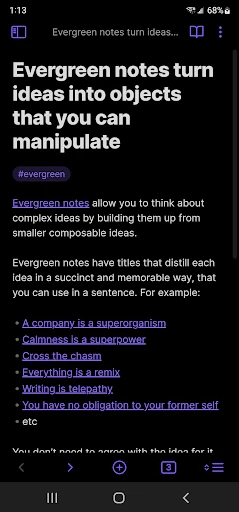




Obsidian: Your Personal Knowledge Management Hub
Obsidian is a powerful and flexible note-taking and knowledge management app built on a local-first, Markdown-based foundation. It transforms simple notes into an interconnected network of ideas, enabling users to build a second brain for deep thinking, research, and project management. Unlike cloud-dependent tools, Obsidian ensures your data remains private and under your control, while its extensible plugin system allows for limitless customization, catering to both casual note-takers and professional researchers.
Chapter 1: Function
Obsidian’s core function is to create, organize, and interconnect plain-text Markdown notes. The app provides a dual-pane editor and preview mode for seamless writing. Its central innovation is the graph view, which visualizes links between notes, revealing hidden connections. Features include backlinking, which automatically shows all references to the current note, and a powerful search function that can target specific folders, tags, or linked content. Additionally, Obsidian supports a canvas view for visual brainstorming, daily notes for journaling, and a hierarchical file system for traditional folder-based organization. The app’s true power lies in its plugin architecture: community-built plugins can introduce kanban boards, calendar views, database queries (via Dataview), and even integration with external tools like Todoist or Zotero. This makes Obsidian not just a note app, but a fully customizable platform for managing knowledge, tasks, and projects entirely offline, with optional sync.
Chapter 2: Value
Obsidian’s primary value proposition is its commitment to data ownership and longevity. Notes are stored as plain Markdown files on a user’s local device, meaning no proprietary format or server shutdown can ever lock away your information. This approach ensures complete privacy and offline access. The app’s value is further amplified by its network effect: as you link notes, the graph view reveals patterns and relationships that were previously invisible, fostering creative insights and a deeper understanding of complex topics. This turns passive note-taking into an active process of knowledge synthesis. For professionals, Obsidian replaces scattered tools like Evernote, Notion, or OneNote by providing a unified, high-performance environment that scales from thousands to millions of notes without lag. The extensible plugin system allows users to tailor the app to specific workflows, from academic citation management to agile project tracking. Crucially, Obsidian is free for personal use, with paid Sync and Publish options offering convenience. This combination of data sovereignty, cognitive enhancement, and infinite customizability makes Obsidian invaluable for anyone seeking to build a durable, personal knowledge system that grows more powerful over time.
Chapter 3: Scenarios
Obsidian serves a diverse range of users. Academics and researchers use it to link papers, lecture notes, and citations, creating a personal Wikipedia of their field. Software developers store code snippets, system documentation, and debugging logs, using graph views to trace dependencies. Writers and bloggers rely on its distraction-free editor and daily notes to draft works, linking characters or themes across chapters. Students deploy it for course note-taking with spaced repetition plugins for exam preparation. Project managers and freelancers create interconnected project dashboards via the Dataview plugin, tracking tasks and deadlines across multiple clients. Regular professionals use it for meeting notes with automatic backlinks to previous conversations, building a searchable history of organizational knowledge. In daily life, users maintain health logs, travel plans, or reading lists, with each note contributing to an evolving personal database. The common thread is a need for structured yet flexible information management that grows organically, allowing users to capture ideas anywhere and later discover new connections, making Obsidian a companion for lifelong learning and productivity.
Advantages
- local-first offline vault with plain markdown files
- graph view maps link connections between notes visually
- community plugins extend functionality without bloat
- bidirectional linking makes knowledge retrieval non-linear
- obsidian sync works across desktop and mobile devices
Disadvantages
- steep learning curve for non-technical users
- no built-in cloud backup; sync requires paid add-on
- plugin incompatibility can break workflows after updates
- mobile editing feels sluggish on large vaults
- proprietary sync relies on end-to-end encryption limits
Frequently Asked Questions
Q: What core features does Obsidian offer for note-taking?
A: Obsidian is a local-first knowledge management app that supports Markdown-based note-taking, bidirectional linking, and a graph view to visualize connections. It works offline without internet, stores data as plain files on your device, and uses a plugin system for extensibility. Core functions include note editing, linking between notes, and a canvas for diagramming.
Q: Is Obsidian free to use or does it require payment?
A: Obsidian is free for personal use with core features like unlimited local notes, graph view, and most community plugins. Paid plans, Obsidian Sync and Obsidian Publish, are optional for syncing across devices and publishing notes online. No in-app purchases block basic functionality, and no subscription is required for offline or single-device usage.
Q: Does Obsidian work on Windows, macOS, Linux, and mobile devices?
A: Obsidian is available on Windows, macOS, Linux, Android, and iOS via the official website or app stores. It supports both desktop and mobile platforms with sync options via paid Sync or third-party cloud services (e.g., iCloud, Dropbox). The app requires modern OS versions; for mobile, iOS 15+ or Android 8+ is recommended.
Q: How can I sync my Obsidian notes across multiple devices?
A: Obsidian offers official Sync (paid) for end-to-end encrypted real-time syncing between devices. Alternatively, you can manually sync using third-party services like iCloud, Google Drive, Dropbox, or OneDrive, though conflicts may occur. No built-in free sync exists; community plugins like Remotely Save provide a limited free alternative.
Q: Can I use Obsidian without an internet connection?
A: Yes, Obsidian works fully offline with all local features—editing, linking, graph view, and most plugins—available without internet. No account or login is required for local use. Internet is only needed for plugin downloads, theme updates, or optional cloud sync. Your notes remain private on your device.
Technical Information
Recommended for You

Google Lens

Themify: Theme & Icon Changer

USB Connector Cast Phone to TV

Google Wallet

Shake Shack

Umax - Become Hot

Cocktail Party: Drink Recipes

Kiddopia - Kids Learning Games

Brightspace Pulse

Amazon Kindle

Camera for Android

Pizza Hut - Delivery & Takeout

Map Chart Mosaic

MarineTraffic - Ship Tracking

QR Code Scanner & Scanner App

365Scores: Live Scores & News

Bible App for Kids

Photo Collage Editor: SCRL

Qeepsake: Family & Baby Book

National Car Rental

NBA: Live Games & Scores

IPTV Pro

Tripadvisor: Plan & Book Trips
