Life360: Stay Connected & Safe

Life360: Stay Connected & Safe
Community safety for families with real time location sharing
Screenshots
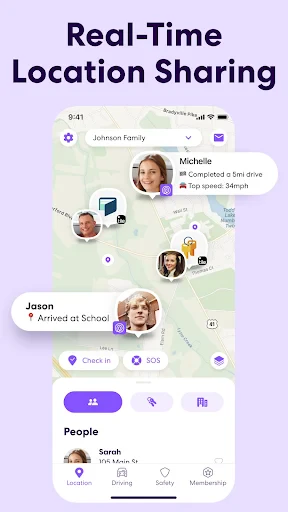
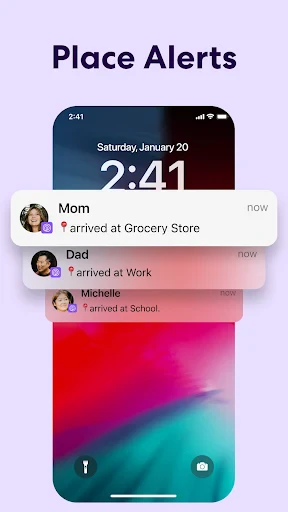
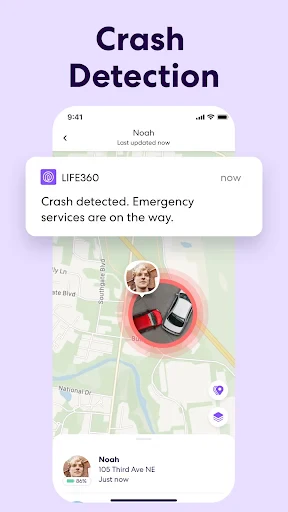
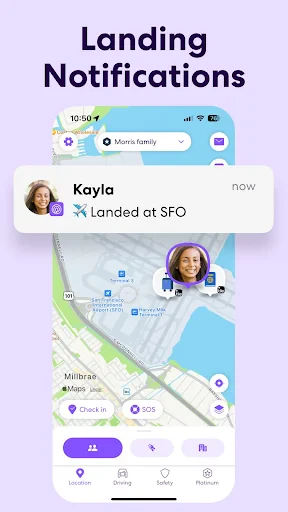
Life360: Stay Connected and Safe
Life360 is a comprehensive family safety and location-sharing app designed to keep loved ones connected and informed. It provides real-time location tracking, driving safety reports, and emergency assistance features, all within a private network. The app transforms a smartphone into a reliable tool for peace of mind, helping families coordinate daily activities and respond to unexpected situations with ease.
Chapter 1: Function
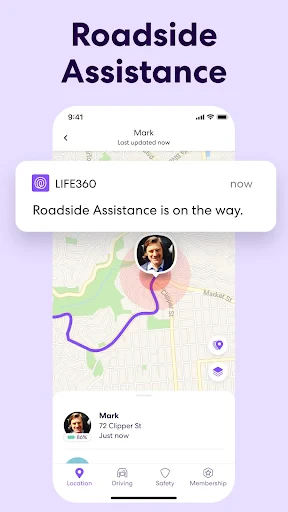
Life360s core functions center on location sharing, safety monitoring, and communication. The app creates a private circle where members can see each others real-time location on a shared map. It includes Place Alerts that notify users when family members arrive at or leave designated locations like home, school, or work. Driving features such as Crash Detection and Roadside Assistance add a layer of safety for drivers, while the app also monitors driving behavior to provide reports on speed, phone use, and harsh braking. Additionally, Life360 offers a panic alert button that instantly notifies all circle members with the users location in emergencies. Communication is streamlined through in-app messaging and check-in requests, ensuring everyone stays coordinated without switching between different platforms.
Chapter 2: Value
Life360s primary value lies in fostering family security and reducing anxiety. For parents, it eliminates the worry of not knowing a childs whereabouts during commutes or outings. The real-time map and alert system replace constant text check-ins, allowing families to stay informed without intrusive monitoring. The driving safety features are particularly valuable for teenage drivers, as the app provides constructive feedback on driving habits and automatically detects potential crashes, instantly notifying emergency contacts and services. This proactive approach can significantly reduce accident response times. For multi-generational households or families with elderly members, Life360 offers independence by allowing seniors to stay connected without needing to master complex technology. The app also aids in daily logistics, such as coordinating pickups, tracking a spouses arrival home, or finding a lost phone. By consolidating safety, location, and communication into one platform, Life360 simplifies family management and builds trust among members. Its Emergency SOS feature and roadside assistance partnership provide tangible support during crises, transforming the app from a simple tracker into a life-saving tool. Ultimately, the key advantage is the blend of convenience and protection, which helps families feel more secure in an increasingly busy world.
Chapter 3: Scenarios
Life360 is primarily designed for families with children, especially those with teenage drivers, elderly relatives, or members who travel frequently. Typical users include parents who want to monitor their kids routes to and from school or extracurricular activities. It is also widely used by couples to share locations for logistical coordination, such as knowing when a partner is close to home for dinner planning. Another key scenario involves caregiving for elderly parents who may wander or experience health issues; caregivers can set location boundaries and receive alerts if their loved one leaves a safe zone. The app also serves groups of friends traveling together for vacations or road trips, allowing everyone to see each others positions and easily regroup. In emergency situations, such as natural disasters or unexpected breakdowns, the app becomes a critical tool for confirming that all members are safe and directing help to the exact location. Practical daily use includes checking a childs progress on a walk home, ensuring a senior parent has arrived at a doctors appointment, or receiving a notification when a family member leaves work.
Advantages
- real-time location sharing with customizable alerts for family members
- automatic crash detection sends emergency contacts your precise location
- driving behavior reports track speed
- phone use
- and hard braking
- cross-platform works on both iOS and Android without subscription lock-in
- battery optimization mode reduces drain while keeping tracking active
Disadvantages
- subscription required for advanced features like location history
- battery usage remains high even with optimization enabled
- privacy concerns due to constant location tracking by default
- inconsistent location accuracy in rural areas with weak cellular signal
- family circles cannot be combined if members exceed device limit
Frequently Asked Questions
Q: What core safety features does Life360 offer?
A: Life360 provides real-time location sharing, crash detection with emergency alerts, and 24/7 roadside assistance. It includes driver reports for speed and phone usage monitoring, plus place alerts for when family members arrive at or leave designated locations like home, school, or work. All features require GPS and network access to function.
Q: Is Life360 free to use or does it require a subscription?
A: Life360 has a free basic version with core features like location sharing and place alerts. Premium features such as crash detection, roadside assistance, and detailed driver reports require a paid subscription (Life360 Plus or Platinum). No additional equipment is needed, but the app uses your phone’s GPS and data connection.
Q: Which devices and systems are compatible with Life360?
A: Life360 is available on iOS 13.0 or later and Android 6.0 or later. It runs on smartphones and tablets, but not on smartwatches or desktops. The app supports multiple family members across different device types as long as each user installs the app and enables location permissions.
Q: null
A: Life360 works globally with location sharing and place alerts wherever your device has cellular or Wi-Fi data. However, crash detection and roadside assistance are limited to the United States and Canada. International users rely on the core location features, and data roaming charges may apply from your carrier.
Q: How can I fix common issues like inaccurate location or battery drain?
A: How can I fix common issues like inaccurate location or battery drain?
Technical Information
Recommended for You

Python Master - Learn to Code

SketchPad - Doodle On The Go

Spirit Airlines

Open Radio - Online FM Radio

FedEx Mobile

Ti.Live-Chill & Stream

Volume Styles - Custom control

FamilySearch Tree

Mini Piano Lite

Calendar Planner - Agenda App

Lively Lock Screen Wallpapers

Radio Garden

Cut and Paste Photo Editor

Advance Auto Parts

Burmese TV Pro

Qustodio Parental Control App

Bible Launcher-KJV & Prayer

Wegmans Meals 2GO

UpFoto - AI Photo Enhancer

RM Play

PhotoSync Bundle Add-On

BetMGM - Online Sports Betting

US Debt Clock .org
