Wegmans Meals 2GO

Wegmans Meals 2GO
Wegmans Meals 2GO: Order fresh groceries and ready meals for quick pickup
Screenshots

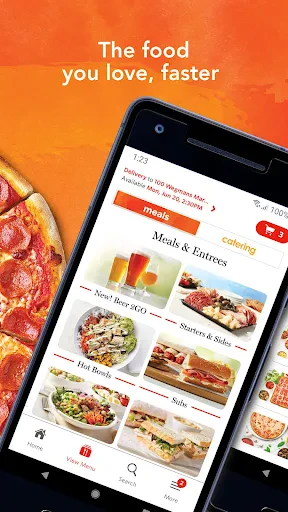
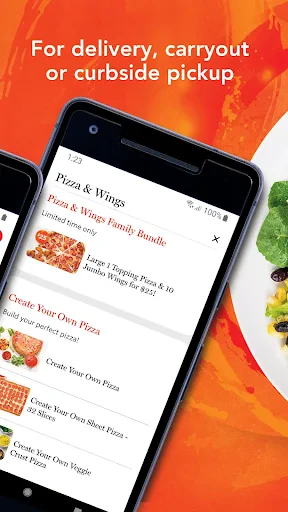


Wegmans Meals 2GO: Streamlined Meal Ordering for Fresh and Convenient Dining
Wegmans Meals 2GO is the official mobile ordering application from Wegmans Food Markets, a regional supermarket chain renowned for its high-quality fresh foods and prepared meals. The app allows users to browse a comprehensive menu of ready-to-eat items, custom sub sandwiches, pizzas, sushi, and more from their local Wegmans store. Users can place orders for pickup or delivery, pay directly through the app, and earn loyalty points via the Wegmans Shopper Club. The app integrates with store inventory to ensure accurate availability, supports scheduled ordering, and provides real-time order tracking. Designed to replicate the in-store experience digitally, it simplifies access to hot and cold prepared foods, deli counters, and bakery items, making it a practical tool for daily meal solutions.
Chapter 1: Function
The core function of Wegmans Meals 2GO is to enable users to order prepared foods from their local Wegmans store without waiting in line. The app displays a digital menu organized by station, including the Sub Shop, Pizza, Sushi, Hot Foods Bar, and Custom Cakes. Users select items, customize ingredients for subs and pizzas, choose a pickup or delivery time, and complete payment through stored credit cards or Apple Pay. The app also stores user preferences and past orders for quick reordering. A built-in notification system updates users on order status from preparation to ready-for-pickup, and the integrated Wegmans Shopper Club tracks points earned on purchases. This functionality eliminates the need for in-store queuing and streamlines the entire ordering workflow into a few taps.
Chapter 2: Value
The primary value of Wegmans Meals 2GO lies in its ability to deliver the trusted quality and variety of Wegmans prepared foods with unmatched convenience. For time-constrained families and professionals, the app eliminates the friction of waiting at busy deli or hot food counters during peak hours. It bridges the gap between grocery store quality and fast-food speed, offering freshly made subs, restaurant-style sushi, and chef-prepared entrees that are often more affordable than restaurant equivalents. The app also supports dietary preferences through detailed ingredient filters and allergy information, empowering users to make informed choices. For busy parents, it enables ordering a complete family meal in advance, reducing evening stress. Additionally, the loyalty program integration provides tangible rewards for regular use, creating a recurring value loop. Compared to third-party food delivery platforms, Wegmans Meals 2GO charges no significant markup on menu prices, making it a cost-effective solution for frequent prepared meal purchases. The app also reduces food waste by allowing users to order exactly what they need, and its geolocation features ensure orders are correctly routed to the user’s preferred store. Overall, it transforms a grocery store run from a chore into an efficient, high-quality meal solution.
Chapter 3: Scenarios
Wegmans Meals 2GO primarily serves busy professionals, suburban families, students, and elderly individuals who value fresh prepared food but lack time to cook. A typical use case is a working parent ordering a large sub platter and a family-sized salad for a weekday dinner, scheduling pickup right before the commute home to avoid a second trip. Another scenario involves college students living near a Wegmans who use the app to order inexpensive sushi or individual pizzas during study breaks, bypassing campus dining hall lines. The app also serves elderly or mobility-limited users who prefer delivery of ready-to-heat meals from Wegmans rather than cooking from scratch. Additionally, event planners use the app to pre-order party trays, cakes, and beverages for gatherings, taking advantage of scheduled pickup times. Finally, health-conscious individuals leverage the app to order custom salads and grilled proteins from the hot foods bar, combining nutritional transparency with meal speed. The app reduces friction for all these groups by enabling precise timing, touchless payment, and order accuracy.
Advantages
- single app covers ordering
- rewards
- and pantry management
- real-time order tracking from prep to curbside pickup
- meal kit integration syncs directly with your shopping list
- loyalty savings auto-apply without scanning a separate card
- recipe ingredients one-tap add to cart via barcode scan
Disadvantages
- curbside pickup slots fill up quickly on weekend mornings
- no dedicated express lane for app-only orders in-store
- meal kit inventory lags behind actual in-store stock
- push notifications sometimes duplicate existing order status updates
- app crashes when switching between multiple store lists quickly
Frequently Asked Questions
Q: What is Wegmans Meals 2GO and what does it do?
A: Wegmans Meals 2GO is a mobile app for ordering prepared meals, deli items, and grocery staples from Wegmans supermarkets. It allows users to browse menus, customize orders, and schedule pickup or delivery. The app integrates with Wegmans store inventory and offers meal planning features.
Q: Is the app free to use or are there in-app purchases?
A: The app is free to download and use. There are no in-app purchases for the app itself, but users pay for the food items ordered. Standard Wegmans pricing applies, and delivery may incur additional fees depending on the order size and location. No subscription is required.
Q: What devices and systems are compatible with this app?
A: Wegmans Meals 2GO is compatible with iOS and Android devices running recent operating systems. It requires a stable internet connection and location permissions to find nearby Wegmans stores. The app works on smartphones and tablets, but no additional equipment like external sensors is needed.
Q: Can I place a pickup order for a specific time slot?
A: Yes, the app allows users to select a specific pickup time slot based on store availability. You can schedule orders up to several days in advance. After placing the order, you receive notifications when the items are ready and instructions for contactless pickup at the designated area.
Q: How do I handle a missing or incorrect item in my order?
A: If an item is missing or incorrect, contact Wegmans customer service through the app’s support section or call the store directly. Most issues are resolved by issuing a refund or replacing the item. Keep the order receipt in the app for reference. Response times may vary by store.
Technical Information
Recommended for You

Fidelity Investments

Secure Camera

ETM: AI Art Generator

BabyCam - Baby Monitor Camera

MyNISSAN®

Maru - ComicViewer/TextReader

Moonstories

MaxPreps: High School Sports

FOX

IKEA

ACleaner - Clean Phone

Instawork: Be your own boss

Smart Remote For Vizio TV

Icon Pack Studio

Chordify: Song Chords & Tuner

Lumosity: Brain Training

TodayTix – Theatre Tickets

Nintendo Music

Dutch Bros

AOL: Email News Weather

Flip: Watch, Create, Shop

Librera PRO - Book reader

National Car Rental