Volume Styles - Custom control

Volume Styles - Custom control
Volume Styles customizes volume panel with stylish controls for Android users
Screenshots

Volume Styles - Custom control
Volume Styles is a mobile application that replaces the default system volume panel with a customizable and visually appealing interface. Instead of the standard pop-up that blocks content, this app allows users to choose from various themes, positions, colors, and sizes for their volume control. It enhances the user experience by providing a non-intrusive, stylish, and highly adjustable volume adjustment tool that integrates seamlessly with Android devices. The app focuses on personalization, offering both free and premium options to tailor the look and behavior of the volume slider to individual preferences.
Chapter 1: Function
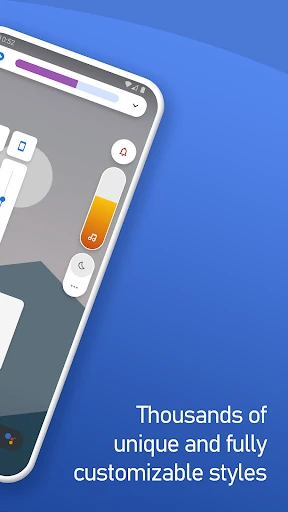
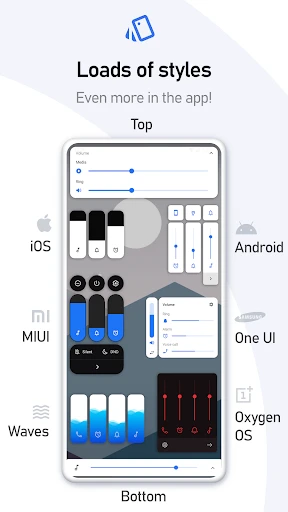
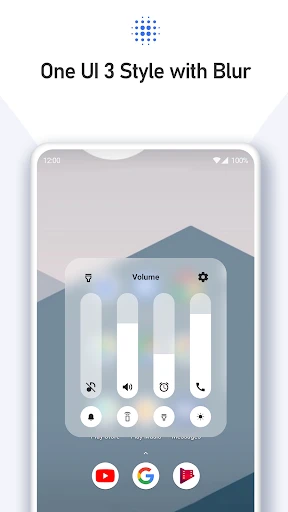
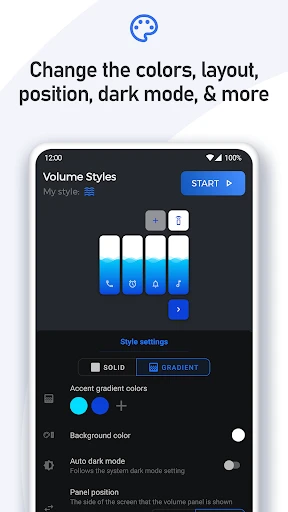
The core function of Volume Styles is to completely overhaul the native volume control panel on Android smartphones. Users can select from a library of pre-designed themes, ranging from minimalist bars to colorful circular dials. The app allows modification of the slider’s appearance, including its color, transparency, and shape. It also enables users to adjust where the volume panel appears on the screen, such as the top, bottom, left, or right edge. Additionally, Volume Styles provides options to change the font style, add custom backgrounds, and set animations for when the panel appears or disappears. For advanced users, the app supports per-app volume settings, allowing different volume levels for specific applications. It also offers a quick-access toggle to mute or switch between sound modes. The app runs in the background without draining significant battery, ensuring the custom panel replaces the default one every time the volume buttons are pressed. This functionality transforms a mundane system interaction into a personalized and enjoyable experience.
Chapter 2: Value
The primary value proposition of Volume Styles lies in its ability to combine aesthetic personalization with practical utility. First, it solves a common user annoyance: the default volume panel is often large, intrusive, and blocks on-screen content during gaming or video watching. By allowing users to shrink, reposition, and customize the panel, the app significantly improves screen usability and multitasking efficiency. Second, the app empowers users who desire a unique look for their device. With hundreds of theme combinations, it satisfies the demand for individuality without requiring root access or complex system modifications. Third, the per-app volume control feature adds substantial functional value, enabling users to manage different audio profiles for music, games, and notifications independently, which is a feature often missing from standard Android systems. Furthermore, the app’s lightweight design ensures that personalization does not come at the cost of performance. Its value is amplified by the option to unlock premium themes and advanced customization through a one-time purchase, making it accessible to a wide audience. Overall, Volume Styles delivers a superior user interface experience, reduces visual clutter, and provides granular control over device audio, making it a practical tool for daily use. Its key advantage is the seamless integration of beauty and functionality, transforming a basic system function into a personalized asset.
Chapter 3: Scenarios
Volume Styles is primarily designed for Android users who prioritize aesthetics and efficiency. The main target user groups include smartphone enthusiasts who enjoy customizing every aspect of their device’s interface, such as users of custom launchers or icon packs. It is also ideal for gamers and video streamers who need a non-obtrusive volume control that does not interrupt their full-screen experience. For example, while playing a mobile game or watching a movie in fullscreen, the user can adjust the volume without a large panel covering critical areas of the display. Another common use case is for users with visual impairments or specific color preferences; the app allows them to set high-contrast sliders or change the panel size for better readability. Professionals who frequently switch between silent, vibrate, and normal modes during meetings will benefit from the quick-access mode toggle integrated into the custom panel. Additionally, parents can set specific volume limits for children’s apps using the per-app feature. In everyday scenarios, such as listening to music in public transport, the user can style the panel to match their mood or outfit. The app serves anyone who finds the default volume control ugly, intrusive, or insufficient. By offering a tailored solution, Volume Styles appeals to a broad audience seeking a more pleasant and efficient interaction with their device’s audio management system.
Advantages
- adjusts individual app volumes independently
- creates custom sound profiles per activity
- works system-wide without root access
- integrates with headphone button shortcuts
- minimal battery drain from persistent service
Disadvantages
- setup requires navigating multiple permission layers
- limited to basic amplification
- no equalizer
- some widgets fail on non-stock Android launchers
- profiles don't sync across devices automatically
- free version caps at 3 custom presets
Frequently Asked Questions
Q: What is Volume Styles - Custom control?
A: Volume Styles - Custom control is an Android app that allows users to customize the appearance and behavior of their device's volume control panel. It offers themes, colors, sliders, and layout adjustments. No root access is required. The app primarily functions as a system UI modifier for Android devices running version 5.0 or higher.
Q: Is Volume Styles free to use or does it require in-app purchases?
A: The app is free to download and offers basic customization features with no upfront cost. However, advanced themes, additional presets, and premium slider styles are locked behind one-time in-app purchases. No subscription is required. Users can test core functions for free before deciding to purchase additional content.
Q: Does Volume Styles work on all Android devices and system versions?
A: Volume Styles works on most Android devices running version 5.0 (Lollipop) or higher. It is fully compatible with both smartphones and tablets. However, custom ROMs or heavily modified manufacturer skins may cause compatibility issues. The app does not support iOS or any other operating system.
Q: Can Volume Styles change the actual sound output or volume levels?
A: No, Volume Styles only modifies the visual and interactive design of the volume control panel. It does not alter actual audio output, volume levels, or sound quality. For volume level adjustments, users must still use the system's native controls. The app is purely a UI customization tool.
Q: How do I restore the default volume panel after using Volume Styles?
A: To restore the default volume panel, open Volume Styles, go to 'Settings' or 'Presets', and select the 'Reset to Default' option. Alternatively, uninstalling the app will automatically revert the system volume UI to its original state. No additional steps or manual file deletion is required.
Technical Information
Recommended for You

Messenger: Text Messages, SMS

iFunny-videos,memes,jokes,GIFs

Remove Objects - Photo & Video

Windfinder: Wind & Weather map

All Devices Detector finder

Bigo Live - Live Streaming App

Easy Pose - 3D pose making app

Booktime

Paylocity

Sticker.ly - Sticker Maker

NoBroker Rent, Buy, Sell Flats

Spanish English Translator

Picsart AI Photo Editor, Video

QR Scanner

BubbleUPnP UPnP/DLNA License

GEICO Mobile - Car Insurance

RideRTC

Indoor thermometer

Fish|Hunt FL

Purebond - Fun chat & dating

File Recovery, Photo Recovery

Google Calendar

HeyPiggy - Paid Surveys
