TurboScan™ Pro: PDF scanner

TurboScan™ Pro: PDF scanner
TurboScan Pro scans documents to PDFs for professionals needing quick mobile scanning
Screenshots


TurboScan Pro: PDF Scanner – Document Digitization Simplified
TurboScan Pro is a mobile application designed to transform your smartphone into a powerful portable document scanner. It enables users to capture, enhance, and convert images of physical documents into high-quality PDF files or JPEG images. The app focuses on delivering speed, precision, and ease of use for professionals, students, and anyone who needs to manage paper documents digitally. By leveraging advanced image processing technology, TurboScan Pro eliminates the need for a traditional flatbed scanner, offering a convenient solution for digitizing receipts, contracts, notes, books, and whiteboards directly on the go.
Chapter 1: Function
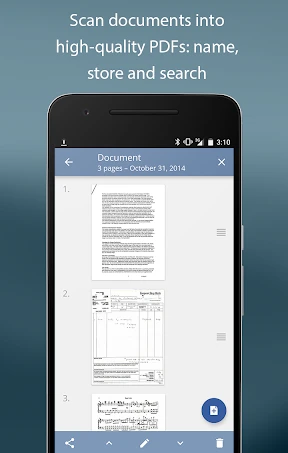
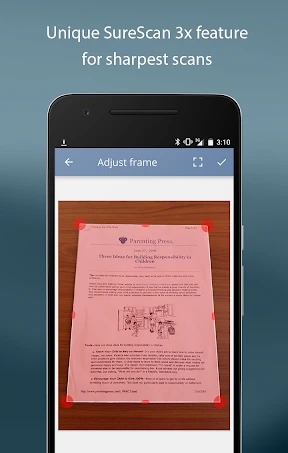
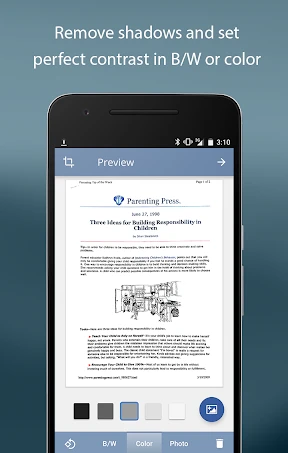
TurboScan Pro provides a robust set of core functions for document management. Its primary feature is the automatic detection of document edges and perspective correction, which ensures that captured images are straightened and aligned perfectly, removing unwanted backgrounds. The app supports batch scanning, allowing users to capture multiple pages in a single session and save them as a single PDF file. Users can adjust image quality with filters such as black and white, grayscale, and color photo mode to enhance readability. The application also includes optical character recognition (OCR) technology, enabling text extraction from scanned documents for searchable PDFs. Additionally, TurboScan Pro offers seamless sharing via email, cloud storage services like Dropbox and Google Drive, and printing, with the ability to save files at various resolutions to meet different quality and storage needs.
Chapter 2: Value
The value proposition of TurboScan Pro lies in its combination of professional-grade scanning quality with extreme portability and time efficiency. Unlike basic camera apps, TurboScan Pro uses sophisticated algorithms to automatically crop, clean, and enhance images, producing results that rival dedicated desktop scanners. This eliminates the need for costly hardware and saves users from the tedious manual editing process. The app’s key advantages include its highly accurate edge detection, which works even on crumpled receipts or glossy pages, and its ability to create multi-page documents quickly. The integrated OCR adds immense value by converting scanned text into editable and searchable content, making information retrieval instantaneous. Furthermore, the app protects privacy by processing all data locally on the device without uploading images to external servers, a critical feature for business professionals handling sensitive contracts. The batch processing and direct cloud integration also streamline workflow, reducing clutter and enabling instant digital archiving. For anyone looking to reduce paper waste, improve organization, or simply share polished documents from anywhere, TurboScan Pro provides a reliable, fast, and professional solution that justifies its premium positioning through consistent performance and feature depth.
Chapter 3: Scenarios
TurboScan Pro serves a diverse range of primary target user groups including business professionals, remote workers, students, and administrative staff. Everyday use cases are plentiful: a lawyer can digitize a signed contract in a client meeting and immediately email a clean PDF; an accountant can scan and categorize a pile of receipts for expense reporting; a student can photograph lecture whiteboards and handwritten notes, converting them into searchable study guides; a real estate agent can instantly capture and send property documents to clients from a site visit. The app is also invaluable for digitizing old family photos or historical documents, as well as for travelers who need to store copies of passports or boarding passes securely. By replacing the need for a bulky scanner and paper filing cabinets, TurboScan Pro becomes an essential productivity tool for anyone who needs to capture, organize, and share information in a digital format quickly and accurately.
Advantages
- scans multi-page docs into a single PDF in seconds
- auto-crops and enhances text legibility without manual tweaks
- uses on-device OCR to extract text directly from scans
- export to iCloud
- Dropbox
- or email with one tap
- supports batch rename and reorder within the app
Disadvantages
- free version limits daily scans to 5 pages
- OCR accuracy drops on handwritten or low-contrast text
- no built-in cloud sync without a pro upgrade
- scan preview lag on older iPhone models
- lacks document signature or fillable form support
Frequently Asked Questions
Q: What is TurboScan Pro and what does it do?
A: TurboScan Pro is a mobile document scanning app that turns your phone into a PDF scanner. It captures images of documents, receipts, or whiteboards, then automatically detects edges, enhances clarity, and generates high-quality PDF files. Core functions include batch scanning, email sharing, and cloud storage integration. No additional scanning hardware is required.
Q: Is TurboScan Pro free or does it require a purchase?
A: TurboScan Pro is a paid app available on iOS and Android platforms. It offers a one-time purchase model with no recurring subscriptions. There is no free version for full features, but some app stores may offer a limited trial or refund window. No in-app purchases or hidden fees are required for core scanning functionality.
Q: Which devices and systems are compatible with TurboScan Pro?
A: TurboScan Pro is compatible with iPhone, iPad, and iPod touch running iOS 12.0 or later, as well as Android devices with OS 5.0 or higher. It supports most modern smartphones and tablets. No external hardware or additional permissions beyond camera access and storage are needed for basic operation.
Q: Can I edit or annotate scanned PDFs within the app?
A: TurboScan Pro primarily focuses on scanning and exporting clean PDFs. It does not offer advanced editing or annotation tools like text highlighting or drawing. However, you can crop, rotate, adjust color/contrast, and reorder pages before saving. For heavy editing, export to a third-party PDF editor is recommended.
Q: How does TurboScan Pro handle multi-page batch scanning?
A: TurboScan Pro supports continuous batch scanning by automatically detecting new pages after each capture. You can scan multiple pages in one session, then reorder, delete, or add pages before generating a single multi-page PDF. The process is manual but straightforward, with no automatic page feed or OCR for text recognition.
Technical Information
Recommended for You

FNBT & FCB Mobile

Amazon Seller

Tzofar - Red Alert | צופר

Tripadvisor: Plan & Book Trips

AGE-R medicube Digital clinic

Samsung Music

Live football TV

UsA Minimalist Digital -USA159

D&D Beyond

Launcher iOS16 - iLauncher

Prepware Remote Pilot

Lucky Reais: Play & Win

B-hyve

Music Player Offline & MP3

Real News - Republican News

MeetMe: Chat & Meet New People

SuperCook - Recipe Generator

Photo App - AI Photo Enhancer

Cleaner Elite

Smart Home Manager

ZBD: Earn Bitcoin Rewards

Inky - Run Inkscape on Android

ThinkDiag+