DIY Cat Language Wallpaper

DIY Cat Language Wallpaper
Decode your cat with playful wallpapers and purrsonalized feline insights.
Screenshots


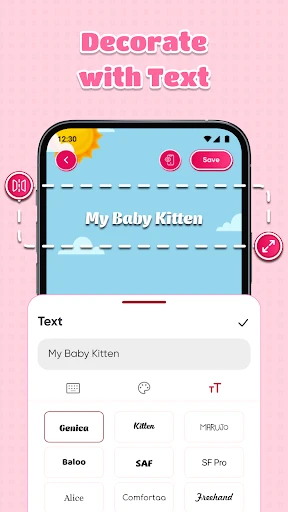
DIY Cat Language Wallpaper: Personalize Your Screen with Feline Expressions
DIY Cat Language Wallpaper is a mobile application designed for cat lovers who want to transform their device screens into interactive and expressive showcases of feline behavior. The app enables users to create custom wallpapers featuring realistic cat poses, speech bubbles, and text that translates imagined cat thoughts into readable phrases. By combining high-quality cat illustrations with user-generated captions, the app bridges the gap between pet affection and digital creativity. Its intuitive interface allows anyone, regardless of design skills, to craft unique wallpapers that capture the playful, curious, or grumpy moods of cats. The app also includes a library of cat body language cues, such as ear positions and tail movements, to help users add authentic details.
Chapter 1: Function
DIY Cat Language Wallpaper offers a suite of core functions that empower users to design personalized cat-themed wallpapers. First, it provides a catalog of over 100 customizable cat models, ranging from sleeping poses to pouncing stances, all rendered in high-resolution art. Users can adjust the cat’s fur color, eye shape, and background scenery to match their preferences. Second, the app includes a text editor with dozens of preset phrases like I want treats or Pet me now, as well as a freeform input for original messages. Users can position speech bubbles and choose font styles, sizes, and colors. Third, a unique Body Language Assistant analyzes user-selected cat poses and suggests relevant captions based on feline gestures, such as flattened ears for irritation or a raised tail for excitement. Finally, the app supports resolution optimization for different phone models and allows one-tap saving or setting as wallpaper directly.
Chapter 2: Value
The primary value of DIY Cat Language Wallpaper lies in its ability to merge emotional connection with personalization, offering cat owners a playful outlet to express their bond with pets. Unlike generic wallpaper apps, this tool treats each cat as a unique personality, allowing users to simulate conversations or humorous scenarios that reflect their own pet’s quirks. For example, a user can create a wallpaper showing their cat seemingly complaining about an empty food bowl, adding a daily dose of humor. This strengthens the owner-pet relationship by fostering imaginative interaction even when the pet is not present. Another key advantage is the educational aspect: the Body Language Assistant subtly teaches users about real feline communication signals, turning wallpaper creation into a learning experience. This appeals to new cat owners who want to understand their pets better. Additionally, the app avoids complex design tools, lowering the barrier for older adults or less tech-savvy users who still desire personalized aesthetics. From a practical standpoint, the ad-free pro version ensures distraction-free creation, and the offline functionality means wallpapers can be designed without internet access. The social sharing feature, which lets users export creations as images without watermarks, further extends its value by enabling community engagement on other platforms. Compared to static cat photos, this app turns the phone screen into an ever-changing story board that reflects the user’s creativity and love for cats.
Chapter 3: Scenarios
DIY Cat Language Wallpaper targets multiple user groups with distinct needs. Primary users are cat owners who want to celebrate their pets daily. For instance, a young professional commuting to work can set a wallpaper showing a cat with a speech bubble saying Have a great day, human to start mornings positively. Another common use case is among families with children: parents can help kids design wallpapers featuring a cat counting down to a birthday or holiday, combining pet love with festive anticipation. The app also appeals to cat influencers and social media content creators who need unique background visuals for videos or posts; they can generate themed wallpapers matching their cat’s personality for cohesive branding. Veterinary clinics or pet adoption centers could use the app to create informational wallpapers that display real cat body language tips alongside adorable images, engaging visitors while spreading awareness. Additionally, elderly cat owners living alone might use the app to design comforting wallpapers with messages like You are loved, turning their phone into a source of emotional support. The app’s language options, including support for multiple languages beyond English, make it accessible to global users. In all these scenarios, the app serves as more than a utility; it becomes a tool for joy, education, and self-expression within the cat-loving community.
Advantages
- creates custom wallpapers from your cat’s vocal patterns
- voice recognition maps meows to unique visual motifs
- offline sound analysis works without internet
- real-time preview of sound-to-color patterns
- supports multiple cat breeds and tone frequencies
Disadvantages
- requires quiet environment for accurate voice capture
- limited wallpaper export resolution on free tier
- sound analysis drains battery during recording
- no cloud sync between devices
- breed profiles only cover 20 common types
Frequently Asked Questions
Q: What does DIY Cat Language Wallpaper do?
A: It generates customizable wallpapers featuring cat-related text and symbols based on user input, such as phrases or behavior cues. Users select design elements, adjust colors, and save or share the image. The core function is creating unique, feline-themed phone backgrounds without needing design skills.
Q: Is the app free to use with no hidden costs?
A: The app is free to download and use for basic wallpaper creation. Some advanced templates, font styles, or sticker packs require a one-time in-app purchase. No subscription fees or mandatory payments exist, and all features remain accessible after purchase without recurring charges.
Q: Does the app work on both iOS and Android devices?
A: The app supports Android 8.0 and above, and iOS 14.0 and above. It is optimized for smartphones but not tablets or desktop. Both operating systems require camera and storage permissions to load custom images and save wallpapers. No additional hardware is needed.
Q: How to fix cat symbols not displaying correctly?
A: Ensure the app is updated to the latest version via your app store. If symbols appear as blank squares, your device may lack Unicode support for certain cat emojis. Switch to the built-in ‘Simplified’ symbol set under Settings > Font Pack. Restart the app after changing settings.
Q: Can I transfer my created wallpapers to another phone?
A: Yes, all created wallpapers are saved locally in your device gallery as PNG or JPEG files. You can manually transfer them via cloud services, messaging apps, or USB. The app does not include cloud sync or export to the app store, so manual backup is required for device changes.
Technical Information
Recommended for You

Nintendo Switch Online

Pratilipi Comics

IO Cleaner - Phone Cleaner
Text Me: Second Phone Number

HD Camera

Quiz AI: AI Homework Helper

EMT Review Plus

Madison Reed App - Hair Color

USPS MOBILE®

Mobile Passport Control

Blaze Pizza

Music ringtones for android
Christmas Globe

SpotHero - Find Parking

Direct Chat & Messaging

Zeus

Bobby Approved
Dazz Cam: Retro Filter Effect

Lufthansa

NewsNation: Unbiased News
Board Game Stats

FedEx Mobile

Ventusky: Weather & Live Radar