Edits, an Instagram app

Edits, an Instagram app
Edits Instagram photos videos creators creative tools
Screenshots
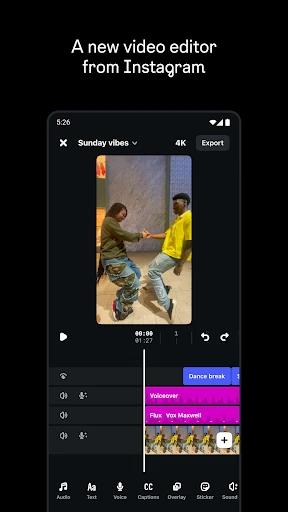
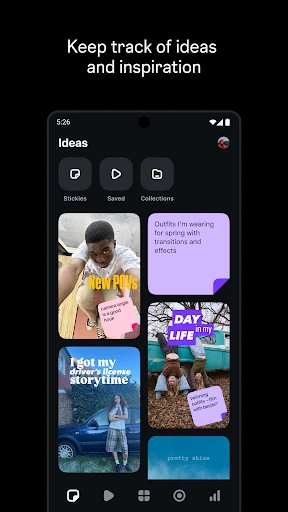
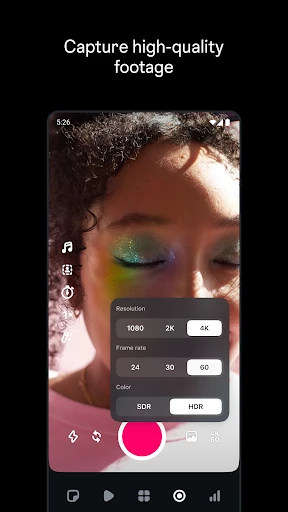

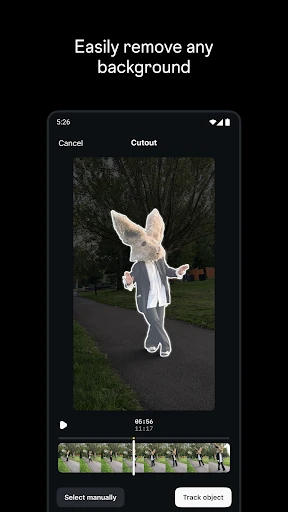
Edits, an Instagram app Feature Overview
Edits is a dedicated companion app by Instagram designed for creators who demand more control over their video content before sharing it to the main platform. It functions as a standalone editing suite, offering a range of professional-grade tools for trimming, cutting, layering audio, and applying visual effects. Unlike using Instagram’s built-in editor within the posting flow, Edits provides a focused workspace where users can fine-tune every frame, experiment with transitions, and preview their work without the distraction of notifications or feed timelines. The app aims to bridge the gap between quick mobile edits and more sophisticated desktop software, making high-quality video production accessible directly from a smartphone.
Chapter 1: Function
The core function of Edits is to provide a robust, non-linear video editing environment specifically optimized for Instagram’s vertical format. Users can import video clips and photos from their device’s gallery, then arrange them on a timeline for precise control over sequencing. The app allows for frame-accurate trimming and splitting of clips, enabling creators to remove unwanted sections seamlessly. It includes a multi-track audio feature, letting users layer background music, voiceovers, and sound effects with independent volume control. Additionally, Edits offers a library of visual effects, including color correction filters, speed ramping options for slow motion or time-lapse, and keyframe-based animation for text overlays or stickers. The output is always curated to maintain the 9:16 aspect ratio, ensuring that the final product adheres to Instagram’s display standards without any cropping surprises.
Chapter 2: Value
The primary value of Edits lies in its ability to elevate the quality of Instagram content while preserving the simplicity of mobile creation. For influencers, small business owners, and content marketers, this app eliminates the need to switch between multiple third-party tools, saving both time and storage space. Its key advantage is the seamless integration with the Instagram ecosystem; edits made in the app can be exported directly to the main platform’s draft folder or schedule without losing metadata or resolution. Furthermore, Edits introduces a non-destructive editing workflow, meaning users can revert changes or tweak adjustments even after saving a project. This reduces the risk of losing work due to accidental saves, a common frustration with simpler editors. The app also includes a dedicated asset library with trending audio tracks and Instagram-specific sticker packs, allowing creators to stay current with platform trends without external downloads. For professional users, the ability to export in 4K resolution at 60 frames per second provides the technical fidelity required for brand partnerships and advertising campaigns. This combination of professional output and mobile convenience makes Edits a strategic tool for anyone looking to maintain a consistent, high-quality visual presence on Instagram.
Chapter 3: Scenarios
Edits is primarily used by content creators, such as fashion bloggers, travel vloggers, and fitness coaches, who post daily video stories or reels. These users benefit from the app’s batch editing capability, allowing them to process several clips for a week’s worth of posts in a single session. Small business owners also rely on Edits to produce polished product demonstrations, behind-the-scenes looks, and customer testimonial videos without hiring a video editor. For example, a boutique owner can use the app to overlay text for sizing information, apply a warm filter for a consistent brand aesthetic, and add a voiceover explaining return policies, all within a few minutes. Educational content creators, such as tutors or recipe developers, use Edits to create step-by-step tutorials with on-screen timing markers and smooth transitions between steps. The app is also popular among event photographers and videographers who need to deliver quick highlight reels for social media from a wedding or corporate event. In each case, the app reduces the friction between filming and publishing, enabling users to maintain a regular posting schedule without sacrificing production value.
Advantages
- instantly hides specific shared carousel photos from view
- applies privacy edits without altering original Instagram posts
- works offline once carousel IDs are synced
- selective per-user blocking avoids unfollowing or muting
- no login required—uses your existing Instagram session token
Disadvantages
- requires manually entering each carousel’s URL to hide
- hidden filters reset after Instagram API changes
- no batch-select option for hiding multiple carousels
- does not work on Instagram stories or Reels content
- if Instagram login token expires
- all hidden settings clear
Frequently Asked Questions
Q: What does Edits app do for Instagram users?
A: Edits is an Instagram companion app designed for editing photos and videos before posting. It provides tools like advanced filters, cropping, text overlays, and color adjustments. No additional equipment is needed, and it works directly with your Instagram account to streamline content creation.
Q: Is Edits free to use or requires in-app purchases?
A: Edits is free to download and use. There are no in-app purchases or subscription fees. All core editing features are accessible without payment, and no additional permissions beyond standard camera and storage access are required for functionality.
Q: Does Edits work on both iOS and Android devices?
A: Edits is currently available only on iOS devices running iOS 14 or later. Android support has not been announced. It is optimized for iPhone and iPad, requiring a stable internet connection for Instagram integration but not for offline editing.
Q: Can Edits edit videos longer than 60 seconds?
A: Edits supports video editing up to 10 minutes in length. It can trim, merge, and apply effects without resolution loss. However, final export for Instagram Stories is limited to 60 seconds, while feed posts allow up to 10 minutes natively.
Q: How to troubleshoot if Edits crashes during editing?
A: If Edits crashes, first update the app via App Store and restart your device. Ensure your iOS is updated to at least version 14. If the issue persists, reinstall Edits—your unsaved projects will be lost, but saved drafts on iCloud may restore. No official support chat is available; contact Instagram Help instead.
Technical Information
Recommended for You

Mary Kay® MirrorMe™

HuntStand: GPS Maps & Tools

Satellite View:Live Earth Maps

TMCARS

Skincare Routine: FeelinMySkin

Mens Hairstyles And Haircuts

Drawing Pad Pro - Sketchpad

AI Interior Design Home Decor

Infinite Painter
Decibel Meter: Sound Meter App

Cabify

Google Keep - Notes and lists

Eyezy – GPS Location Tracker

Fart Sounds

House Chores Cleaning Schedule
Thermometer++ Room Temperature

Photoroom AI Photo Editor

AI Video Generator : SelfyzAI

Fresha for business

Samsung TV Plus - TV & Movies

Wells Fargo Mobile®

Trending Prank Call & Chat

Camera Location: Geotag Photos