LightMeter
LightMeter
LightMeter precision light measurement tool for photographers
Screenshots


[LightMeter] Professional Light Meter for Photography
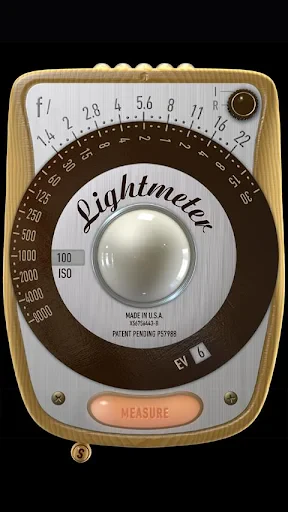
LightMeter is a precision light measurement tool designed for photographers, videographers, and cinematographers. It transforms your smartphone into a reliable incident and reflective light meter, offering accurate exposure readings without the need for bulky hardware. The app leverages your device's camera sensor and advanced algorithms to simulate professional-grade metering, supporting both ambient and flash light scenarios. It provides real-time EV, lux, and foot-candle values, along with shutter speed, aperture, and ISO recommendations. LightMeter is tailored for both analog and digital workflows, ensuring consistent exposure across different lighting conditions. Its intuitive interface and calibration options make it an indispensable companion for creative professionals seeking precise control over their lighting setups.
Chapter 1: Function
LightMeter delivers core light metering functionalities essential for accurate exposure. It uses your smartphone's front and rear cameras to measure incident light by covering the lens with a diffuser, or reflective light by pointing at the subject. The app displays critical metrics including Exposure Value, illuminance in lux and foot-candles, and recommended camera settings such as shutter speed, aperture, and ISO based on your selected film or digital profile. It supports both continuous and flash metering, with a dedicated flash sync mode for studio strobes. Users can calibrate the sensor for consistency, save reference measurements, and switch between spot and average metering modes. The app also includes a zone system overlay for advanced exposure planning, and it logs history for comparing multiple readings. Its minimal latency and real-time updates ensure responsiveness during dynamic shoots, making it a direct replacement for standalone handheld meters.
Chapter 2: Value
LightMeter offers significant value by replacing expensive, dedicated light meters with a software-based solution that is both affordable and portable. Its key advantage lies in leveraging existing smartphone hardware, eliminating the need for additional equipment while maintaining professional-grade accuracy. For photographers transitioning to film, the app provides zone system support and film-specific profiles, enabling precise exposure without guesswork. Videographers benefit from its ability to measure continuous light sources in lux and foot-candles, ensuring consistent illumination across scenes. The app's calibration feature allows users to fine-tune measurements against a known reference, achieving reliability comparable to Sekonic or Gossen meters. Its flash metering capability is particularly valuable for studio work, where syncing strobes to ambient light is critical. Additionally, LightMeter saves time by logging readings and offering comparative analysis, which aids in troubleshooting lighting setups. The absence of recurring subscriptions or hidden costs further enhances its cost-effectiveness. By democratizing access to accurate metering, it empowers hobbyists and professionals alike to achieve technically correct exposures with confidence, ultimately reducing film waste and post-production corrections.
Chapter 3: Scenarios
LightMeter serves a diverse user base including film photographers, digital content creators, and lighting technicians. Its primary target users are analog photographers who require precise exposure for slide film or negative stocks without relying on camera meters. For example, a landscape photographer using a medium-format film camera can use LightMeter to meter the sky and foreground separately, then adjust settings accordingly. Studio photographers benefit from its flash metering mode when setting up multiple strobes for portrait or product shoots, ensuring even illumination. Videographers and cinematographers use it to measure ambient light levels on set, particularly when matching natural light with artificial sources to achieve a desired Key-to-Fill ratio. Outdoor event photographers leverage its reflective metering for fast-moving subjects where incident metering is impractical. Educators and students in photography courses use LightMeter as a teaching tool to understand exposure triangles and the zone system. Everyday use cases include checking light levels for indoor plant growth, calibrating monitor brightness, or assessing lighting for macro photography. Its portability makes it ideal for location shoots where carrying a separate meter is inconvenient.
Advantages
- dual metering modes adapt to both ambient and flash
- supports zone system with 1/3 stop fine-tuning
- real-time histogram overlay for precise exposure balance
- compensates for filter factors automatically in manual mode
- post-shot EV review with highlight/shadow clipping map
Disadvantages
- requires calibration for non-standard sensor response curves
- no built-in incident dome attachment for reflective-only use
- battery life drops significantly in continuous live-preview mode
- manual only
- no auto-exposure lock for quick handheld snaps
- tripod spot metering is mandatory for accurate low-light readings
Frequently Asked Questions
Q: What does LightMeter do in photography?
A: LightMeter measures ambient light levels to help photographers set correct exposure values (ISO, aperture, shutter speed). It uses the device’s camera sensor or manual input for incident and reflective metering. No external hardware required. Works for digital and film photography.
Q: Is LightMeter free to use without in-app purchases?
A: The core metering function is free with basic modes. Advanced features like spot metering, histogram display, and custom calibrations require a one-time in-app purchase. No subscription needed. All purchases are permanent and linked to your app store account.
Q: Does LightMeter work on Android and iOS devices?
A: LightMeter is available on iOS for iPhone and iPad, and on Android for phones and tablets. Requires iOS 13+ or Android 8.0+. Optimized for devices with rear cameras. Not compatible with smartwatches or desktop operating systems.
Q: How accurate is the light measurement compared to a handheld meter?
A: Accuracy depends on device camera sensor quality. In good light (EV 5–18), deviation is within ±0.3 EV for most modern smartphones. Low light or extreme contrast may reduce accuracy. Manual calibration and spot metering mode help improve consistency.
Q: Can LightMeter be used for film photography without a battery?
A: No. LightMeter requires a powered mobile device with a working camera and app open. It does not function as a standalone mechanical meter. For film cameras without batteries, you must keep your phone charged and the app running during use.
Technical Information
Recommended for You

Photo Editor - Collage Maker

Chai: Chat AI Platform
Master Wifi - Password Show

Proxy Browser

Bybit: Buy Bitcoin & Crypto

YouTube TV: Live TV & more

Merrick Bank Mobile

My Aurora Forecast & Alerts

AniDub Max

Cut and Paste Photos

Яндекс Афиша — билеты

Sereal+ Short Dramas&TV Series

Sendwave—Send Money

Smart TV Cast: Screen Share

ShortMax - Watch Dramas & Show

AI Chat: Ask AI Chat Anything

Speak English with Loora AI

CamCard-Digital business card

FLY PDF

Vacasa - Vacation Rentals

CarGurus: Used & New Cars

Babysits - Find Babysitters

Cittamobi: Ônibus e Trilhos