TradingView: Track All Markets

TradingView: Track All Markets
TradingView app charts markets with real time data for traders and investors
Screenshots


TradingView: Track All Markets – A Comprehensive Market Analysis Platform
TradingView is a powerful financial charting and social networking platform designed for investors and traders across all asset classes, including stocks, cryptocurrencies, forex, futures, and bonds. It provides real-time data, advanced technical analysis tools, and a community-driven environment where users can share ideas and strategies. The platform is accessible via web, desktop, and mobile applications, making it a versatile tool for both novice and professional market participants.
Chapter 1: Function
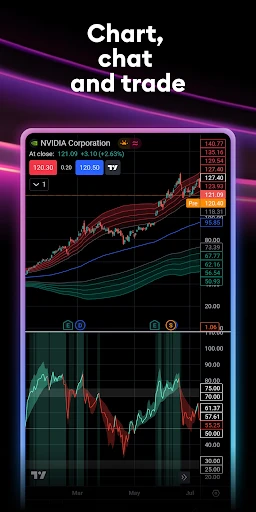
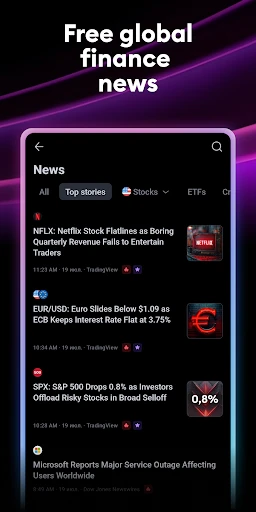
TradingView’s core functions include interactive, customizable charts with over 100 technical indicators and drawing tools, allowing users to analyze price movements and trends in depth. It offers real-time and historical data from global exchanges, supporting multiple timeframes and chart types such as candlestick, bar, and line charts. Users can set price alerts, screen stocks using predefined criteria, and backtest trading strategies with Pine Script, a proprietary scripting language. The platform also integrates a social feed where traders publish charts, analyses, and trade ideas, fostering collaborative learning. Additionally, it provides economic calendars, news feeds, and portfolio tracking features, enabling comprehensive market monitoring from a single dashboard.
Chapter 2: Value
TradingView’s primary value proposition lies in its democratization of professional-grade market analysis. It offers a seamless, cross-platform experience that eliminates the need for multiple subscription services, consolidating charting, screening, and social interaction into one ecosystem. Key advantages include its intuitive user interface, which reduces the learning curve for beginners while satisfying advanced traders with deep customization options. Cloud-based storage ensures user settings, alerts, and scripts are synchronized across devices, providing flexibility for on-the-go monitoring. The community aspect sets it apart; users can access millions of public trading ideas, follow expert analysts, and receive immediate feedback, which accelerates skill development. Furthermore, its freemium model allows access to core features at no cost, with premium tiers offering enhanced data, faster execution, and exclusive indicators. This accessibility, combined with robust backtesting capabilities and a vast library of user-created indicators, empowers individuals to make data-driven decisions without relying on expensive proprietary software. For professionals, TradingView enhances workflow efficiency through multi-chart layouts and API integrations with brokers for direct trading.
Chapter 3: Scenarios
TradingView serves a broad user base, including retail investors, day traders, swing traders, and financial analysts. Retail investors use it to monitor long-term portfolios, track dividend stocks, and analyze fundamental data alongside technical charts. Day traders, particularly in forex and crypto markets, rely on real-time streaming data and fast, customizable alerts to execute high-frequency strategies. Swing traders leverage its multi-timeframe analysis and pattern recognition tools to identify entry and exit points over days or weeks. Financial educators and content creators use the platform to generate annotated charts for tutorials or market commentary, publishing them directly to the social feed. Everyday use cases include checking market news before trading, setting price alerts for specific assets like Bitcoin or Apple stock, and using the stock screener to filter for breakout candidates based on volume and RSI. During earnings seasons, traders compile watchlists and share predictions, turning the platform into a collaborative research hub. For crypto enthusiasts, TradingView’s integration with exchanges like Binance and Coinbase allows seamless on-screen trading execution, bridging analysis and action.
Advantages
- real-time multi-asset charting with 100+ indicators
- custom Pine Script allows algorithmic strategy backtesting
- social community with shared trading ideas and scripts
- works on web
- mobile
- and desktop with synced layouts
- lightweight terminal handles high-frequency data feeds
Disadvantages
- advanced features locked behind expensive subscription tiers
- steep learning curve for writing custom Pine Script code
- execution requires external broker integration
- no built-in trading
- free version shows ads and limits indicator usage per chart
- heavy CPU load when running multiple complex studies simultaneously
Frequently Asked Questions
Q: What is TradingView's core function for market tracking?
A: TradingView is a charting and social networking platform for tracking stocks, forex, crypto, and futures. It offers real-time data, over 100 technical indicators, customizable charts, and a community for sharing analysis. No additional equipment is required beyond a device with internet access.
Q: How does the free version compare to paid subscriptions?
A: The free version provides basic charts, three indicators per layout, and delayed data. Paid plans (Pro, Pro+, Premium) unlock real-time data, more indicators, multi-monitor support, and ad-free experience. Pricing starts at $12.95/month for Pro, with annual discounts available.
Q: Is TradingView compatible with my device and system?
A: TradingView works on web browsers, Windows, macOS, Linux, iOS, and Android. It requires a stable internet connection and modern browser (Chrome, Firefox, Safari). No special permissions or hardware needed. It suits individual traders and analysts globally.
Q: Can I use TradingView's indicators for automated trading?
A: No, TradingView does not execute trades directly. It supports Pine Script for creating custom indicators and strategies, and alerts for manual action. For automated execution, you must connect third-party brokers (e.g., OANDA, Tradovate) via their APIs, subject to broker compatibility.
Q: What common problems occur with data syncing across devices?
A: Syncing issues may arise from unstable internet or mismatched account login. Ensure you use the same account on all devices and enable cloud sync in settings. Real-time data depends on your subscription plan. For persistent issues, clear cache or contact support via the help center.
Technical Information
Recommended for You

Illinois Tollway

Mastodon

Baskin-Robbins

Spark Driver

ArriveCAN

Anime Wallpaper HD & 4k Live

Arby's Fast Food Sandwiches

myLidl

Fanatics Sportsbook & Casino

Credit Genie: Get Cash Advance

GHIN

CLZ Comics comic book database

Allyz®

Christmas Photo Frames & Cards

Habit Burger & Grill

Dutch Bros

PXPlay: Remote Play

Kwik Rewards

Facer Watch Faces

Voice Recorder

AI Chat Smith Smart Assistant

H&M

Widgeet-Color Widgets(Widget)
