Tagofy - Geotag Map Camera

Tagofy - Geotag Map Camera
Photo location tagger for travelers to mark memorable spots
Screenshots
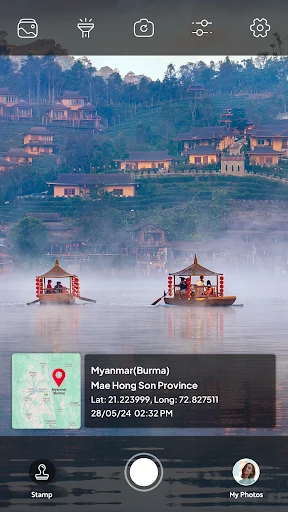

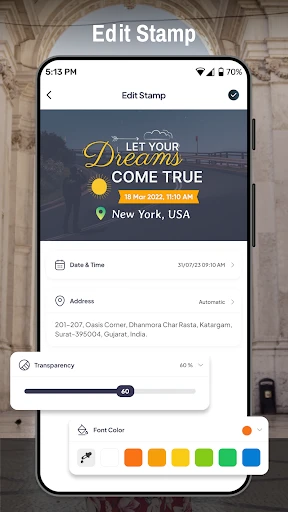


Tagofy - Geotag Map Camera: Precision Location Capture
Tagofy - Geotag Map Camera is a specialized mobile application designed to embed accurate geographic coordinates, map data, and timestamp information directly into photographs. Unlike standard camera apps, it focuses on geotagging as a core feature, allowing users to capture images with precise location metadata. The app integrates GPS functionality to automatically record latitude, longitude, altitude, and address details, and overlays this data onto photos or stores it within the file's EXIF metadata. It supports customizable watermarks, multiple coordinate formats, and offline map usage, making it a practical tool for professionals and enthusiasts who require verifiable location evidence in their visual documentation.
Chapter 1: Function
Tagofy's core functions center on merging photography with geospatial data. The app automatically retrieves GPS coordinates from the device's sensor at the moment of capture, ensuring each image is tagged with exact latitude and longitude. Users can choose from various coordinate display formats, including decimal degrees and degrees-minutes-seconds. A key feature is the ability to add a customizable watermark to the photo, which can include the location address, coordinates, altitude, date, and time, directly visible on the image. The app also supports manual location adjustment for indoor or low-GPS areas, and provides a real-time map view showing the shooting location. Additionally, it offers batch geotagging for existing photos, EXIF metadata editing, and the option to save geotagged images in high resolution without compression.
Chapter 2: Value
The primary value of Tagofy lies in its ability to transform ordinary photographs into objective, location-verified records. For professionals in real estate, construction, surveying, and insurance, the app eliminates guesswork by providing irrefutable proof of where and when an image was taken. This accuracy supports compliance with documentation standards, reduces disputes over site conditions, and streamlines evidence collection for claims or audits. For outdoor enthusiasts, such as hikers, travelers, and geocachers, Tagofy serves as a digital logbook, precisely mapping routes and points of interest. The offline map functionality ensures reliability in remote areas without cellular connectivity. Furthermore, the customizable watermark feature adds a layer of transparency and authenticity, making images suitable for legal, journalistic, or research purposes where location integrity is crucial. By combining ease of use with robust geospatial accuracy, Tagofy empowers users to create a reliable visual record that extends beyond simple photography, offering a competitive advantage in fields reliant on spatial data verification. The app also respects user privacy by allowing full control over which location data is shared or embedded.
Chapter 3: Scenarios
Tagofy is primarily designed for professionals and hobbyists who require verified location data alongside their images. Real estate agents use it to document property listings with exact addresses and coordinates for clients and MLS databases. Construction project managers capture progress photos with geotags to track work stages across multiple sites, ensuring accurate chronological and spatial records for stakeholders. Field surveyors and environmental researchers rely on the app to precisely mark sample collection points, vegetation plots, or infrastructure assets, linking each photograph to a specific GPS location for later analysis. Insurance adjusters employ Tagofy to photograph damage sites after accidents or natural disasters, creating tamper-proof evidence with embedded location details for claims processing. Travel bloggers and geocachers use the app to geotag scenic spots, hidden trails, or cache locations, building a reliable map-based journal of their journeys. Additionally, law enforcement and security personnel utilize the tool for crime scene documentation, where the accuracy of location and time stamps is paramount. In everyday use, homeowners might use Tagofy to photograph utility locations for home maintenance records, ensuring future reference points are precisely mapped. The app serves anyone who values the context of where a photo was taken, transforming a simple snapshot into a data-rich document.
Advantages
- adds precise GPS coordinates to photos without internet
- batch geotagging works for existing photo libraries
- displays coordinates
- altitude
- and address on image overlay
- supports both manual pin placement and auto GPS capture
- exports EXIF data compatible with external mapping tools
Disadvantages
- accuracy drops indoors or in dense urban canyons
- no built-in photo editor beyond text overlay
- battery drains faster when continuous GPS is on
- file naming based on location can confuse sorting
- free version limits batch processing to 10 photos
Frequently Asked Questions
Q: What does Tagofy do with GPS data?
A: Tagofy embeds precise GPS coordinates, altitude, and timestamp directly into photo EXIF data. It uses your device's location to geotag images, creating a searchable map of where each photo was taken. No external GPS tracker is required; the app reads native phone sensors for accuracy within 5-10 meters in open areas.
Q: Is it free or does it require in-app purchases?
A: Tagofy is free to download with basic geotagging features. A one-time in-app purchase unlocks advanced options like batch editing, custom location pins, and export to GPX format. No subscription is needed. All core functions—auto-geotagging, map view, and sharing—are available without payment.
Q: Does Tagofy work offline or only with internet?
A: Tagofy requires an internet connection only for loading map tiles and reverse geocoding (displaying address names). Geotagging itself uses GPS satellite signals, which work offline. Photos will still tag coordinates without Wi-Fi or cellular data. You can view saved locations on a blank map grid offline.
Q: How accurate is the location tagging in cities?
A: In dense urban areas with tall buildings, accuracy can drop to 10-50 meters due to GPS signal reflection. Tagofy uses both GPS and Wi-Fi positioning to improve reliability. For best results in cities, enable high-accuracy mode in device settings. Accuracy meets typical travel photography needs but not survey-grade precision.
Q: Can I edit or remove geotags from existing photos?
A: Yes. Tagofy lets you view, manually adjust, or delete geotags from any photo in your camera roll. You can drag the location pin on the map to correct coordinates. Batch removal of all location data from multiple images is supported. Edited photos save as copies, preserving originals. No data is sent to external servers during editing.
Technical Information
Recommended for You

Stretch Fall - Watch face

Chipotle

GoFundMe

Walgreens

Duolingo: Language Lessons

Audio Editor & Music Editor

Invitation Maker & Card Design

IPTV

Cryptomator

AiGo - Chat with AI Girlfriend

ArtPlay - Cartoon Video editor

Tinker DIY

MyMercy+

brightwheel: Childcare App

Microsoft OneNote: Save Notes

MediBang Paint:Draw Art, Comic

Golf Pad: Golf GPS & Scorecard

PREMIER Credit Card

TikTok - Videos, Shop & LIVE

Animagic: Anime Art Generator

Cheetah Leopard Wallpaper

Photo Frame & Collage Maker

phyphox
