Animagic: Anime Art Generator
Animagic: Anime Art Generator
Animagic transforms photos into anime art for creators
Screenshots
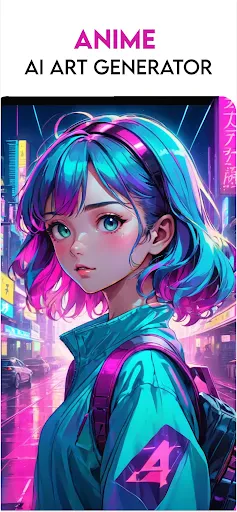
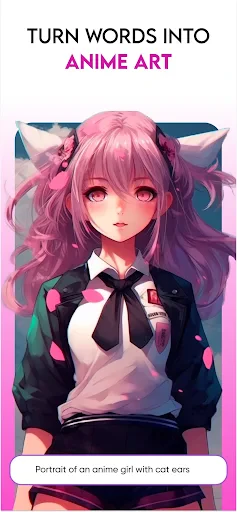

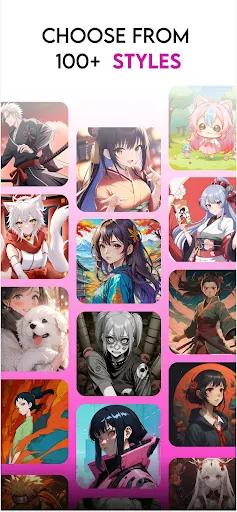
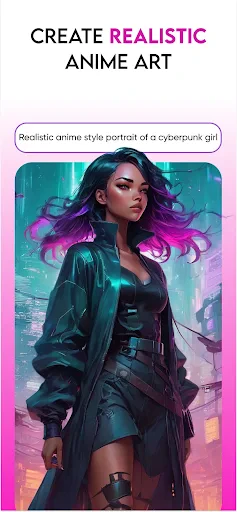
Animagic: Anime Art Generator – Overview, Core Functions, Value, and Use Cases
Animagic: Anime Art Generator is a mobile application designed to transform ordinary photos and text descriptions into stylized anime artwork. It leverages advanced artificial intelligence algorithms to analyze input images or prompts and applies a range of anime-specific artistic filters. The app aims to make anime-style creation accessible to users without traditional drawing skills. It offers a streamlined interface for generating, editing, and sharing custom anime portraits, characters, and scenes directly from a smartphone. The primary focus is on speed, ease of use, and producing consistent results that mimic various anime art styles, from classic cel-shaded looks to modern digital illustrations.
Chapter 1: Function
The core function of Animagic is AI-powered image generation focused exclusively on anime aesthetics. Users can initiate creation in two primary modes: Photo to Anime and Text to Anime. In Photo to Anime mode, the app captures or imports a portrait photo and applies a neural network that redraws the subject in a chosen anime style, adjusting features like eye size, hair texture, and shading. In Text to Anime mode, users type descriptive phrases, such as a warrior in a fantasy forest, and the app generates a corresponding anime character or scene. Additional core functions include a style selector with presets like Studio Ghibli, Shonen, and Chibi, a background removal tool for isolating characters, and an in-app gallery for saving and revisiting previous generations. The app also includes basic editing sliders for adjusting color saturation, line thickness, and brightness after generation.
Chapter 2: Value
The value proposition of Animagic lies in democratizing anime art creation by removing the barrier of technical drawing skill. Its primary advantage is time efficiency: generating a high-quality anime portrait that would take a human artist hours to complete can be done in under 30 seconds. This allows for rapid prototyping of character designs for personal projects or social media content. A second key advantage is consistency. The app provides a controlled environment where users can iterate on a single prompt or photo multiple times, tweaking styles while retaining the core subject, which is useful for building a cohesive set of character portraits. Third, Animagic offers cost effectiveness. Subscriptions or one time purchases grant access to unlimited generations, contrasting with the cost of commissioning professional artists. Fourth, the app functions as a creative catalyst. Users who are not artists can explore visual ideas, generate inspiration for stories, games, or cosplay concepts, and then refine those concepts through multiple generated drafts. Finally, the app provides accessibility for social sharing, with built in export options optimized for common social media dimensions, enabling users to quickly produce profile pictures, stickers, or banner art without external editing software.
Chapter 3: Scenarios
The primary target users for Animagic are anime fans, social media content creators, and casual digital artists seeking quick inspiration. Everyday use cases include creating personalized profile pictures for platforms like Discord, Twitter, or WhatsApp. For example, a user can take a selfie and generate an anime version of themselves to use as an avatar. Another common scenario is character concepting for writers or game masters designing characters for tabletop role-playing games like Dungeons and Dragons. They can generate multiple visual iterations of an original character based on text descriptions. Cosplayers also benefit by using the app to visualize how a character would look in a specific anime style before constructing a costume. Additionally, the app serves as a tool for generating unique artwork for social media posts, such as custom stickers or banners for personal channels. Students and hobbyists learning about AI art use Animagic as an entry point to understand prompt engineering and style transfer, experimenting with different text inputs to see how the AI interprets descriptions.
Advantages
- generates anime art from text prompts in seconds
- supports multiple anime art styles like Ghibli and Shonen
- offers real-time style transfer from uploaded photos
- optimized for mobile with fast on-device processing
- includes batch generation for series of character designs
Disadvantages
- limited to anime-specific aesthetics
- no photorealism
- requires stable internet for cloud-based model runs
- output resolution capped at 1024px without upscale
- free tier adds watermark on generated images
- struggles with complex anatomy like hands and eyes
Frequently Asked Questions
Q: What is Animagic used for?
A: Animagic is an AI-powered app that generates anime-style artwork from text prompts or uploaded photos. It specializes in transforming real images into anime characters and creating original illustrations, targeting anime fans and digital artists. No additional equipment is required beyond a compatible smartphone.
Q: Is Animagic free to use?
A: Animagic offers a free tier with limited daily generations and basic filters. Advanced styles, high-resolution exports, and ad-free experience require a subscription. In-app purchases are available for one-time unlocks. No refunds are offered for partial subscription periods, as per standard policy.
Q: Does Animagic work on all devices?
A: Animagic runs on iOS 14.0+ and Android 8.0+ devices. It requires a stable internet connection for AI processing, a minimum of 3GB RAM, and camera/photo library permission to upload images. It is not optimized for tablets with split-screen mode or older devices below OS requirements.
Q: How does Animagic handle image privacy?
A: Uploaded images are processed on secure servers and not stored longer than necessary for generation. User data is not shared with third parties for marketing. However, generated images may be used for model improvement if users opt in. Deleting the app does not automatically remove server data; contact support for full deletion.
Q: Can Animagic generate consistent character designs?
A: Animagic does not support character consistency across multiple generations. Each output varies based on prompt randomness and AI model. For consistent character sheets, users must manually re-enter descriptions or use external tools. Face and pose customization is limited to presets, not freeform adjustments.
Technical Information
Recommended for You

Cubasis 3 - DAW & Music Studio

Currency converter offline

Quick Settings

Messenger

Safe QR OCR AI Scanner Creator

Game Launcher: Gaming Hub App

PixAI: AI Anime Art Generator
Fomz
HelloFresh: Meal Kit Delivery

Universe Splitter

Themify: Theme & Icon Changer

Local Weather:Weather Forecast
Baby Tracker App | Glow

Fidelity Investments

MERO - Programări Online

WOMBO Dream - AI Art Generator

Penly: Digital Planner & Notes

Doodle Art: Magic Drawing App

Nice Miner: Bitcoin Miner Hash

Holy Quran - Deeper journey

Pool-Calculator

Electrify America
All Document Reader - PDF, DOC