Canopy - Parental Control App

Canopy - Parental Control App
Safe kids digital habits tracker for caring families
Screenshots
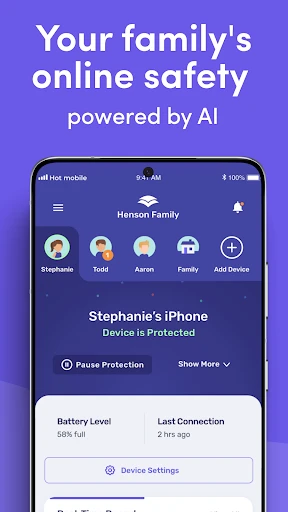
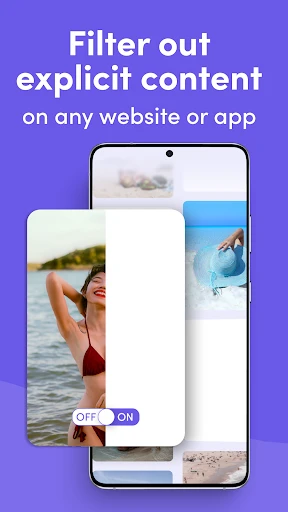
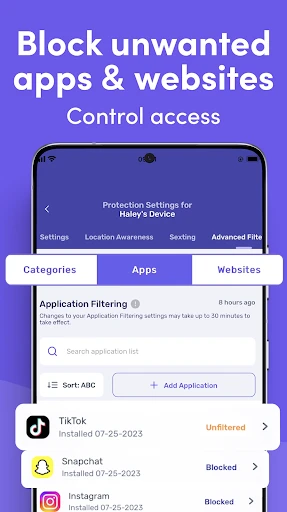
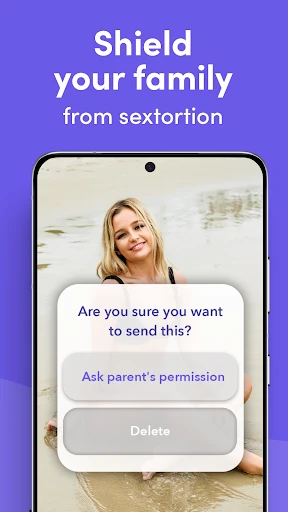
Canopy Parental Control App Comprehensive Guide
Canopy is a parental control application designed to help parents manage and monitor their children's digital activities across smartphones and tablets. It focuses on providing a safe online environment by filtering inappropriate content, setting screen time limits, and offering location tracking features. The app aims to balance digital freedom with parental oversight, allowing children to explore the internet responsibly while giving parents peace of mind through real-time alerts and detailed usage reports.
Chapter 1: Function
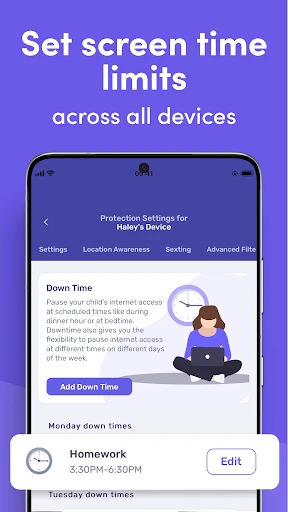
Canopy's core functions include content filtering, screen time management, and location tracking. The content filtering system blocks access to adult websites, violent material, and other harmful online content by using a combination of AI-driven algorithms and curated blocklists. Parents can customize filter sensitivity levels and add specific websites to allow or block lists. The screen time management feature enables parents to set daily usage limits, schedule device-free times such as during homework or bedtime, and lock the device remotely when needed. Additionally, Canopy provides real-time GPS location tracking, allowing parents to see their child's whereabouts on a map, set geofences for safe zones like school or home, and receive notifications when the child enters or leaves these areas. The app also offers activity reports that summarize web browsing history, app usage, and attempts to access blocked content, giving parents actionable insights into their child's digital behavior.
Chapter 2: Value
Canopy delivers significant value by addressing the growing concerns of digital safety and screen addiction among children. Its primary advantage is the comprehensive, multi-layered approach to content filtering, which goes beyond simple keyword blocking to analyze visual and contextual cues, ensuring even newly created harmful content is captured. This reduces the risk of children encountering explicit material, cyberbullying, or online predators. The screen time management feature helps instill healthy digital habits, preventing excessive usage that can negatively impact sleep, schoolwork, and social development. Unlike basic parental controls built into devices, Canopy offers cross-platform compatibility, working across iOS and Android devices with a single subscription, making it convenient for families with mixed device ecosystems. The location tracking with geofencing adds a layer of physical safety, allowing parents to monitor their child's movements without constant check-in calls. Furthermore, the detailed activity reports provide transparency and foster open conversations between parents and children about responsible internet use. Canopy also prioritizes privacy by not storing personal browsing data long-term and using encrypted communication between the parent and child devices. For busy parents, the intuitive dashboard and real-time alerts reduce the need for constant manual monitoring, saving time and mental energy. Overall, Canopy empowers parents to create a safe, structured digital environment that supports their child's growth and learning while minimizing risks.
Chapter 3: Scenarios
Canopy is primarily designed for parents of children aged 5 to 17, particularly those concerned about online safety, screen addiction, or location safety. Typical use cases include families where children own smartphones or tablets for school and leisure. For example, a parent of a 10-year-old can use Canopy to filter explicit content while allowing educational websites and YouTube Kids. Teenagers aged 13 to 17 may benefit from screen time limits during homework hours and after bedtime to ensure proper rest. Parents with children who travel to school independently can use the location tracking feature to confirm safe arrival and departure. Another common scenario is managing digital nutrition for children with impulsive online behavior, where the app helps enforce consistent rules without constant arguments. Canopy is also valuable for parents who work from home or have busy schedules and cannot directly supervise internet usage throughout the day. Additionally, the app supports families with special needs children, where structured routines and filtered content reduce anxiety and distractions. Overall, Canopy serves as a digital parenting tool for modern families seeking to navigate the challenges of the internet age while maintaining trust and communication.
Advantages
- real-time screen time limits across iOS and Android devices
- AI-driven content filtering blocks apps by context
- not just categories
- location tracking with geofence alerts for school and home zones
- one-tap pause suspends internet access during homework or bedtime
- activity reports show app usage patterns without storing personal data
Disadvantages
- requires both parent and child devices to install the companion app
- no support for Windows or macOS
- limiting cross-platform coverage
- free tier only allows one child profile and basic filtering rules
- geofence accuracy drops in areas with weak GPS or network signal
- manual whitelist setup needed for some educational apps flagged as games
Frequently Asked Questions
Q: What does Canopy do for parental control?
A: Canopy is a parental control app that filters web content, blocks inappropriate sites, and manages screen time across devices. It uses AI-driven categorization to block adult content, violence, and gambling in real-time, without requiring root or jailbreak. It also supports location tracking and app usage reporting for parents to monitor activity.
Q: Is Canopy free to use with all features?
A: Canopy offers a free basic tier with limited filtering and time management. Full access, including advanced content categories, location tracking, and detailed reports, requires a subscription. No additional hardware is needed, but in-app purchases are present. A 7-day free trial is available for premium features.
Q: Does Canopy work on both iOS and Android devices?
A: Yes, Canopy works on iOS 12+ and Android 6.0+ devices. It requires installation of a profile on iOS or accessibility permission on Android for content filtering. It also supports Windows and macOS via browser extensions. No root or jailbreak is needed, making it compatible with standard consumer devices.
Q: Can Canopy block all adult content automatically?
A: Canopy blocks over 95% of adult content using AI analysis of URLs, page text, and image metadata. It cannot block content in encrypted apps like WhatsApp or Signal unless device-level monitoring is enabled. Users may need to adjust sensitivity settings for custom filtering, and false positives can occur with health or education sites.
Q: How do I cancel or get support for Canopy?
A: To cancel, go to account settings in the app or manage subscriptions via Apple/Google Play store. Support is available through in-app chat, email ([email protected]), and a help center with articles. Refunds follow standard store policies. No after-sales maintenance contracts exist; updates are free with an active subscription.
Technical Information
Recommended for You

Weather Radar - Windy, rain ra

Go Translate All Languages

PlantSnap: plant identifier

Microsoft Bing Search

Nintendo Switch Online

Seasoned Service Industry Jobs

Grindr - Gay Dating & Chat

Fancy Keyboard Theme And Style

Tesla

Ti.Live-Chill & Stream

OCEARCH Shark Tracker™

Hilton Honors: Book Hotels

Set Battery Charging Animation

Lowe's

Cloned Voices

SwingU: Golf GPS Range Finder

Local News: Headlines & Alerts

File Manager

Weather Forecast & Radar

Wells Fargo Mobile®

Joyread

TV Remote App for All TV

Stemz: AI Tool for Musicians
