Tesla

Tesla
Tesla app controls charge drive climate anywhere
Screenshots
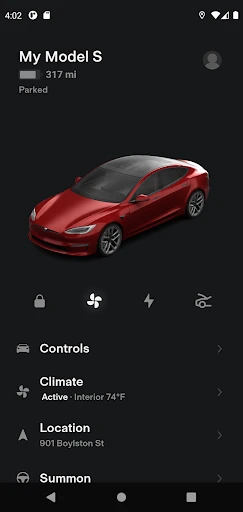
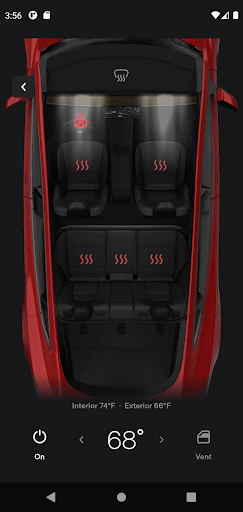
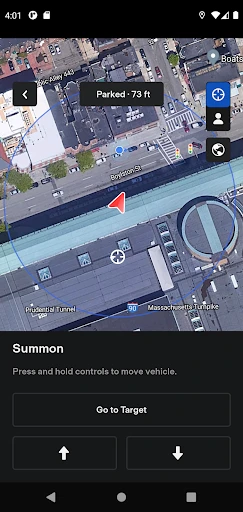
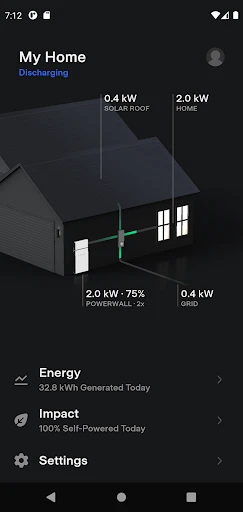
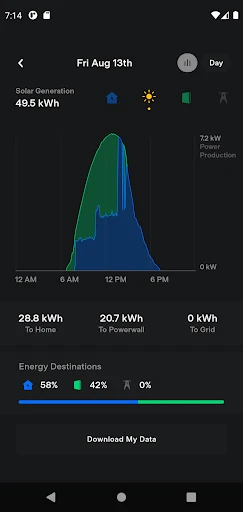
Tesla App: Comprehensive Vehicle Management and Energy Control
The Tesla app serves as the central digital interface for Tesla vehicle owners and energy product users, enabling remote monitoring, control, and automation of their electric vehicles and home energy systems. It connects seamlessly with the vehicle via cellular or Wi-Fi networks, providing real-time data access and command capabilities without requiring physical proximity to the car. The app extends beyond basic remote start or lock functions, integrating deeply with Tesla’s hardware and software ecosystems, including Powerwall solar storage and solar inverter systems. It is designed to streamline ownership by putting key information—such as battery charge level, range estimates, climate pre-conditioning, and charging status—directly into the user’s hand. Regular software updates ensure the app evolves alongside Tesla’s vehicle firmware, adding new features like Sentry Mode live view, scheduled departure planning, and service appointment scheduling. Available on both iOS and Android platforms, the Tesla app is a mandatory tool for maximizing the functionality and convenience of any Tesla product.
Chapter 1: Function
The Tesla app delivers a wide range of core functions that transform a smartphone into a command center for the vehicle. Users can lock and unlock doors, open the frunk and trunk, and even summon the car in or out of a tight parking space using Summon or Smart Summon features. Climate control can be activated remotely to pre-heat or pre-cool the cabin before entering, with the ability to set a specific temperature or turn on seat heaters and steering wheel heaters. The app provides a detailed battery status display, showing current charge level, estimated driving range, and a live charging progress indicator when plugged in. Users can start and stop charging sessions, set charge limits, and even view charging history. Navigation integration allows users to send destinations from their phone to the vehicle’s navigation system, and the app can display real-time location and even a live camera feed from the vehicle’s external cameras via Sentry Mode Live View. Other functions include setting driver profiles, viewing tire pressure warnings, controlling audio volume, and scheduling service visits through a built-in booking system. The app also supports keyless phone-as-key functionality, allowing the smartphone to act as the primary key for locking, unlocking, and starting the vehicle.
Chapter 2: Value
The primary value proposition of the Tesla app lies in its ability to drastically enhance the convenience, security, and efficiency of owning a Tesla electric vehicle or home energy product. By putting comprehensive remote control capabilities into a single mobile interface, it eliminates the need for physical keys, reduces trips back to the car, and offers true peace of mind. For example, a user can check whether the car is locked or windows are rolled up from anywhere, giving immediate assurance. The value extends to optimizing daily routines: the app learns individual driving habits and can schedule departure times to pre-condition the battery and cabin, which improves driving efficiency and comfort. From a security standpoint, Sentry Mode Live View provides a live feed of the vehicle’s surroundings, deterring theft or damage and offering remote awareness. The app also dramatically simplifies the charging experience—users can monitor charging speed, locate nearby Superchargers, and remotely end a charging session to avoid idle fees. Furthermore, the app integrates seamlessly with Tesla’s energy products, allowing Powerwall owners to monitor solar production, battery backup level, and grid usage in real time, all from the same interface used for their car. This unification of mobility and home energy management adds a layer of eco-conscious control that competitors rarely match. The regular software updates ensure that the app’s value compounds over time, as new features like expanded third-party integration or enhanced summon capabilities are delivered over-the-air. Financially, the app helps users schedule home charging during off-peak hours, reducing electricity costs, and its maintenance alerts can preempt costly repairs. Ultimately, the Tesla app transforms a high-tech vehicle into a smart, connected lifestyle device that responds to the user’s needs before they even enter the driver’s seat.
Chapter 3: Scenarios
The Tesla app caters to a broad demographic but primarily targets existing Tesla vehicle owners, Tesla Energy product users, and those who commute or travel frequently via electric vehicle. Daily commuters benefit from the scheduled departure feature, which pre-conditions the battery and cabin for optimal efficiency and comfort on their route to work. Road trip enthusiasts rely on the app to plan long-distance travel, locating Superchargers along the route, monitoring real-time charging progress while they eat or shop, and managing battery range remotely. Families often use the app for parental control features, such as limiting top speed or viewing driving history to monitor teen drivers. Homeowners with a Tesla solar system or Powerwall use the app to track energy production, manage battery backup during outages, and optimize self-consumption of solar energy. For example, during a grid outage, the app allows a homeowner to see Powerwall status instantly and decide which circuits to power. Rental car hosts or multi-vehicle owners appreciate the ability to switch between vehicles in the app and grant or revoke remote access to other drivers. Car sharing or valet scenarios are simplified because the app can enable valet mode, which restricts certain vehicle functions while still allowing remote visibility. Additionally, the app supports service center visits by allowing users to schedule appointments, upload photos of issues, and approve quoted work directly through the interface. Even daily parking scenarios gain utility—users can quickly see if their charge door is open or set up a speed-limit warning to deter unauthorized movement. Overall, the Tesla app adapts to a wide range of real-world use cases, from micromanaging charging in a garage to navigating a cross-country road trip, making it indispensable for every Tesla owner.
Advantages
- voice-controlled cabin features like dog mode
- over-the-air updates add new functions monthly
- navigate on autopilot merges highways automatically
- sentry mode records 360° parking incidents
- supercharger network routes trips seamlessly
Disadvantages
- touchscreen-only controls distract during driving
- no apple carplay or android auto support
- build quality varies between production batches
- battery range drops significantly in cold climates
- expensive premium connectivity subscription required
Frequently Asked Questions
Q: What core functions does the Tesla app offer?
A: The Tesla app allows you to monitor and control your Tesla vehicle remotely, including locking/unlocking doors, preconditioning climate, checking charge status, starting/stopping charging, and locating your car. It also enables software updates, schedule service appointments, and manage solar/Powerwall home energy products. Key features include phone key access, sentry mode live camera view, and vehicle summon capabilities.
Q: Is the Tesla app free to use or require in-app purchases?
A: The Tesla app is free to download and use for all core vehicle and energy product functions. No in-app purchases are required for standard features. However, certain premium connectivity features (like live traffic visualization, satellite-view maps, and streaming music) require a paid subscription after the first year for most vehicles, unless included with Full Self-Driving or referral credits.
Q: Does the Tesla app work on both iOS and Android devices?
A: Yes, the Tesla app is available for free download on both iOS devices (iPhone/iPad running iOS 14 or newer) and Android devices (running Android 8.0 or newer). It requires a Bluetooth 4.0+ enabled phone for phone key functionality, and an active internet connection for remote features. The app supports all current Tesla vehicle models and power products globally.
Q: How can I use the Tesla app to unlock my car without internet?
A: You can unlock your Tesla via the app using Bluetooth Phone Key even without cellular or Wi-Fi internet, as long as your phone has Bluetooth enabled and the app is running in the background. For remote unlock when you are far from the vehicle, both your phone and the car need an active internet connection. Phone Key works automatically when you approach the car.
Q: Can the Tesla app control third-party chargers or non-Tesla EVs?
A: No, the Tesla app is designed exclusively to control Tesla vehicles (Model S, 3, X, Y, Cybertruck) and Tesla energy products (Powerwall, Solar, Solar Roof). It does not support third-party chargers, non-Tesla electric vehicles, or third-party home energy devices. For third-party charging, use the respective manufacturer’s app or network-specific apps like ChargePoint or Electrify America.
Technical Information
Recommended for You

Real Weather

Samsung TV Plus - TV & Movies

Radio FM AM Live Radio Station

CVS Specialty

Bath & Body Works

Recover Deleted Messages App

Pathway

TMOLector: Manga and Stories

Microsoft Edge: AI browser

Baby Tracker App | Glow

Remote Control for All TV

AI Home Design: Interior DecAI

Amazon Seller

Liven: Discover yourself

XBrowser - Mini & Super fast

Local Single: Chat & Friends

Zello PTT Walkie Talkie

NOAA Weather Unofficial

Erie Weather

Norton Family Parental Control

17TRACK Package Tracker

Payactiv

Bark - Parental Controls