Remote Control for All TV

Remote Control for All TV
Remote Control for All TV: Universal remote for any TV brand
Screenshots


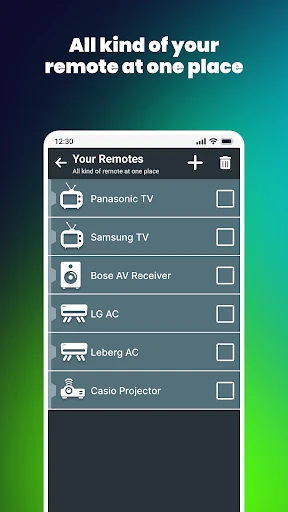

Remote Control for All TV: Universal Remote App Overview
Remote Control for All TV is a versatile mobile application designed to replace traditional physical remote controls for various television brands and models. It leverages your smartphone's infrared blaster or Wi-Fi connectivity to provide a seamless control experience. The app supports a wide range of TV manufacturers, including Samsung, LG, Sony, Panasonic, and many others, enabling users to manage power, volume, channels, input sources, and smart TV functions directly from their mobile device. Its intuitive interface mimics a standard remote layout, making it easy for anyone to use without a learning curve.
Chapter 1: Function
The core function of Remote Control for All TV is to transform your smartphone into a fully functional television remote. Upon installation, the app scans for compatible devices using either the built-in infrared port on Android phones or network-based protocols for both Android and iOS devices. It offers a comprehensive set of controls, including basic functions like power on/off, volume adjustment, channel scrolling, and mute. Additionally, it provides specialized buttons for accessing smart TV features such as Netflix, YouTube, home screen, and input switching between HDMI and AV sources. The app supports customizable layouts, allowing users to rearrange frequently used buttons for quicker access. For older TV models without smart capabilities, the app relies solely on infrared commands to replicate the original remote's full button set, ensuring compatibility with nearly any infrared-enabled television.
Chapter 2: Value
Remote Control for All TV delivers substantial value by eliminating the need for multiple physical remotes and addressing common inconveniences. Its primary advantage is accessibility; if a physical remote is lost, broken, or out of batteries, the app provides an instant backup without any additional cost. The digital interface reduces clutter around the living room and prevents the frustration of searching for misplaced remotes. For users with smart TVs, the app often integrates more advanced navigation options than the original remote, such as a QWERTY keyboard for text input on streaming services, significantly speeding up searches. The app also supports multiple device profiles, meaning one phone can control televisions in different rooms, making it ideal for households with several TVs. Furthermore, regular updates ensure compatibility with newer TV models and operating systems, extending the lifespan of the app's usefulness. By offering a free alternative to purchasing replacement remotes, and by enhancing the user experience through responsive touch controls and macro commands for sequences like powering on both TV and soundbar, the app provides exceptional practical and economic value.
Chapter 3: Scenarios
The primary target user groups for Remote Control for All TV are busy families, tech-savvy individuals, and households with multiple televisions. Everyday use cases include controlling the TV when the physical remote is out of reach, such as while lying on the couch or cooking in an adjacent room. It is particularly useful for parents who want to quickly mute the TV or change channels during commercials without searching for the remote. Students living in dormitories or rented apartments, where original remotes are often missing or damaged, rely on this app as a permanent control solution. Additionally, users with smart home setups frequently use the app to integrate TV controls into broader automation routines, such as turning off the TV when leaving the house. Elderly users benefit from the enlarged, customizable button layouts that can be adjusted for better visibility. The app also serves as a handy tool during gatherings, allowing a host to directly control the TV from their phone without passing a single physical remote among guests.
Advantages
- one remote pairs with ir
- wifi
- and bluetooth tvs
- auto-detects tv brand and model via phone camera
- works offline with no internet after initial setup
- supports voice commands for channel and volume control
- fits samsung
- lg
- sony
- and hisense models
Disadvantages
- ir blaster required for older non-smart tvs
- some streaming apps have delayed button response
- setup fails on uncommon or unbranded tv models
- phone proximity needed for ir-based controls
- no physical button feedback during touchscreen use
Frequently Asked Questions
Q: What devices does this app support for TV control?
A: This app works with most smart TVs and streaming devices, including Samsung, LG, Sony, Roku, and Android TV. It uses IR or Wi-Fi connection depending on your device model. No additional hardware is required if your TV supports Wi-Fi control. Check the app's compatibility list for older models.
Q: Is the app free to use or does it require purchases?
A: The app itself is free to download with basic remote functions. Some advanced features, like voice control or personalized macros, require a one-time in-app purchase. No subscription fees exist. Additional hardware is not needed unless your TV lacks Wi-Fi, in which case an external IR blaster may be needed.
Q: How do I pair the app with my TV for first-time use?
A: Ensure your phone and TV are on the same Wi-Fi network. Open the app, select "Add Device," and choose your TV brand from the list. Follow on-screen prompts to confirm pairing. For IR models, point your phone's IR blaster at the TV and test basic commands. The process takes about one minute.
Q: Does the app work without an internet connection?
A: Yes, if your phone has a built-in IR blaster, the app can control your TV offline via infrared signals. However, Wi-Fi-based control requires both devices to be on the same local network. No internet connection is needed for direct IR control, but cloud features like voice search will be unavailable.
Q: What should I do if the app stops responding to commands?
A: First, restart the app and check if your phone's Bluetooth or Wi-Fi is enabled. Re-pair the device by removing and re-adding it in the app. Ensure your TV's firmware is updated. If using IR, clean the phone's IR blaster lens with a soft cloth. No reset button exists; uninstalling and reinstalling may resolve persistent issues.
Technical Information
Recommended for You
Instabridge: WiFi Hotspot Map
Roaring Tiger Live Wallpaper

Hush: Android Auto Audio Fix

Compass

Background Eraser

Securly Home

Call Santa Claus - Prank Call

SelfComic: Sasuke Ninja Photo

Citizens Bank Mobile Banking

Nykaa Fashion – Shopping App
Screen Mirroring + for Fire TV

MiraClean - File Manager

DayComics

Sprouts

Swagbucks Play Games + Surveys

lPlayer - Offline Video Player

Curb - Request & Pay for Taxis

Number Locator- Call Location

Google Earth

Instant Voice Translate

TV Remote App for All TV

Windfinder: Wind & Weather map

Dormi - Baby Monitor
