AI Home Design: Interior DecAI

AI Home Design: Interior DecAI
AI Home Design redefines rooms for homeowners seeking quick, realistic decor previews
Screenshots

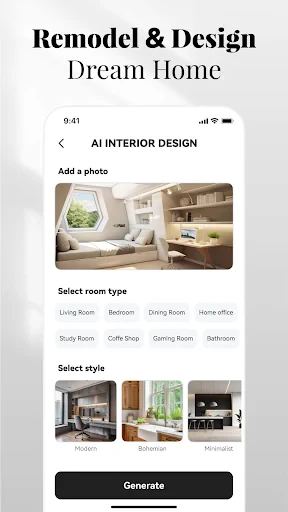
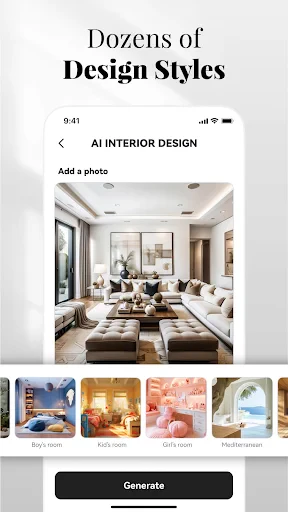
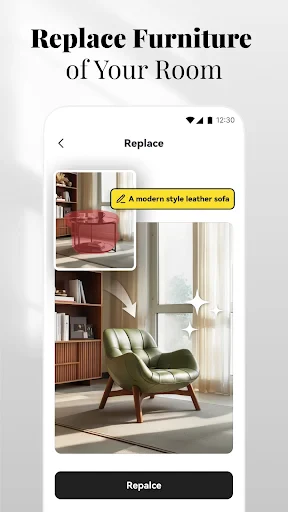
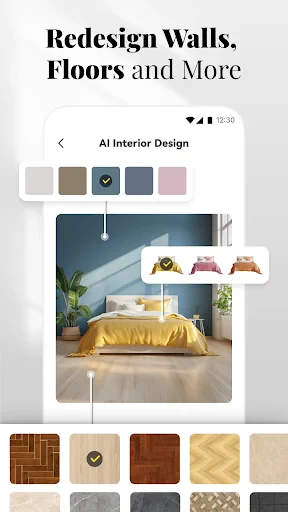
AI Home Design: Interior DecAI – Smart Interior Design Assistant
AI Home Design: Interior DecAI is a mobile application that leverages artificial intelligence to assist users in visualizing and planning interior design projects. The app allows users to upload photos of their existing rooms and generate redesigned versions with different styles, furniture arrangements, and color schemes. It serves as a practical tool for homeowners, renters, and design enthusiasts seeking quick inspiration or realistic previews of potential changes before committing to physical renovations or purchases.
Chapter 1: Function
The core function of AI Home Design: Interior DecAI is to transform user-provided room images into professionally styled interior designs using AI algorithms. Users begin by taking or selecting a photo of their space. The app then analyzes the room’s layout, dimensions, and existing elements. From there, users can choose from a variety of design styles, such as modern, minimalist, rustic, or Scandinavian. The AI generates a new version of the room, replacing furniture, adjusting lighting, and altering wall colors and textures. Additional functions include a virtual staging feature for empty rooms, a furniture catalog overlay for trying specific items, and the ability to save and compare multiple design versions side by side. The app also offers a basic editing suite for manual adjustments, such as modifying color saturation or object placement, giving users some control over the final output.
Chapter 2: Value
The primary value of AI Home Design: Interior DecAI lies in its ability to democratize interior design expertise. Traditionally, visualizing a room makeover required hiring a professional designer or using complex software. This app removes those barriers by offering instant, realistic visualizations at a fraction of the cost. A key advantage is speed: users can experiment with dozens of design concepts in minutes, accelerating decision-making for home improvement projects. The AI’s accuracy in maintaining room proportions and lighting conditions provides a trustworthy preview, reducing the risk of costly mistakes in furniture purchases or paint selection. For real estate agents and property managers, the app adds value through virtual staging, enabling them to showcase empty spaces with appealing decor without physical staging expenses. Additionally, the app fosters inspiration by exposing users to design styles they might not have considered, broadening their creative horizons. The ability to save and revisit designs supports collaborative planning among family members or with contractors. Overall, the app saves time, money, and effort while empowering users to make informed design choices.
Chapter 3: Scenarios
The primary target user groups for AI Home Design: Interior DecAI include homeowners planning renovations, renters seeking temporary decor solutions, and real estate professionals. Homeowners frequently use the app to test paint colors, furniture layouts, or full room overhauls before hiring contractors or making purchases. Renters benefit from the app’s ability to visualize non-permanent changes, such as decor rearrangement or lighting adjustments, to personalize their space within lease restrictions. Real estate agents and property managers use the app for virtual staging, uploading photos of vacant listings to generate furnished versions that attract potential buyers or tenants. Everyday use cases include a user preparing for a living room makeover by uploading a photo and comparing Scandinavian, industrial, and bohemian styles in minutes. Another scenario involves a renter experimenting with wall art and rug placement to ensure harmony with existing furniture. For a real estate listing, an agent generates multiple staged versions of an empty apartment, selecting the most appealing outcome for online platforms. The app also serves hobbyists who enjoy exploring design trends without immediate renovation plans.
Advantages
- generates photorealistic room renders from sketches in seconds
- supports AR preview to overlay designs onto existing spaces
- one-tap style transfer mimics specific interior design aesthetics
- offline AI inference works without internet for quick iterations
- voice input lets you describe furniture placement hands-free
Disadvantages
- object recognition can misidentify clutter as intended decor
- AR mode requires a flat
- well-lit surface for accurate placement
- texture detail degrades when scaling low-res source photos
- initial model downloads consume over 600MB of storage space
- no multi-room undo history—reverts all changes at once
Frequently Asked Questions
Q: What does AI Home Design: Interior DecAI do?
A: AI Home Design: Interior DecAI is a mobile app that uses artificial intelligence to generate interior design ideas and room layouts. Users can upload photos of their space and receive AI-suggested decor styles, furniture arrangements, and color schemes. The app includes a 3D preview feature to visualize changes before implementation.
Q: Is the app free to use or does it require payment?
A: The app offers a free tier with basic design generation and limited room scans. Premium features, such as high-resolution 3D renders, unlimited style variations, and ad-free experience, require a subscription or one-time in-app purchase. No additional equipment is needed to use the core functions.
Q: Which devices and systems are compatible with this app?
A: The app is compatible with iOS 14.0 or later and Android 8.0 or higher. It requires a device with a camera for room scanning and at least 2GB of RAM for smooth 3D rendering. It is not available on desktop or web platforms? Users need to grant camera and storage permissions.
Q: null
A: The AI design accuracy depends on the quality of the uploaded photo and lighting conditions. It works best with well-lit, clutter-free spaces. Complex room shapes or low-resolution images may result in less precise recommendations. The app cannot account for structural constraints without user input.
Q: null
A: Yes, users can export designs as high-resolution images or PDF files, including a list of suggested furniture items and color codes. However, the app does not generate architectural blueprints or professional-grade CAD files. Sharing options include email and social media. No direct contractor integration is available.
Technical Information
Recommended for You

Nova Launcher

PDF Note Reader

LEX18 Storm Tracker Weather

Betr Fantasy & Sportsbook

Fonts Art: Cute Keyboard Font

aTranslator - Text & Voice

Weather data & microclimate :

Drawing Apps: Draw, Sketch Pad

All Video Downloader & Player

realestate.com.au - Property

Call Santa Claus: Prank Caller

Mileage Tracker by Everlance

Sony | Sound Connect

Live Weather: Weather Forecast

Mudflap

Blink Charging Mobile App

Mirror link car connector

Fine Lock (only for Samsung)

TikTok Shop Seller Center

Robokiller - Spam Call Blocker

OLX: Compras Online e Vendas

GetYourGuide: Travel & Tickets

Cute Blue Koala Wallpaper HD