FamilyWall: Family Organizer

FamilyWall: Family Organizer
Family hub sharing calendars lists and meals for busy parents
Screenshots


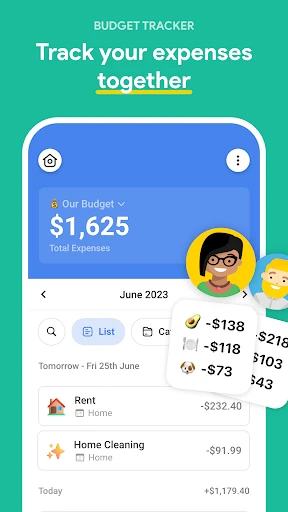
FamilyWall: Family Organizer – Streamline Your Family Life with Shared Coordination
FamilyWall is a comprehensive family organization app designed to simplify daily life for households. It centralizes communication, scheduling, task management, and location sharing into one secure platform. By replacing scattered notes, group texts, and multiple calendars, FamilyWall helps families stay connected and organized, reducing chaos and improving efficiency. The app focuses on privacy with end-to-end encryption, ensuring that all shared information remains within the family circle. Its intuitive interface and cross-platform availability make it accessible for all age groups, from tech-savvy teens to less digital-native grandparents.
Chapter 1: Function
FamilyWall core functions revolve around four pillars: shared calendar, to-do lists, shopping lists, and family locator. The shared calendar allows every member to view, add, and edit events such as appointments, school activities, and sports practices, with automatic sync across devices. Color-coding and reminders prevent scheduling conflicts. To-do lists enable assigning chores or tasks to specific family members, with status tracking and due dates. Shopping lists are collaborative and can be organized by store or category, with real-time updates so anyone can add items while at the store. The family locator feature uses GPS to show each member location on a private map, with optional geofencing alerts when someone arrives or leaves a designated area like home or school. Additionally, the app includes a private chat function for secure messaging, a shared photo gallery for memories, and a meal planner to organize weekly menus. These tools are designed to reduce duplication, miscommunication, and the mental load of managing a household.
Chapter 2: Value
FamilyWall delivers significant value by addressing the core pain points of modern family management, particularly fragmentation and information overload. Its key advantage is consolidation: it replaces the need for multiple apps like separate calendars, messaging platforms, and note-taking tools with one unified ecosystem. This saves time and mental energy that would otherwise be spent switching contexts or searching for misplaced information. The real-time synchronization ensures that changes made by one member are instantly visible to all, eliminating the classic double-booking or forgotten grocery item. Privacy is a major selling point; unlike many location-sharing apps, FamilyWall keeps data within the family circle with robust encryption, avoiding third-party data mining or public exposure. The app is designed for inclusivity, with a simple user interface that accommodates different technical proficiencies, meaning parents can easily teach children and elderly relatives to use it. Another advantage is the reduction of household stress. By clearly visualizing everyone responsibilities, FamilyWall fosters accountability and teamwork, reducing the need for verbal reminders or disputes over chores. For busy families with multiple children and extracurricular activities, the app acts as a central command center, allowing parents to delegate tasks and children to gain independence in managing their own schedules. Ultimately, FamilyWall transforms a family group from a loosely coordinated set of individuals into a well-oiled team, where collaboration replaces confusion, and trust is reinforced through transparency in location and responsibilities.
Chapter 3: Scenarios
FamilyWall primary target user groups are families with children, particularly those aged 5 to 18, and multi-generational households where coordination is complex. Typical users include busy parents juggling work, school runs, and appointments; teenagers who need to track homework deadlines and social events; and grandparents who want to stay connected without complex technology. Everyday use cases include a parent assigning a grocery list to a teenager before shopping, with real-time checkoffs as items are found, or a family planning a weekend trip where everyone votes on activities and adds packing tasks. Another common scenario is a working parent checking the family locator to see when a child has left school and is heading to a piano lesson, receiving a geofence alert when they arrive safely. Meal planning is another frequent use: a parent organizes dinners for the week, syncs the ingredient list to the shopping list, and delegates meal prep tasks to different family members. On a daily basis, the shared calendar prevents scheduling chaos, such as avoiding a parent meeting and a soccer practice overlapping. For blended families or those with multiple caregivers, FamilyWall ensures seamless communication about custody schedules, medication reminders, and shared expenses. Even for simple coordination like picking a movie night or remembering a relative birthday, the app acts as a non-intrusive digital family bulletin board, making it an essential tool for any household seeking order and connection amidst the daily whirlwind.
Advantages
- real-time location sharing with geo-fencing alerts
- shared grocery lists auto-sync across all devices
- calendar events post directly to phone calendars
- private family social feed replaces group texts
- multimedia journal auto-timelines child milestones
Disadvantages
- requires all members to install app for full sync
- location tracking drains battery on child phones
- free version limits storage for photos and videos
- no integration with third-party task managers
- privacy concerns if family members share single login
Frequently Asked Questions
Q: What does FamilyWall do for family organization?
A: FamilyWall is a shared family organizer app that offers a shared calendar, to-do lists, grocery lists, meal planning, and location sharing. It allows family members to coordinate schedules, assign tasks, and communicate via a private family feed. The app syncs across devices in real time, helping households manage daily routines and events efficiently without using multiple separate tools.
Q: Is FamilyWall free to use or does it require payments?
A: FamilyWall offers a free version with basic features like a shared calendar, lists, and messaging. Premium features such as advanced storage, custom reminders, and priority support require a subscription via in-app purchase. There are no mandatory fees for core functionality, but some limits on storage and list items apply to free users. Check current pricing on your app store.
Q: Does FamilyWall work on both iOS and Android devices?
A: Yes, FamilyWall is available on iOS and Android smartphones and tablets. It also has a web version for desktop access. All platforms sync automatically when logged into the same family account. The app requires iOS 13+ or Android 6.0+ and an internet connection for real-time updates. Offline access is limited to recently synced data.
Q: How does FamilyWall handle location sharing and privacy?
A: FamilyWall includes an optional location sharing feature that lets members see each other’s real-time location on a private family map. This is turned off by default and can be enabled per person. Location data is encrypted and only visible to invited family members. You can also set location alerts for arrivals or departures. No location data is shared with third parties.
Q: Can I recover deleted items or undo actions in FamilyWall?
A: FamilyWall does not currently offer a built-in undo or trash feature for permanently deleted calendar events, lists, or messages. Deleted items cannot be recovered unless you have a backup from a third-party service. For premium users, some data may be retained in server logs for a limited time, but no formal recovery tool is available. Always double-check before deleting.
Technical Information
Recommended for You

WalletPasses | Passbook Wallet

Screen Time - Parental Control

Captions Lite

Baby Tracker by Nara

Hilton Honors: Book Hotels

Messages: Text Message, SMS

All HD Video Player-All Format

SketchPad - Doodle On The Go

Signia App

Baby Shark Hospital Play: Game

Urban Company (Prev UrbanClap)

WFP 339 Ultra watch face

IO Cleaner - Phone Cleaner

Themify: Theme & Icon Changer

Volaris

DeerCast: Weather, Maps, Track

ComicScreen - PDF, ComicReader

Compose Material Catalog

Champions League Official

IAA Buyer Salvage Auctions
Redfin: Buy, Sell & Rent Homes

Bedtime Stories for Kids Sleep

E! News