Micro SD Card formatter
Micro SD Card formatter
Format SD cards for stable performance by erasing data
Screenshots
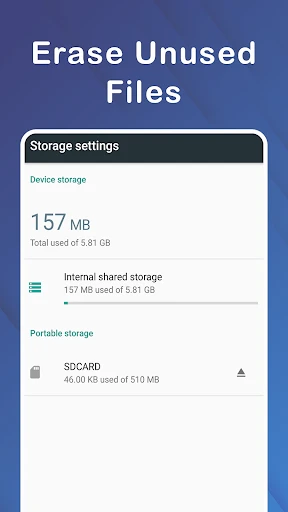
Micro SD Card formatter: Effortless Storage Optimization and Error Fixing Tool Overview
Micro SD Card formatter is a specialized utility designed to format microSD memory cards quickly and reliably. It ensures compatibility with various devices by restoring the card to its factory file system state, such as FAT32, exFAT, or NTFS. The app addresses common issues like unreadable cards, write protection errors, or partition corruption, providing a straightforward solution for users who need to reset their storage media safely and efficiently.
Chapter 1: Function
The app streamlines the formatting process by offering a clear user interface that detects inserted microSD cards automatically. Users can select from standard file system options to match their device requirements, such as cameras, drones, or smartphones. It performs full or quick format modes to either erase data rapidly or conduct a thorough overwrite for deeper sanitation. The tool also repairs minor logical defects by restructuring partition tables, which often resolves read-write errors without needing complex computer software.
Chapter 2: Value
The primary value of Micro SD Card formatter lies in its ability to salvage malfunctioning or slow memory cards without requiring specialized hardware or technical expertise. It prevents data corruption by thoroughly wiping residual fragments that accumulate from repeated use across different gadgets. Unlike generic operating system formatting tools, this app adheres to SD Card Association standards, ensuring the formatted card maintains peak performance and longevity. Its key advantage is accessibility: users can perform professional-grade formatting directly on Android devices, bypassing the need for a PC. This is particularly beneficial for photographers and travelers who rely on microSD cards for backup but encounter compatibility issues between devices. The app also supports large-capacity cards, managing partitions up to 2TB efficiently. By eliminating hidden errors, it reduces the risk of sudden data loss during critical tasks like recording 4K video. Furthermore, it offers a safety check before execution, warning users about pending data deletion, which prevents accidental erasure.
Chapter 3: Scenarios
The app is essential for frequent smartphone users who experience storage full warnings despite having a microSD card installed, as it can reset the card to reclaim space occupied by orphaned files. It also serves drone operators, who must format their cards in FAT32 before each flight to avoid recording interruptions. Camera enthusiasts benefit from using this app to ensure their cards are optimized for burst shooting without lag. Additionally, it aids IT professionals who manage multiple memory cards across devices, needing a quick and uniform formatting solution. Everyday use cases include troubleshooting a card that is suddenly unrecognized by a tablet or fixing write errors in dashcams. Parents can use it to prepare clean storage for childrens educational tablets, removing old content securely.
Advantages
- formats SD
- SDHC
- SDXC cards exclusively
- overwrites legacy data for clean reuse
- restores cards to full factory capacity
- fixes corrupted or unreadable cards
- works offline without internet dependency
Disadvantages
- only supports SD card family devices
- no support for USB or hard drives
- requires admin rights on Windows to run
- interface lacks batch formatting option
- no preview of card health before format
Frequently Asked Questions
Q: What does Micro SD Card formatter do?
A: Micro SD Card formatter is a utility app designed to format microSD cards to their optimal file system, typically FAT32 or exFAT. It erases all data, resolves corruption or read/write errors, and restores full storage capacity by removing hidden partitions. The app uses low-level formatting algorithms compatible with SD Association standards, ensuring reliable performance on cameras, drones, and smartphones. It does not support internal storage or devices without a microSD slot.
Q: Is the app free to use with no hidden charges?
A: Yes, Micro SD Card formatter is completely free to download and use. There are no in-app purchases, subscriptions, or paid features. All formatting functions, including quick and full format options, are accessible without any payment. The app does not require additional equipment like a card reader if your device has a built-in microSD slot. No ads interrupt the formatting process, ensuring a clean user experience.
Q: Does it work on all Android devices and versions?
A: The app runs on Android devices running version 5.0 or higher. It requires a device with an integrated microSD card slot; USB OTG adapters for external card readers are not officially supported. The app is optimized for smartphones and tablets, but not for Windows or iOS systems. For PCs, users should download the official SD Memory Card Formatter from the SD Association website instead.
Q: How to fix a microSD card that is not recognized?
A: First, insert the card correctly and reboot your device. If still unrecognized, open Micro SD Card formatter and select the card from the dropdown list. Tap 'Format'—the app will attempt to repair the partition table and file system. If the card is physically damaged (e.g., bent pins or controller failure), the app may display 'Format failed.' In that case, the card likely needs replacement, as software cannot repair hardware damage.
Q: Can it recover deleted files after formatting?
A: No, Micro SD Card formatter permanently erases all data during the format process and does not include a file recovery function. After formatting, the card appears empty, and previous files become overwritten. For data recovery, you must use third-party recovery software before formatting. Once formatting is completed, the chance of successful recovery is extremely low due to low-level overwriting of storage cells.
Technical Information
Recommended for You

Animal Sounds and Ringtones

Voice GPS & Driving Directions

Burner: Second Phone Number

Chilis

Breaking News - Live Headlines

Little Caesars

Premier Bowl Scorekeeper

iSync Premium: All iCloud Apps

PractiScore Competitor

ArtCanvas: Learn how to draw

CVS Specialty

Yubo: Make new friends

maxim — order a taxi & food

DoorDash: Food, Grocery, More

Pocket Novel

Widgetable: Besties & Couples

Hudl

Watchgram for Telegram

FREECABLE© TV App: Shows, News

IMVU: Social Chat & Avatar app

RadarNow! ®

TV Cast - Cast for Chromecast

Yesway & Allsup’s Rewards