ArtCanvas: Learn how to draw

ArtCanvas: Learn how to draw
ArtCanvas Learn Drawing Step by Step for Beginners
Screenshots

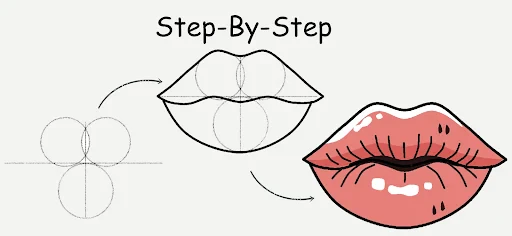
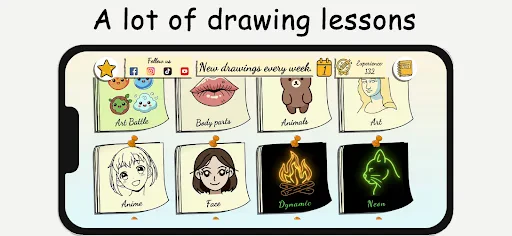
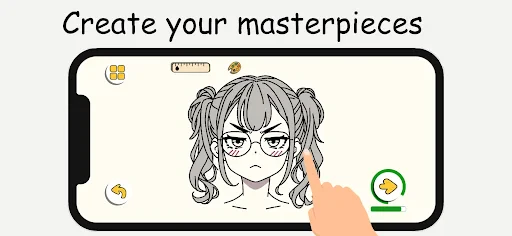

ArtCanvas: Learn how to draw
ArtCanvas is a mobile application designed to help users learn drawing from scratch, offering step-by-step tutorials, interactive exercises, and personalized feedback. It combines digital tools with structured lessons to make art education accessible to everyone, regardless of skill level.
Chapter 1: Function
ArtCanvas provides a comprehensive suite of core functions for learning drawing. The app offers a library of over 500 step-by-step tutorials covering basic shapes, shading, perspective, and advanced techniques like portrait sketching. Users can draw directly on the app's canvas using a variety of digital brushes, pencils, and erasers, with pressure sensitivity support for stylus users. A unique feature is the trace overlay mode, which allows beginners to practice by tracing outlines from reference images. The app also includes an auto-assessment tool that analyzes user strokes for line accuracy, proportion, and symmetry, offering real-time suggestions for improvement. Additionally, users can save their progress, create custom practice sessions, and access a built-in color theory guide for mixing and matching hues. All tutorials are designed by professional artists and are updated monthly with new content.
Chapter 2: Value
The primary value proposition of ArtCanvas lies in its ability to democratize art education by removing barriers such as high costs, lack of access to instructors, and intimidating skill gaps. Unlike traditional art classes, which may require physical materials or scheduled attendance, ArtCanvas offers a flexible, on-demand learning environment that fits into any daily routine. Key advantages include its adaptive learning path, which uses initial skill assessments to recommend personalized tutorials, ensuring users neither feel overwhelmed nor bored. The instant feedback mechanism, powered by stroke analysis, mimics the guidance of a live teacher, reducing the frustration of making uncorrected mistakes. For experienced artists, the app serves as a constructive tool to refine specific techniques, such as cross-hatching or gesture drawing, through targeted drills. Moreover, ArtCanvas fosters a sense of achievement through a progress tracking system, where completing lessons unlocks higher-difficulty levels and virtual badges. By combining educational rigor with gamification, it sustains user motivation over long periods. The app also supports multiple languages, broadening its global appeal, and offers offline access to downloaded tutorials, making it practical for users in areas with limited internet connectivity. Overall, ArtCanvas transforms a potentially solitary learning process into an engaging, guided experience that builds confidence and artistic competence simultaneously.
Chapter 3: Scenarios
ArtCanvas primarily targets three user groups. The first is absolute beginners, including children aged 8 and above, hobbyists, and adults who have never drawn before but wish to start a new creative pursuit. For these users, everyday use cases include following basic animal drawing tutorials during commute breaks or creating simple still-life sketches at home. The second group consists of intermediate artists, such as students in visual arts programs or self-taught enthusiasts looking to correct common mistakes in anatomy or shading. They use ArtCanvas for daily warm-up exercises, like timed gesture drawings, and to explore advanced topics like digital painting fundamentals. The third group includes educators and parents who employ the app as a supplemental teaching resource. Teachers integrate ArtCanvas into classroom curriculums for structured practice sessions, while parents guide their children through family drawing challenges during weekends. Other use cases include therapeutic drawing sessions for stress relief, where users follow calming landscape tutorials, and collaborative projects where multiple users share created artworks via the app's community gallery for peer feedback. The app's versatility ensures it serves casual learners, serious students, and facilitators alike in various settings, from quiet personal study to group activities.
Advantages
- step-by-step stroke tracing for real-time hand guidance
- AI evaluates sketches and highlights improvement areas
- offline mode lets you draw without internet access
- library covers anime
- portraits
- and landscapes equally
- pressure-sensitive brush engine mimics real pencil texture
Disadvantages
- advanced lessons require weekly subscription to unlock
- no community gallery for sharing or peer feedback
- auto-correction sometimes overrides intended artistic style
- limited color palette in free version restricts creativity
- high battery drain during continuous AI analysis sessions
Frequently Asked Questions
Q: What is ArtCanvas and how does it teach drawing?
A: ArtCanvas is a mobile app for beginners and intermediates to learn drawing. It offers step-by-step tutorials, interactive sketching exercises, and a library of reference images. No additional equipment is required beyond your device and a finger or stylus. The app uses guided strokes and progress tracking to help users improve skills at their own pace.
Q: Is ArtCanvas free to use or does it require purchase?
A: ArtCanvas offers free basic tutorials and daily sketch prompts. Full access to advanced lessons, special brushes, and offline mode requires a monthly or yearly subscription. No in-app purchases for one-time features exist. There is no hardware purchase needed beyond a compatible mobile device.
Q: What devices and systems are compatible with ArtCanvas?
A: ArtCanvas runs on iOS 13.0 or later and Android 8.0 or later. It supports smartphones and tablets, but not desktop computers or web browsers. The app is optimized for touch input and works with most styluses. No specific brand or model is required.
Q: Can I use ArtCanvas offline without internet connection?
A: Basic downloaded lessons and saved reference images can be accessed offline. However, new tutorial downloads, community features, and cloud sync require an internet connection. The app will notify you when offline mode is active and which features are unavailable.
Q: How do I fix common issues like lag or crashes in ArtCanvas?
A: For lag or crashes, ensure your device OS is updated and close background apps. Clear the app cache in settings. If problems persist, reinstall the app—your progress is saved to your account. Contact support via the in-app help center for unresolved issues. No official forum exists.
Technical Information
Recommended for You

Wallpapers

AttaPoll - Paid Surveys
Themes

AlphaNovel — Books & Stories

HiSense Smart TV Remote
Video Maker Music Video Editor

Vio.com: Hotels & travel deals

Little Caesars

Compress Video Size Compressor
Southwest Airlines: Travel App

JW Library

Tubi: Free Movies & Live TV

Marriott Bonvoy: Book Hotels

Atom - Movie Tickets & Times

Orz Live - Video Chat Online

Learn how to draw - ArtWorkout
Holiday Calendar

EpicWalls

SplashLearn: Kids Learning App
2nd Line+ Phone Number & eSIM

Property Finder - Real Estate

Bitcoin Price for Wear OS

MiraClean - File Manager
