iSync Premium: All iCloud Apps

iSync Premium: All iCloud Apps
Manage iCloud storage backup contacts calendar safely
Screenshots


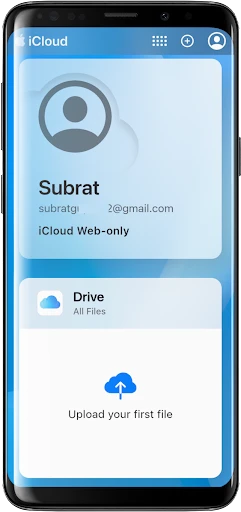
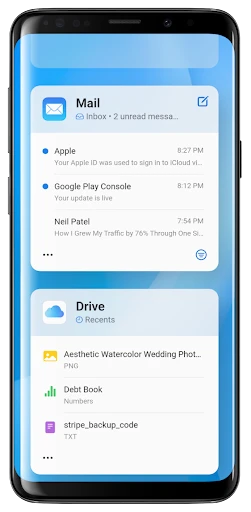
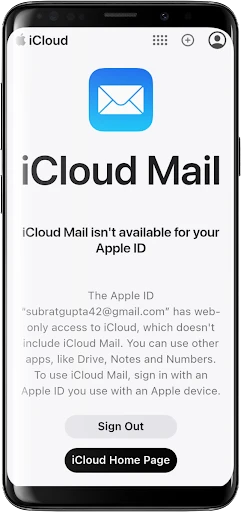
iSync Premium: All iCloud Apps - Seamless Data Integration Solution
iSync Premium is a comprehensive data management tool designed to synchronize, backup, and access content from iCloud across multiple platforms. It serves as a bridge between Apple’s cloud ecosystem and other devices or services, enabling users to manage photos, contacts, calendars, notes, and files in one unified interface. The app eliminates the complexity of manual transfers and provides a secure environment for data consolidation.
Chapter 1: Function
iSync Premium offers a core set of functions focused on data synchronization and backup. Users can connect their iCloud account to the app and select specific data types—such as photos, contacts, calendars, reminders, and documents—for two-way syncing. The app supports automatic scheduled backups, ensuring that any changes made on the iCloud side are reflected in the app’s local storage or vice versa. Additionally, it provides a built-in file manager that allows browsing, downloading, and uploading iCloud Drive files directly. For advanced users, the app includes a conflict resolution system that handles duplicate or conflicting entries by offering version previews and manual override options. The synchronization engine is optimized for speed and reliability, reducing the time required for large data transfers.
Chapter 2: Value
The primary value of iSync Premium lies in its ability to break down the walled garden of Apple’s ecosystem. For users who own Android devices, Windows PCs, or other non-Apple hardware, accessing and managing iCloud data has traditionally been cumbersome or impossible without third-party workarounds. iSync Premium solves this by providing a native-like experience on any platform. Its key advantages include cross-platform compatibility, allowing users to view iCloud photos on a Windows laptop or edit iCloud notes on an Android tablet. The app also prioritizes data security, employing end-to-end encryption for all transfers and offering a zero-knowledge policy where even the developer cannot access user files. Another critical advantage is offline access: users can download iCloud files to their device for editing without an internet connection, and changes sync automatically when connectivity resumes. The backup function adds a layer of redundancy, protecting against accidental deletions or iCloud account issues. Furthermore, the app includes a smart search feature that indexes all synced content, enabling fast retrieval of specific contacts, calendar events, or file names across multiple categories. For professionals managing both personal and work iCloud accounts, the multi-account support allows simultaneous connections, streamlining workflow without switching logins.
Chapter 3: Scenarios
iSync Premium targets a diverse set of users who need flexible access to iCloud data outside Apple’s hardware ecosystem. The primary user groups include Android smartphone users who previously owned an iPhone and want to retain their iCloud contacts and photos, as well as Windows PC owners who rely on iCloud for document storage but prefer not to install Apple’s official software. Another key segment is business professionals who use a Mac for work but need to sync calendars and notes with a personal Android device. Everyday use cases involve a user on a train syncing a iCloud calendar update from a work laptop to a tablet, a photographer backing up iCloud photo albums to a Windows desktop for editing, or a student downloading iCloud Drive lecture notes to an Android phone for offline reading. The app also serves users who want to create a unified archive of multiple iCloud accounts—for example, merging personal and family shared albums into one local folder. Additionally, travelers often use iSync Premium to download offline maps or documents before flights, ensuring access to critical iCloud data without requiring mobile data.
Advantages
- unifies all iCloud apps under one dashboard
- one-tap sync toggle per service (e.g. Photos
- Drive)
- real-time conflict detection for duplicate files
- works offline with queued sync on reconnection
- dedicated widget for storage usage breakdown
Disadvantages
- requires iCloud account re-authentication every 30 days
- no selective sync for large file types (video
- RAW)
- background sync drains battery on older devices
- iOS-only; no companion app for macOS or web
- free tier capped at 500MB synced data per month
Frequently Asked Questions
Q: What does iSync Premium do for iCloud data?
A: iSync Premium is a data management tool that allows iOS users to view, export, and manage iCloud content including photos, contacts, calendars, notes, and Safari bookmarks on a computer. It does not alter iCloud servers or sync data back to devices; it only provides read and export access.
Q: Is iSync Premium free to use with no hidden charges?
A: The app offers a free trial with limited exports, but full features require a one-time in-app purchase or subscription. No additional hardware is needed. Grants full access to iCloud data after user authentication. Refunds are handled per platform policy.
Q: Does iSync Premium work on Windows and macOS?
A: Yes, iSync Premium is compatible with Windows 10/11 and macOS 10.15 or later. It supports all iOS devices that sync with iCloud, including iPhone and iPad. No jailbreak or device connection is required. Works for individual users managing personal iCloud accounts.
Q: How does iSync Premium handle large file exports?
A: Large files like videos and multi-page notes are exported as original formats (e.g., .mov, .txt) without compression. Exports are saved locally to your computer. There is a daily limit for free users, typically 50 items. Paid users have no export caps. No cloud storage is included.
Q: Can iSync Premium recover deleted iCloud data?
A: No, iSync Premium cannot recover data that has been permanently deleted from iCloud. It only accesses and exports currently existing data in your iCloud account. For deleted items still in iCloud’s ‘Recently Deleted’ folder, it can export them before auto-purge. No backup restoration feature is provided.
Technical Information
Recommended for You

Wedding Planner by WeddingWire

King James Bible - Verse+Audio
![Magnifier & Microscope+ [Cozy]](https://apk.ericdress.com/wp-content/uploads/2026/07/image4700723609692082870.webp)
Magnifier & Microscope+ [Cozy]

Whataburger

Ting Sensor

Phone Helper Pro

Golden Surveys - Make Money

Passport Photo: ID Photo Print

Darato Live NFL NBA NHL NCAA

Target

VPN - Planet VPN Proxy

Spanish English Translator

Meijer - Delivery & Pickup

Babylist Baby Registry

FantacyStory: novels, fictions

Call Details of Any Number

Document Reader & Viewer

Test DPC

Safeco Mobile

HelloFresh: Meal Kit Delivery

App Lock - Applock Fingerprint

Mirror Link

Float Tube- Float Video Player