Test DPC

Test DPC
Test DPC: IT admin tool for managing Android device policies and testing.
Screenshots

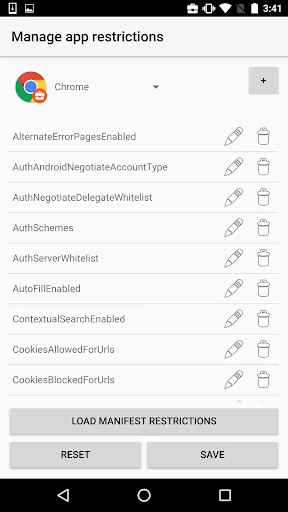

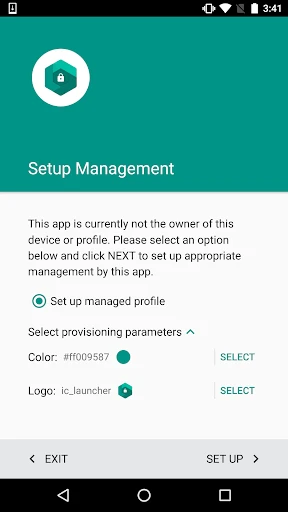

Test DPC: Enterprise Device Management Tool for IT Administrators
Test DPC is a specialized application developed by Google for Android enterprise device management testing. It serves as a simulation tool for IT administrators and developers to evaluate and validate Device Policy Controller (DPC) configurations without deploying physical devices. The app enables users to test various management features, including work profile provisioning, policy enforcement, and app management in a controlled environment. It is essential for organizations adopting Android Enterprise to ensure seamless integration of mobile device management (MDM) solutions.
Chapter 1: Function
Test DPC functions primarily as a test harness for Android Enterprise device management. Its core features include simulating a fully managed device or a work profile within a personal device. Users can configure policies such as password requirements, encryption settings, and app whitelisting or blacklisting. The app supports the creation of test accounts and the installation of managed applications via an MDM server. Additionally, it provides real-time feedback on policy compliance, allowing administrators to verify that restrictions function correctly. It also offers logs and diagnostic tools to troubleshoot configuration errors. This functionality streamlines the development and deployment of enterprise mobility solutions by reducing the need for physical hardware during the testing phase.
Chapter 2: Value
The primary value proposition of Test DPC lies in its ability to accelerate and secure enterprise device management deployment. By enabling IT teams to test policies virtually, it eliminates the cost and time associated with provisioning multiple physical devices for validation. This is particularly advantageous for large-scale rollouts where configuration errors could lead to significant operational disruptions. The app enhances security testing by allowing administrators to simulate worst-case scenarios, such as unauthorized app installations or data breaches, without risking actual corporate data. Moreover, Test DPC supports a wide range of Android Enterprise features, including managed configurations, Wi-Fi and certificate provisioning, and device-level restrictions. Its open-source nature ensures transparency and compatibility with various MDM solutions. For developers, it provides a reliable environment to verify app compliance with enterprise policies before release. Ultimately, the app reduces the risk of post-deployment failures, saves resources, and empowers IT teams to confidently manage diverse device fleets.
Chapter 3: Scenarios
Test DPC primarily targets IT administrators, mobility managers, and enterprise security professionals responsible for managing Android devices in corporate environments. Developers building applications for enterprise use also benefit from testing app behavior under managed configurations. Typical use cases include preparing for mass device deployments in sectors like healthcare, logistics, and finance, where compliance with strict security policies is mandatory. For example, an IT admin can use Test DPC to validate that a new password policy enforces complexity requirements without disrupting existing workflows. Another scenario involves testing the provisioning of a dedicated kiosk mode on devices used in retail for point-of-sale systems. The app is also used during pilot programs to assess the impact of device restrictions on user productivity before rolling out to all employees. Additionally, managed service providers leverage Test DPC to demonstrate MDM capabilities to clients without risking their own infrastructure. Its versatility makes it ideal for both initial setup testing and ongoing policy updates.
Advantages
- enables enterprise device management without root access
- supports multiple work profile configurations on a single device
- directly tests Android Enterprise policies for IT admins
- lightweight tool focused solely on DPC functionality
- works offline once configured
- no constant server dependency
Disadvantages
- requires deep Android system knowledge to operate effectively
- limited to testing
- not a full MDM solution for daily use
- profile setup can conflict with existing Google accounts
- no graphical UI for policy management
- terminal-oriented
- frequent updates needed to match latest Android Enterprise changes
Frequently Asked Questions
Q: What is Test DPC used for?
A: Test DPC is a testing tool for Android enterprise device policy controllers. It allows developers and IT admins to simulate managed device configurations, test work profiles, and verify app restrictions without deploying actual enterprise devices.
Q: Does Test DPC require a paid subscription?
A: No, Test DPC is free to download and use. It does not have in-app purchases or subscription fees. However, it requires a device running Android 5.0 or later with a work profile enabled, which is a standard Android feature and does not incur additional costs.
Q: Can Test DPC work on any Android device?
A: Test DPC functions on any Android device running version 5.0 (Lollipop) or higher. It is primarily designed for testing purposes and may not be compatible with devices lacking work profile support. No additional hardware is needed beyond the device itself.
Q: How does Test DPC handle app restrictions?
A: Test DPC applies policies such as blocking specific apps, limiting camera usage, and restricting network access within the work profile. These restrictions are for testing and can be reset by removing the work profile. Policies do not affect the personal side of the device.
Q: Is there any support available for Test DPC issues?
A: Test DPC is a developer tool with no official customer support. For troubleshooting, refer to the Android Enterprise documentation or community forums. Bug reports can be submitted via the Android Open Source Project issue tracker. No warranty or maintenance is provided.
Technical Information
Recommended for You

Wattpad - Read & Write Stories

Wish: Shop and Save

Widgets Art - Wallpaper, Theme

Phone Cleaner - AI Cleaner

Drawing Pad Pro - Sketchpad

MediaMonkey Pro

Time Clock: Easy Tracker

Cursa - Online courses

Church Center App

Picrew PFP & OC Maker

Al QURAN - القرآن الكريم

Blink Charging Mobile App

ConnectNetwork by GTL

Offline Music Player: Play MP3

Phone Number Tracker

Compass app - Accurate Compass

Love, Manuela The Baking APP

myStop® Mobile

randstad: jobs for workers

Android Ringtone Songs

GPS Navigation- World Map 3D

CosmoProf Beauty

Pregnancy Tracker App | Glow
