Home Assistant

Home Assistant
Home Automation Hub for Smart Home Control
Screenshots


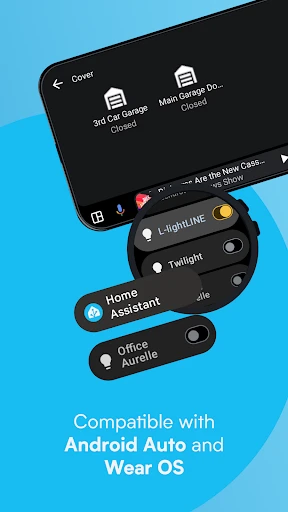
Home Assistant: Centralized Smart Home Control Platform
Home Assistant is an open-source home automation platform designed to centralize control of smart devices from various manufacturers. It prioritizes local operation and privacy, allowing users to automate routines, monitor sensors, and manage hundreds of interconnected devices through a unified interface. Its extensibility supports integrations with thousands of products, services, and protocols, making it one of the most flexible smart home solutions available.
Chapter 1: Function
Home Assistant core functions include device integration, automation engine, and local control. The platform connects to over 2,000 brands and services, including lights, switches, thermostats, cameras, locks, and sensors via Wi-Fi, Zigbee, Z-Wave, or Bluetooth. Users define automations using a visual editor or YAML configuration, triggering actions like turning off lights at sunset or sending alerts when motion is detected. The dashboard provides a customizable interface for monitoring device states, energy usage, and camera feeds. Built-in history logging, voice assistant support (Amazon Alexa, Google Assistant, Apple HomeKit), and remote access through encrypted tunnels further expand utility. Its modular architecture allows adding custom components through community-developed integrations.
Chapter 2: Value
Home Assistant offers significant value by addressing fragmentation in the smart home market. Unlike proprietary hubs limited to one ecosystem, it unifies devices from competing brands under one roof, eliminating the need for multiple apps. Local processing ensures automations run even without internet, enhancing reliability and reducing latency compared to cloud-dependent systems. Privacy is a key advantage: data stays on the user's network, preventing manufacturer tracking or service shutdowns. The platform is free and open-source, with no subscription fees for core features, though optional services like Nabu Casa for cloud connectivity cost a small monthly fee. Community-driven development means thousands of contributors continuously add support for new devices and share custom automations. Advanced users benefit from deep customization—scripting in Python, integrating with MQTT brokers, or building complex conditionals. For beginners, pre-built blueprints simplify common automations. Energy management features provide real-time consumption tracking, helping reduce electricity costs. The system also supports partial automation, like turning off forgotten appliances or simulating occupancy during vacations, enhancing convenience and security.
Chapter 3: Scenarios
Primary target users include tech enthusiasts, privacy-conscious homeowners, and households with smart devices from multiple brands. Common use cases include automating morning routines: waking to gradual lights, reading weather from a sensor, and starting a coffee maker. Security scenarios involve triggering cameras and alarms when doors open unexpectedly, sending push notifications, or flashing lights during a smoke detector alarm. Energy conservation users set automations to turn off HVAC systems when windows open or schedule plugs to disable idle electronics. Advanced users create presence-based lighting that follows them through rooms or integrate with garden irrigation based on rainfall data. For rental properties, temporary access codes can be generated for guests without altering permanent settings. The platform also supports multi-user profiles, enabling family members to control shared devices while restricting access to sensitive functions like home alarm arming.
Advantages
- local-first architecture for offline smart home control
- supports over 2
- 000 device brands via integrations
- customizable dashboards with real-time sensor data
- scriptable automations triggered by complex conditions
- open-source platform with community-driven add-ons
Disadvantages
- initial setup requires YAML editing and networking knowledge
- no official cloud back-end for remote access without setup
- voice assistant integration limited to local processing add-ons
- hardware compatibility varies per platform and build
- UI/UX learning curve for non-technical household members
Frequently Asked Questions
Q: What does Home Assistant do exactly?
A: Home Assistant is a free, open-source home automation platform that integrates and controls smart devices from over 1,000 brands. It acts as a central hub, allowing users to create automations, manage lights, locks, sensors, and more locally for privacy and offline reliability. No cloud dependency is required for core functions.
Q: Is Home Assistant free or does it require a subscription?
A: Home Assistant core is completely free with no subscription. Optional paid services include Home Assistant Cloud (Nabu Casa) for remote access and voice assistant integration, which supports development. All local automation, device control, and dashboard features remain free without any in-app purchases or locked features.
Q: Can Home Assistant work with my existing smart devices?
A: Home Assistant supports over 2,000 integrations including Philips Hue, Google Nest, Zigbee, Z-Wave, and many more. It works with Wi-Fi, Bluetooth, and USB dongle-based devices. Check the official integrations page for your specific model. Non-listed devices may work via custom community add-ons.
Q: How do I get remote access to Home Assistant?
A: Remote access requires either Home Assistant Cloud (paid subscription via Nabu Casa) or self-configured methods like port forwarding with a reverse proxy (e.g., NGINX) or a VPN. The cloud option is simpler and secure, while self-hosting gives full control but demands technical setup. No remote access is enabled by default.
Q: Does Home Assistant work on my phone and computer?
A: Yes. Home Assistant offers companion apps for iOS and Android for full control and notifications on phones. For desktop, it runs as a web interface compatible with any modern browser on Windows, macOS, and Linux. The server itself can be installed on Raspberry Pi, NAS, or a dedicated computer.
Technical Information
Recommended for You
ReadAnywhere

English to Spanish Translator
Servers for Minecraft PE Tools

DICK'S Sporting Goods

Princess Cruises

Snap! Mobile

Hexa AI: Logo & Design Creator
Microsoft PowerPoint

PhiApp

BlackPlayer EX

Mercado Libre: Compras online

Chilis

LumaFusion: Pro Video Editing

Oportun: Finances made simple

DMSS
Nickname Generator: NickName

BlazeTV

Advent Magnificat 2024

TruckSmarter Load Board & Fuel

Icon Pack Studio

Brainly: AI Homework Helper

BlockSite: Block Apps & Sites

Old Telephone Ringtones
