LumaFusion: Pro Video Editing

LumaFusion: Pro Video Editing
LumaFusion edits professional videos for mobile storytellers and filmmakers
Screenshots
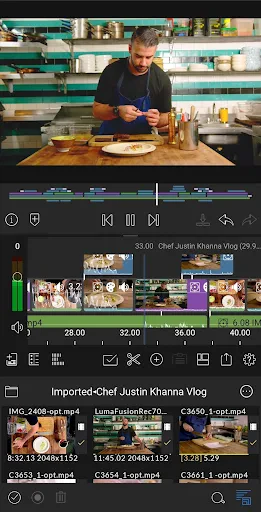
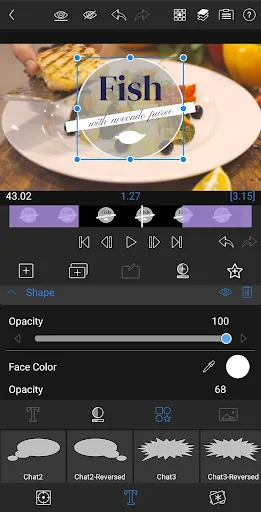
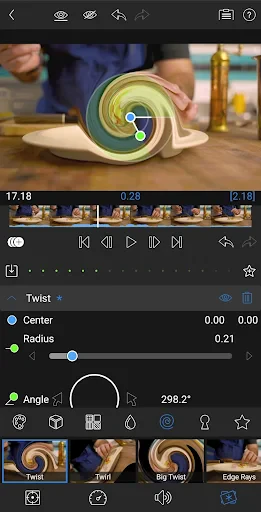
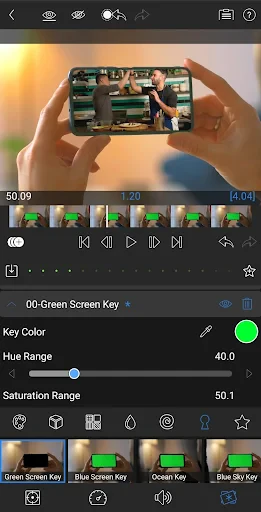

LumaFusion: Pro Video Editing – Comprehensive Mobile Post-Production Powerhouse
LumaFusion is a professional-grade, multi-track video editing application designed exclusively for iOS and iPadOS devices. It brings desktop-class editing capabilities to mobile platforms, allowing creators to produce complex, high-resolution projects directly on an iPad or iPhone. The app supports a wide range of video formats, resolutions up to 4K and beyond, and offers advanced color correction, audio mixing, and keyframing tools. Its timeline-based interface mirrors professional editing software, providing a familiar workflow for experienced editors while remaining accessible to serious enthusiasts. LumaFusion functions as a standalone editing suite, eliminating the need for a traditional computer for many production tasks.
Chapter 1: Function
LumaFusion provides a comprehensive suite of core editing functions that rival desktop applications. The app features a fully customizable six-track timeline, supporting video, audio, still images, and titles. Users can perform precise waveform-based audio editing, apply real-time video effects and transitions, and utilize a powerful color grading panel with curves, color wheels, and LUT support. It includes a built-in title generator with numerous templates and the ability to create custom animated text. The app also offers robust media management, allowing users to organize clips, create bins, and sync audio from external recordings. Advanced features include optical flow for slow-motion, multicam editing with synced angles, and project archiving for transfer to other NLEs like Final Cut Pro and DaVinci Resolve.
Chapter 2: Value
The primary value proposition of LumaFusion lies in its ability to deliver professional editing power in a highly portable and touch-optimized package. Unlike subscription-based competitors, it requires a single purchase with no recurring fees, making it cost-effective for independent filmmakers, journalists, and content creators. Its deep integration with the Apple ecosystem, including direct support for the Apple Pencil, external keyboard shortcuts, and the Files app, enhances workflow efficiency. The app supports direct export to various platforms and formats, including sharing to social media and cloud services. A key advantage is its professional-grade stability and reliability, crucial for deadline-driven work. It allows users to edit anywhere without sacrificing quality, effectively turning an iPad into a complete mobile editing studio. The active developer community and regular updates ensure compatibility with new iOS versions and hardware, maintaining its status as the gold standard for mobile video editing. Its non-linear editing approach empowers creators to experiment freely, as all edits are non-destructive.
Chapter 3: Scenarios
LumaFusion targets a diverse range of users, from professional videographers and documentary filmmakers to YouTube creators, journalists, and educators. Its primary use case includes on-location editing for news crews and event videographers who need to produce finished content quickly without returning to a desktop studio. Travel vloggers and adventure content creators benefit from its ability to edit 4K footage on a device that fits in a backpack. Educators use it to produce instructional videos and podcasts. Another key scenario is multicam editing for live event recordings, weddings, and interviews, where LumaFusion can sync multiple camera angles on a single timeline. Post-production professionals also use it as a field tool for rough cuts and proxy editing before finalizing on a larger system. Its versatility extends to sound designers using its audio mixing features and motion graphics artists creating complex animations through keyframing.
Advantages
- lays unlimited video/audio tracks on timeline
- supports external drive editing via files app
- color wheels & curves rival desktop tools
- exports directly to 10-bit HDR formats
- keyframe automation for every layer property
Disadvantages
- no built-in text template library
- steep learning curve for magnetic timeline
- lacks cloud sync between iPad and iPhone
- hardware decoding limited to Apple Silicon
- no automatic subtitle generation
Frequently Asked Questions
Q: What platforms is LumaFusion available on?
A: LumaFusion is available on iOS devices, including iPhone, iPad, and iPod touch, with support for iPadOS and iOS 15 or later. It is optimized for iPad Pro models with M-series chips for enhanced performance. There is no Android or desktop version currently offered by the developer.
Q: Does LumaFusion require a subscription or in-app purchases?
A: LumaFusion is a one-time purchase app with no subscription required. The base version includes core editing features. Optional in-app purchases are available for additional content packs, such as stock libraries or advanced effects, but these are not necessary for standard video editing workflows.
Q: Can LumaFusion handle 4K and multi-cam editing?
A: Yes, LumaFusion supports up to 4K 60fps video editing with multi-cam timeline functionality, allowing up to six camera angles. It also supports proxy workflows for smoother performance on lower-end devices. Export options include 4K resolution, though performance depends on device RAM and processor.
Q: How does LumaFusion compare to desktop video editors in features?
A: LumaFusion offers professional-grade features comparable to desktop editors, including multi-track timelines, keyframe animation, color grading tools, and audio ducking. However, it lacks advanced plugins, GPU-accelerated rendering, and support for certain codecs like ProRes RAW on older devices. It is best suited for mobile workflow.
Q: Is there customer support or refund policy for LumaFusion?
A: LumaFusion provides email-based technical support through its official website, with response time typically within 24-48 hours. The app does not offer a built-in refund policy; purchases are handled via the App Store, and refund requests must be submitted to Apple. The developer does not provide phone support or live chat.
Technical Information
Recommended for You

Trail Boss BMX

Nusuk | نسك

PERFUMIST Perfumes Advisor

Driver Written Test: 2025 Test

Adoraboo - Raise Boos Together

Xiaomi Home

TikTok Lite - Faster TikTok

Police Detector - Speed Radar

All Document Plus

AI Video Editor - Vidma Cut AI

Photo Scan App by Photomyne

OneMain Financial

Shiftsmart - Find Work

PadSplit: Rooms for rent

Bikemap: Cycling Tracker & GPS

Creati AI Photo Generator

Instant Boost : Addon

SoulChill - Voice Chat & Party

VA Video Connect

Truth Bible: Audio+Verse

D-ID: AI Video Generator

Xoom: Send Money & Transfer
Battery Charging Animation 4D
