VicoHome: Smart Home Camera

VicoHome: Smart Home Camera
VicoHome app remote view two way talk smart home security families
Screenshots
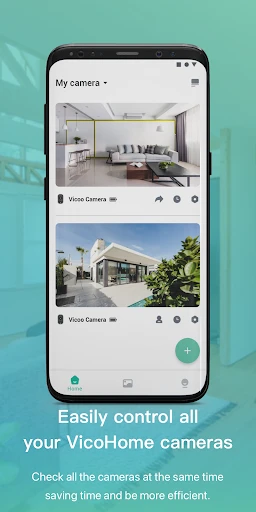
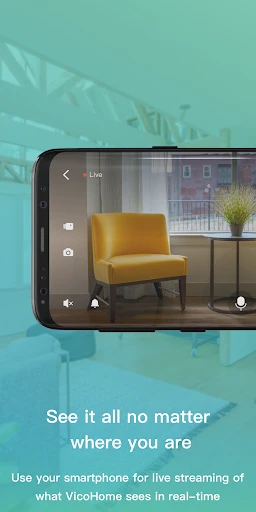
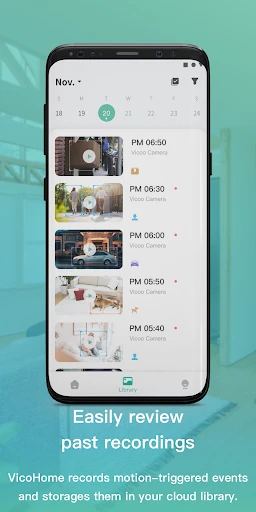
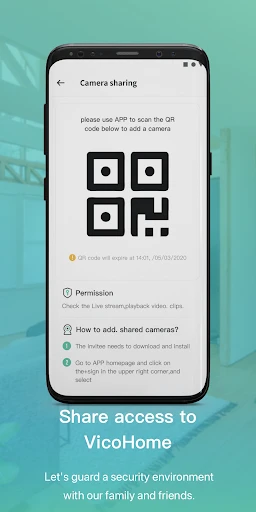
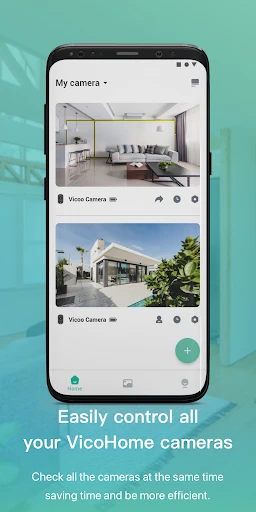
VicoHome: Smart Home Camera – Comprehensive Home Monitoring Solution
VicoHome is a smart home camera application designed to transform any compatible camera into a versatile security and monitoring tool. It offers real-time video streaming, motion detection alerts, two-way audio communication, and cloud or local storage options. The app supports a wide range of IP cameras and integrates seamlessly with smart home ecosystems, enabling users to monitor their property from anywhere via a smartphone or tablet. With an intuitive interface and customizable settings, VicoHome aims to simplify home security for both tech-savvy users and beginners.
Chapter 1: Function
VicoHome primarily functions as a centralized hub for managing and viewing live feeds from multiple cameras. Its core capabilities include high-definition video streaming with adjustable resolution, motion and sound detection with push notifications, and the ability to record clips manually or automatically based on triggers. The app supports two-way audio for communication through the camera, night vision mode for low-light environments, and playback of recorded footage. Users can configure activity zones to reduce false alerts, set schedules for recording or notifications, and share camera access with family members. Additionally, VicoHome offers cloud storage plans and local recording to microSD cards or network-attached storage, ensuring flexibility in data management. The app is compatible with ONVIF-compliant cameras and popular brands, making it a versatile tool for home monitoring.
Chapter 2: Value
VicoHome delivers significant value by bridging the gap between advanced security features and user accessibility. Its primary advantage is affordability: the app is free to download and works with budget-friendly cameras, eliminating the need for expensive proprietary hardware. The intuitive setup wizard guides users through camera pairing, network configuration, and customization, making it suitable for non-technical individuals. Key advantages include robust remote access, enabling users to check live feeds while at work, traveling, or sleeping, which enhances peace of mind. The smart motion detection reduces nuisance alerts by differentiating between people, pets, and objects, while customizable activity zones allow precise monitoring of critical areas like doors or windows. Cloud storage options provide encrypted footage retrieval even if the camera is tampered with, and local storage offers offline security. The app also supports multiple cameras on a single interface, allowing unified management of home, office, or vacation properties. Customer support and regular updates ensure reliability and security patch responsiveness. By prioritizing ease of use, cost efficiency, and feature depth, VicoHome empowers users to create a customized security system without recurring subscription fees for basic functionality.
Chapter 3: Scenarios
VicoHome caters to diverse user groups including homeowners, apartment dwellers, pet owners, and small business owners. Primary use cases include home security monitoring, where users check live feeds during vacations or work hours to ensure property safety. Pet owners utilize the two-way audio to soothe anxious animals or check on their activities remotely. Parents use the app to monitor children playing in yards or common areas, while elderly care scenarios enable family members to check on aging parents living independently. Small business owners deploy VicoHome to oversee retail shops, storage rooms, or parking lots, relying on motion alerts to detect after-hours intrusions. The app is also valuable for frequent travelers who want to verify door or window status from abroad. In rental properties, landlords use it to monitor common areas with tenant permission. Everyday use cases include checking package deliveries at the front door, confirming children arriving home from school, and tracking outdoor weather conditions via camera feeds. The app’s flexibility supports both indoor and outdoor cameras, making it a daily tool for situational awareness and security management.
Advantages
- 24/7 live view with no subscription required
- supports both 2.4G and 5G Wi-Fi bands
- two-way audio with noise reduction built in
- motion detection alerts pushed directly to phone
- cloud storage plus local SD card option
Disadvantages
- night vision range limited to 10 meters
- app requires account registration before use
- no HomeKit or Alexa skill support yet
- camera angle adjustment is manual only
- push notifications occasionally delayed by 2-3 seconds
Frequently Asked Questions
Q: What is VicoHome used for?
A: VicoHome is a smart home camera app that allows users to remotely monitor their home via live video streams. It supports two-way audio, motion detection alerts, and cloud recording. Compatible with VicoHome-branded cameras, it requires Wi-Fi and a power source for the camera device. No additional permissions beyond camera access are needed for the app itself.
Q: Is VicoHome free to use?
A: The VicoHome app itself is free to download and offers basic live viewing and motion alerts at no cost. Cloud storage for recorded clips requires a paid subscription plan (e.g., monthly or yearly). In-app purchases exist for extended cloud storage and premium features like enhanced motion zones. No extra hardware is required beyond the compatible camera.
Q: Does VicoHome work with any camera?
A: No, VicoHome is designed exclusively for VicoHome-branded smart cameras, such as the VicoHome Indoor Camera or Outdoor models. It does not support third-party devices or protocols like ONVIF. Ensure your camera model is listed on the VicoHome compatibility page before purchase. App works on iOS 12+ and Android 6+ devices.
Q: How does motion detection work?
A: Motion detection in VicoHome relies on built-in camera sensors to detect movement within the field of view. When triggered, the app sends a push notification and optionally records a short clip to cloud storage (subscription needed). You can adjust sensitivity levels and set activity zones from the app settings. Continuous recording is not available without subscription.
Q: Can I access VicoHome offline?
A: No, VicoHome requires a stable internet connection for both the camera and the app to function. Live viewing, alerts, and cloud playback all depend on active Wi-Fi or cellular data. The app does not support local SD card playback directly; recorded clips are stored online only. For offline viewing, you would need to export recordings via the app while online.
Technical Information
Recommended for You

GIF Maker, Video to GIF Editor

Camy — Live Video CCTV

BMO Digital Banking

Alpha Manga: Read Isekai Manga

Smashburger - Burgers & Shakes

Threads

Glympse - Share GPS location

Google Chat

PDF Reader - All PDF Viewer

Minute Money

Signal Private Messenger

Dictionary.com: English Words

Speedway: Rewards & Shopping

Obd Mary – Car Scanner for ELM

NOAA Weather & Tides

Download Video & Player

Microphone Blocker - Anti Spy

Salesforce

FacePic Face Editor, Hair, Age

SkySafari 7 Pro

Music Downloader-Song Download

My Mitsubishi Connect

MyWalmart