Pisces - Smart Stream Player

Pisces - Smart Stream Player
Connected TV remote control stream player for seamless home entertainment
Screenshots


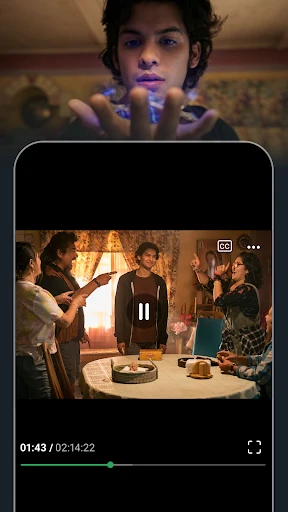
Pisces - Smart Stream Player: Unified Media Control Hub
Pisces is a powerful media player app designed to aggregate and stream content from various sources, including local storage, network drives, and cloud services. It simplifies the user experience by providing a single interface to browse, organize, and play video, audio, and image files. The app prioritizes format compatibility and smooth playback, supporting a wide range of codecs and subtitles. Its smart streaming technology optimizes buffering and quality based on network conditions, ensuring uninterrupted viewing. Pisces also offers advanced features like cast support, playlist creation, and remote control integration, making it a versatile tool for personal media libraries.
Chapter 1: Function
Pisces serves as a central media hub with core functions including multi-source file browsing, universal format playback, and intelligent streaming optimization. Users can connect to local folders, NAS devices, or cloud accounts to access all media in one place. The app supports virtually all video and audio formats, including MKV, MP4, AVI, FLAC, and DSD, with hardware acceleration for high-resolution content. Subtitle management is robust, allowing for external SRT/ASS files and automatic sync. Additional functions include a built-in equalizer, video aspect ratio adjustment, and background audio playback. For smart homes, Pisces integrates with Chromecast, AirPlay, and DLNA receivers to stream content to TVs and speakers seamlessly.
Chapter 2: Value
The primary value of Pisces lies in its ability to eliminate media fragmentation and provide a consistent, high-quality playback experience across devices. Unlike basic players that struggle with rare codecs or complex network setups, Pisces automatically transcodes incompatible formats on the fly, saving users from cumbersome conversion processes. Its smart streaming engine analyzes network bandwidth in real-time to prevent buffering, even with 4K HDR content over Wi-Fi. For power users, the app offers advanced features like IP camera stream support, playlist automation, and cross-device playback synchronization. This reduces the need for multiple subscriptions or apps, as Pisces can replace a dedicated music player, video player, and streaming device. The intuitive interface also appeals to non-technical users, making it simple to organize large libraries through auto-tagging and folder grouping. Security is emphasized through encrypted cloud connections and local-only mode options, addressing privacy concerns often overlooked by cloud-dependent competitors. Overall, Pisces saves time, reduces hardware costs, and delivers a premium media experience without ongoing fees.
Chapter 3: Scenarios
Pisces targets three primary user groups: home media enthusiasts, travelers, and professionals. Home users with large digital collections can consolidate movies, TV shows, and music from old hard drives, NAS devices, and streaming subscriptions into one app. For example, a family can use Pisces to stream a movie from a home server to a living room TV via Chromecast while another member listens to music on headphones. Travelers benefit from offline download support and adaptive streaming, allowing them to pre-load content for flights and enjoy smooth playback on weak hotel Wi-Fi. Professionals, such as videographers or musicians, use Pisces as a preview tool for raw files stored on portable SSDs or cloud backups, leveraging its codec support to avoid installing separate editing software. Everyday use cases include casting a workout playlist to gym speakers, resuming a paused show across phone and tablet, or organizing thousands of photos into slideshows with background music.
Advantages
- zero-buffering startup for instant live playback
- adaptive bitrate switching during network fluctuations
- hardware decoder prioritization extends battery life
- sub-100ms latency for real-time stream interaction
- multi-format container support without re-encoding
Disadvantages
- no built-in recording or DVR functionality
- requires manual codec selection for legacy streams
- limited to UDP/RTMP input protocols only
- single-instance window restricts multi-stream workflows
- no subtitle overlay support for non-embedded tracks
Frequently Asked Questions
Q: What is Pisces - Smart Stream Player used for?
A: Pisces is a streaming media player app designed for iOS and Android devices. Its core function is to play and manage video streams from network sources, including RTSP, RTMP, and HLS protocols. It features a unified player interface, supports multi-stream switching, and requires no additional hardware. The app is positioned for live monitoring, IPTV, and personal media streaming without ads.
Q: Is Pisces free to use or does it require in-app purchases?
A: Pisces is free to download and use for basic streaming playback with standard features. It offers optional in-app purchases for advanced capabilities such as unlimited stream sources, recording functionality, and priority technical support. No additional equipment or subscriptions are mandatory for core usage, but network permissions for internet access and local storage for recording are required.
Q: What devices and systems are compatible with Pisces?
A: Pisces is compatible with smartphones and tablets running iOS 13.0 or later and Android 8.0 or later. It does not support desktop operating systems, smart TVs, or web browsers. For best performance, devices with at least 3GB RAM and Wi-Fi or 5G connectivity are recommended. The app is localized in English, Chinese, and Japanese but functions globally.
Q: How does Pisces handle unstable network connections during streaming?
A: Pisces includes automatic reconnection logic and buffering optimization for network interruptions. When a stream drops, it retries up to three times within 30 seconds. If the source remains unreachable, the player displays an error message without crashing. Users can manually refresh or switch to a backup stream URL. No offline caching is supported for live feeds.
Q: Can Pisces record live streams or play recorded files?
A: Yes, Pisces supports recording live streams to local storage via an in-app purchase. Recorded files are saved in MP4 format in the app’s designated folder. Playback of recorded files is possible only within the app, and external file management is limited. The app does not support screen recording or cloud backup. Recording is not available in the free version.
Technical Information
Recommended for You

TV Cast Pro for Fire TV

LibreLinkUp

Tropical Smoothie Cafe

Christmas Countdown

TfL Go: Plan, Pay, Travel

Radio FM

GasBuddy: Find & Pay for Gas

Conversations (Jabber / XMPP)

IP Camera Viewer

ParkNYC powered by Flowbird

LinkedIn: Jobs & Business News

Spectrum News: Local Stories

AppClose: Co-Parent Essentials

Live Earth Map: GPS Navigation

Ventusky: Weather & Live Radar

Move to iOS

Pentacomix

Baby tracker - feeding, sleep

漫畫集 - 追漫神器

AI Photo Editor - AIFoto

HomeWAV

Elevate - Brain Training Games

Superhero Flying speedster
