LibreLinkUp

LibreLinkUp
A family glucose monitor app for caregivers to stay connected.
Screenshots

LibreLinkUp – Remote Glucose Monitoring App Overview
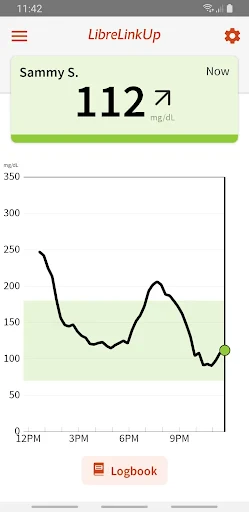
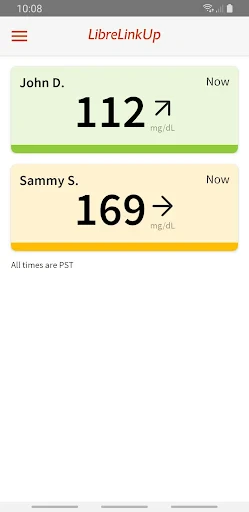
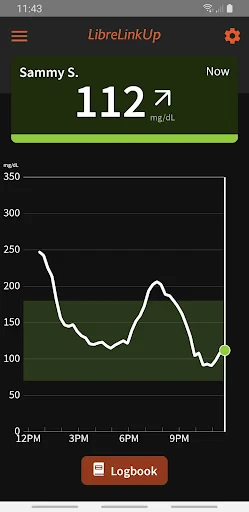
LibreLinkUp is a companion application designed for individuals who wish to monitor the glucose levels of a person with diabetes from a distance. It works in conjunction with the FreeStyle Libre system, allowing caregivers, family members, or healthcare providers to view real-time glucose data on their own smartphones. The app syncs automatically with the primary user’s LibreLink app, providing updates every few minutes without requiring manual intervention. Its primary purpose is to offer peace of mind by enabling remote supervision, particularly for children, elderly individuals, or those who cannot consistently manage their own readings. The interface is clean and straightforward, displaying current glucose values, trend arrows, and a history graph. Users can set customizable low and high glucose alerts to receive notifications directly on their device. LibreLinkUp does not replace medical advice but serves as a supportive tool for proactive diabetes management outside clinical settings.
Chapter 1: Function
The core function of LibreLinkUp is to provide real-time, remote access to glucose data from a connected FreeStyle Libre sensor. Once the primary user shares their data via the LibreLink app, the companion app receives continuous updates. It displays the current glucose level numerically, along with a trend arrow indicating direction and speed of change. A time-stamped graph shows recent glucose history, allowing users to identify patterns such as post-meal spikes or overnight lows. The app supports multiple connections, meaning several people can follow the same user simultaneously. Key functionality includes customizable alert thresholds: users can set notifications for when glucose goes below or above specified levels, ensuring timely awareness. Additionally, the app logs past readings for review, though it does not allow manual entry of insulin or food data. The sync is automatic and requires minimal user interaction, making it suitable for non-technical caregivers. Once connected, the app runs silently in the background, updating data every few minutes as long as the primary user’s phone has internet access. This function transforms a personal monitoring device into a shared safety net.
Chapter 2: Value
The value of LibreLinkUp lies in its ability to bridge the gap between diabetes self-management and remote caregiver involvement, enhancing safety and reducing anxiety. For parents of children with type 1 diabetes, the app eliminates constant worry by providing real-time visibility into their child’s glucose levels during school hours, sleepovers, or sports activities. It empowers caregivers to act proactively rather than reactively: a trend arrow pointing downward can prompt a timely phone call or check-in before hypoglycemia occurs. For elderly users who may forget to check their sensor or misread data, the app allows adult children or home health aides to monitor discreetly and intervene only when necessary. The customizable alert system is a critical advantage, as it reduces alert fatigue by focusing only on actionable thresholds. In clinical settings, healthcare providers can use LibreLinkUp to review trends between appointments, supporting data-driven adjustments to insulin regimens. The app also fosters independence for the person with diabetes, as they know someone is watching without constant manual reporting. From a psychological perspective, it reduces the burden of sole responsibility for both the user and their support network. The long-term value includes potential reduction in severe hypoglycemic episodes, fewer emergency visits, and improved glycemic control through shared awareness. By turning a personal device into a collaborative tool, LibreLinkUp strengthens the care ecosystem without compromising the user’s privacy or autonomy.
Chapter 3: Scenarios
The primary target user groups for LibreLinkUp are caregivers of individuals with diabetes who require remote supervision. This includes parents of children with type 1 diabetes, especially those aged 4 to 17 who attend school or participate in extracurricular activities. A common daily use case is a parent monitoring their child during school hours: the app runs silently on the parent’s phone while the child wears a FreeStyle Libre sensor. If the child’s glucose drops below the set threshold during gym class, the parent receives an instant notification and can contact the school nurse or teacher. Another key group is adult children caring for elderly parents with type 2 or type 1 diabetes. For example, an older adult living alone may forget to check their readings; their adult child can glance at the app from their workplace and call to remind them to eat or adjust insulin. A third scenario involves healthcare providers in outpatient or telemedicine settings: a diabetes educator can monitor a patient’s data between visits and provide timely feedback. The app is also used by partners or roommates who want to support someone with diabetes without intruding on their daily routine. In all scenarios, the app operates passively in the background, only requiring attention when an alert triggers. This makes it ideal for busy caregivers who cannot constantly watch a screen but need to be available for emergencies.
Advantages
- realtime glucose data from any follower
- supports unlimited caregivers per user
- low battery consumption on background mode
- share alarms without phone proximity
- works offline once data is synced
Disadvantages
- requires primary LibreLink app to function
- no manual entry for insulin or meals
- data delay up to 5 minutes from sensor
- limited to Freestyle Libre sensor ecosystem
- no iOS widget for quick glance
Frequently Asked Questions
Q: What is LibreLinkUp and what does it do?
A: LibreLinkUp is a companion app for FreeStyle Libre continuous glucose monitoring systems. It allows caregivers or family members to remotely view a person's glucose readings in real time. The app pulls data from the primary user's LibreLink account and displays trends, alerts, and current glucose levels. No additional hardware is needed beyond the user's existing sensor and smartphone.
Q: Is LibreLinkUp free to use or does it require a subscription?
A: LibreLinkUp is free to download and use. There are no in-app purchases or subscription fees. However, the primary person with diabetes must have an active FreeStyle Libre sensor and the LibreLink app installed on their smartphone. The caregiver must also have a compatible device running iOS or Android. No extra equipment beyond the standard sensor kit is required.
Q: What devices and operating systems support LibreLinkUp?
A: LibreLinkUp is available on iOS (version 13.0 or later) and Android (version 6.0 or later). It works on smartphones and tablets. The app is designed for caregivers and family members, not for the primary user wearing the sensor. For the best experience, both the primary user's LibreLink app and the caregiver's LibreLinkUp app should be updated to the latest versions.
Q: How does the real-time glucose monitoring work remotely?
A: LibreLinkUp syncs automatically every 5 minutes with the primary user's LibreLink account via cloud connectivity. The caregiver receives the same glucose data, including current readings, trend arrows, and historical graphs. Alerts for high or low glucose levels can be set within the app. No Bluetooth proximity is required; the caregiver only needs an internet connection on their phone.
Q: Can I share glucose data with multiple caregivers using LibreLinkUp?
A: Yes, LibreLinkUp allows the primary user to share their glucose data with up to 20 followers. Each follower must have their own LibreLinkUp account and be invited by the primary user through the LibreLink app. All followers see the same real-time data and can configure their own alert settings independently. The primary user can revoke access at any time via their account settings.
Technical Information
Recommended for You

Phone Cleaner - AI Cleaner

DeepL Translate
Webfic - Fantastic Reading

ArtistAI: AI Photo Generator
Mp3 Music Downloader

franceinfo: actualités et info

Fuel Forward

Air Traffic - flight tracker
Camera for S23 - Galaxy Camera

Regions Bank

KMPlayer - All Video Player

Super Funny Ringtones & Sounds

Baskin-Robbins

Black Light

Shuffles by Pinterest

MoneyTime - Play & Earn

QR & Barcode Reader

Learn Coding/Programming: Mimo

Necrometer

Easy Homescreen

Mileage Tracker by Everlance

Holy Bible, KJV Bible + Audio
Podcast Go