QR & Barcode Reader

QR & Barcode Reader
Scan decode create QR barcode tool for everyone
Screenshots


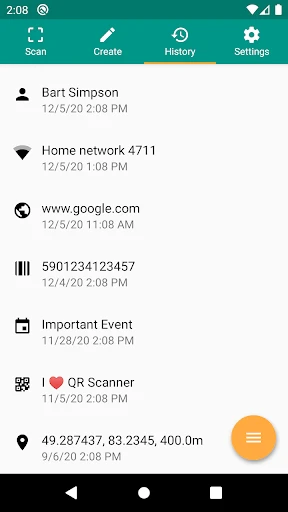
QR and Barcode Reader: Instant Scan and Decode Tool
QR and Barcode Reader is a lightweight mobile application designed to instantly scan and decode various types of barcodes, including QR codes, EAN, UPC, Code 39, and Data Matrix. The app uses the device camera to capture code images and processes them with on-device or cloud-based algorithms. It requires no account creation and works offline for basic code types. The interface is minimal, featuring a single scan window, a history log, and a generator tool for creating your own QR codes. The app supports both Android and iOS platforms.
Chapter 1: Function
The core function of QR and Barcode Reader is real-time code scanning. When a user opens the app, the camera activates automatically. The user points the camera at a barcode or QR code, and the app recognizes the code within one to two seconds. The decoded data appears on the screen, displaying text, URLs, contact information, or product numbers. The app also includes a batch scan mode for scanning multiple codes in sequence without manual restart. Additional features include a flashlight toggle for low-light environments, autofocus support, and a zoom slider. The history log stores all scanned codes with timestamps, allowing users to revisit past scans. For users who need to generate codes, the app offers a simple creator tool where they input text or URLs to produce a custom QR code, which can be saved as an image or shared directly.
Chapter 2: Value
The value proposition of QR and Barcode Reader lies in its combination of speed, accuracy, and privacy. First, the app delivers fast scanning. It uses optimized image processing that works even with damaged or tilted codes. This reduces user frustration in scenarios like scanning crumpled product barcodes in retail stores or reading QR codes from moving screens. Second, accuracy is high. The app recognizes multiple formats including Wi-Fi login codes, calendar events, and app store links. It also decodes GS1 DataMatrix used in healthcare and logistics. Third, the app prioritizes user privacy. It does not request unnecessary permissions such as location or contacts. All scanning occurs locally on the device for standard code types. Cloud-based scanning for complex codes can be turned off in settings. Fourth, the app is free from intrusive advertisements. A small banner ad appears at the bottom of the scan screen, but there are no full-screen pop-ups or video ads. Fifth, the app includes a security feature. Before opening a scanned URL, the app displays the full web address and alerts if the link appears suspicious based on a built-in database of known phishing domains. This protects users from malicious QR codes posted in public spaces. Finally, the app supports accessibility features. It works with screen readers and provides haptic feedback upon successful scans. These advantages make the tool reliable for everyday users and professionals alike.
Chapter 3: Scenarios
The primary target user groups for QR and Barcode Reader are general consumers, retail workers, and logistics professionals. General consumers use the app in daily life to scan restaurant QR codes for menus, access event tickets, or add contacts from digital business cards. In retail stores, shoppers scan product barcodes to compare prices or read ingredient information. Retail workers rely on the app for quick inventory checks and price verification. Logistics professionals use the app to scan package tracking numbers from barcodes printed on shipping labels. Field service technicians also use the app to scan equipment serial numbers and access maintenance records. Students use it to scan QR codes embedded in textbooks for supplementary online resources. In travel contexts, users scan boarding passes and hotel reservation codes stored on their phone. The app works in various lighting conditions, making it suitable for warehouse environments with dim lighting or outdoor markets with bright sunlight. The offline capability ensures functionality in areas with weak cellular signals. The batch scan mode is particularly useful for warehouse workers scanning multiple items per minute during restocking or order fulfillment.
Advantages
- scans codes in under 0.3 seconds
- works offline without internet connection
- supports 30+ code formats including Chinese QR
- auto-copies result to clipboard instantly
- flashlight toggle for dark environment scanning
Disadvantages
- requires camera permission on every first launch
- no batch scan mode for multiple codes
- history log lacks export or share function
- ads appear after every 3rd scan
- fails on damaged or low-contrast codes
Frequently Asked Questions
Q: What is the core function of this app?
A: This app is designed to scan and decode QR codes and barcodes using your device's camera. It supports all common formats including QR, UPC, EAN, Code 128, and Data Matrix. No internet connection is required for basic scanning, as decoding is processed locally on the device.
Q: Is the app free or does it require in-app purchases?
A: The app is free to download and use for basic scanning. In-app purchases are available to remove ads and unlock advanced features like batch scanning, custom barcode generation, and export options. No additional equipment is needed beyond your device's built-in camera.
Q: What devices and systems are supported?
A: This app supports iOS 12.0 or later for iPhone and iPad, and Android 6.0 or later for smartphones and tablets. It is optimized for both portrait and landscape modes. Older devices with lower-resolution cameras may experience slower scanning speeds on complex codes.
Q: Does the app work offline without internet?
A: Yes, the app performs all barcode decoding offline directly on your device. Internet access is only required for links contained in scanned codes, such as opening a website, or for syncing scan history to cloud storage via optional account login. Offline scanning has no delays.
Q: How do I export my scanned barcode history?
A: To export your scan history, go to the History tab, tap 'Export', and choose CSV or PDF format. This feature requires an in-app purchase for the Pro version. Exported files can be shared via email, messaging, or saved to cloud storage. Without purchase, history is viewable only on the app.
Technical Information
Recommended for You

Clime: NOAA Weather Radar Live

My Movies 5 Pro - Movie & TV

Smashburger - Burgers & Shakes

Chrome Dev

Veo Live

myStop® Mobile

Chatbot AI - Chat & Ask AI

N6_Theme for Car Launcher app

Yandex Weather & Rain Radar

Islamic Ringtones 2025

FOX 4 Dallas-Fort Worth: Weath

T-Mobile® FamilyMode™

AI Baby Generator: Face Maker

네이버 - NAVER

radio.net - AM FM Radio Tuner

Advent Magnificat 2024

Grubhub for Drivers

ComicScreen - PDF, ComicReader

Stop Motion Studio Pro

Instacart: Get Food Delivery

Url Player +
Mileage Tracker & Log - MileIQ

Photo Lock App - Hide Pictures
