LiveATC for Android
LiveATC for Android
LiveATC air traffic control listening for aviation enthusiasts
Screenshots
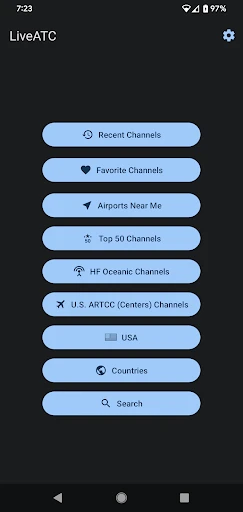
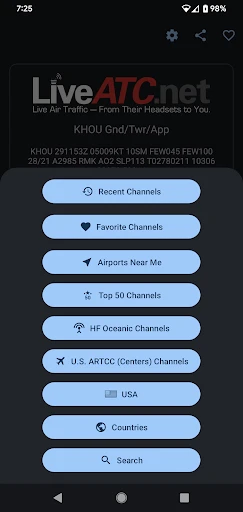

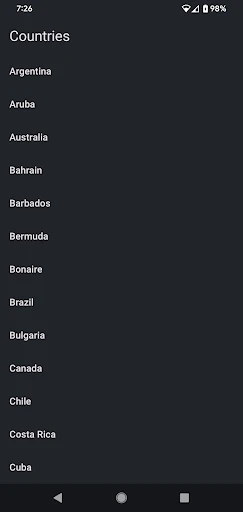

LiveATC for Android - Real Time Air Traffic Control Audio Streaming
LiveATC for Android is a mobile application that provides live streaming of air traffic control communications from thousands of aviation frequencies worldwide. It aggregates audio feeds from volunteer-contributed receivers and official sources, offering users immediate access to real-time ATC chatter from airports, towers, and en-route centers. The app serves aviation enthusiasts, pilots, air traffic controllers, and professionals who require situational awareness of airspace activity. Its core functionality revolves around delivering uninterrupted, low-latency audio streams with a user-friendly interface that allows browsing by airport, region, or frequency.
Chapter 1: Function
The app’s primary function is to stream live ATC audio directly to a user’s Android device. It organizes feeds by airport codes (ICAO/IATA), geographical regions, and specific frequencies such as tower, ground, approach, departure, and clearance delivery. Users can search for any participating airport and instantly hear two-way communications between pilots and controllers. The app includes a favorites system for quick access to frequently listened feeds, a sleep timer for background play, and background audio support to allow multitasking. It also provides detailed information about each feed, including source status, signal quality, and last update time. The interface displays real-time metadata such as airfield weather conditions and NOTAMs when available. The audio quality is optimized for compression over mobile networks while maintaining intelligibility of rapid-fire radio transmissions.
Chapter 2: Value
The primary value of LiveATC for Android lies in its accessibility to live, unfiltered aviation communications that were historically limited to radio scanners. For aviation enthusiasts, it offers an immersive educational experience, allowing them to learn standard phraseology, understand traffic patterns, and build familiarity with various airspace operations. For student or private pilots, the app provides a practical tool to study radio procedures from home, listen to pattern work at local airports, and prepare for unfamiliar tower environments. Professional controllers and dispatchers use it for cross-training, observing flow management, and maintaining awareness of traffic trends. The app’s key advantage is its global coverage, aggregating feeds from major hubs like JFK, Heathrow, and Hong Kong as well as small general aviation fields. Unlike hardware scanners, it requires no equipment investment, antenna setup, or frequency licensing. The background streaming capability allows users to monitor traffic while driving (passively) or working. Additionally, the app supports emergency scenarios, where users can follow live communications during incidents or weather events. Its lightweight design ensures minimal battery drain compared to video streaming, and the sleep timer enables overnight listening without manual intervention. The app also serves as a resource for aviation historians and investigators by archiving notable communications.
Chapter 3: Scenarios
The primary target user groups include aviation enthusiasts, student pilots, and active air traffic controllers. Enthusiasts use the app during leisure time to listen to busy Class B airports like LAX or Atlanta Hartsfield, tracking arrival sequences and departure pushes. Student pilots rely on the app to practice listening comprehension of controller instructions, particularly at nontowered fields to understand CTAF procedures. Controllers use the app to monitor neighboring sectors or practice live traffic scenarios for professional development. Everyday use cases include a student pilot reviewing tower communications at their training airport before a solo flight, an aviation enthusiast tracking transatlantic traffic from their home office, or a private pilot listening to weather-related diversions at a destination airport during severe conditions. The app is also used by aviation journalists covering breaking news events, such as emergency landings or airshow performances. During large events like the Super Bowl or airshows, users tune into temporary control towers to hear special traffic management. Offline, users review their saved favorite feeds and share notable clips with fellow aviation communities.
Advantages
- real-time ATC feeds from 1
- 300+ live airports worldwide
- background audio playback works with screen off for multitasking
- includes offline airport diagrams for navigation during listening
- supports multiple simultaneous feeds for cross-referencing sectors
- low-latency stream with minimal buffering on 4G/WiFi
Disadvantages
- no built-in recording function for later review of transmissions
- requires stable internet connection; no offline playback option
- user interface lacks filter by frequency type (tower/ground/approach)
- push-to-talk and audio alerts absent for hobbyist scanning
- iOS version updates often lag behind Android feature parity
Frequently Asked Questions
Q: What does LiveATC for Android do?
A: LiveATC for Android streams live air traffic control communications from over 1,000 airport and center frequencies worldwide. Users listen to real-time pilot-controller conversations for aviation monitoring, training, or situational awareness. No additional equipment is required beyond an internet-connected Android device.
Q: Is the app free or does it require in-app purchases?
A: The app is free to download and use with basic features. Optional in-app purchases unlock premium features like background playback, push notifications for specific frequencies, and ad removal. No subscription is mandatory for core streaming functionality.
Q: What Android devices and OS versions are supported?
A: LiveATC for Android supports devices running Android 5.0 (Lollipop) or newer. It is optimized for both phones and tablets. Compatibility with Android Auto or Wear OS is not officially confirmed. Stable internet connection (Wi-Fi or cellular) is required for streaming.
Q: Can I listen to multiple frequencies simultaneously?
A: No, the app does not support simultaneous multi-frequency playback in standard mode. Users can select one frequency stream at a time. Premium features may allow bookmarking favorites for quick switching, but concurrent playback is not available.
Q: How do I report a broken or inactive frequency stream?
A: Users can report stream issues directly within the app via the 'Report' button on each frequency page. Alternatively, email support at the address listed on the app's Google Play store page. Feeds depend on volunteer contributors, so restoration timelines vary and are not guaranteed.
Technical Information
Recommended for You

Visual Voicemail

AnkiDroid Flashcards

AI Video Generator - Clips AI

Remove Background From Video

Skincare and Face Care Routine

QR Code Reader: QR Code Maker

Diary with Lock: Diary Journal

Board Game Stats

Translateasy Lingual Assistant

WolframAlpha Classic

signNow: Sign & Fill PDF Docs

Pose Tool 3D

adidas: Shop Shoes & Clothing

Game Launcher: Gaming Hub App

ShortMax - Watch Dramas & Show

Cleanfox - Mail & Spam Cleaner

AI Song Generator - Mozart AI

Pillo: Angry Pill Reminder Box

Yahoo News: Daily News For You

Chirp Audiobooks

Speak: Language Learning

hoopla Digital

Greyhound: Buy Bus Tickets
