Remove Background From Video

Remove Background From Video
Remove backgrounds from videos for creators
Screenshots
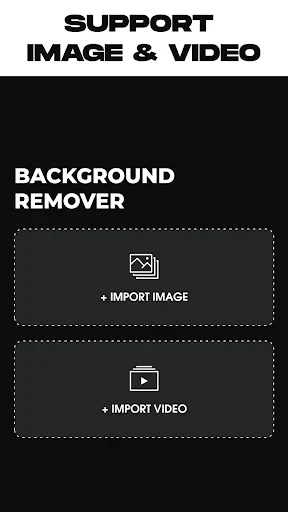


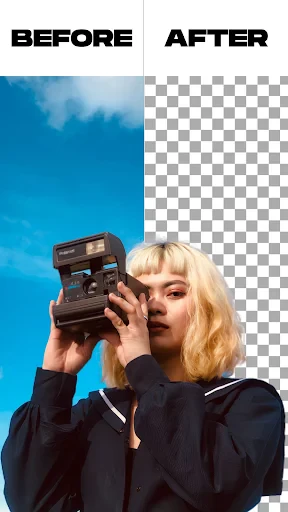

Remove Background From Video: Effortless Video Background Removal Tool
Remove Background From Video is a specialized mobile application designed to automatically detect and eliminate backgrounds from video clips with high precision. Leveraging advanced AI and machine learning algorithms, it allows users to isolate subjects in real-time or process pre-recorded videos without the need for a green screen or complex editing software. The app supports various video formats and resolutions, providing a streamlined interface for both casual users and content creators. Its core promise is to simplify what was once a tedious manual task, enabling anyone to achieve professional-looking results directly from their smartphone.
Chapter 1: Function
The core function of Remove Background From Video is its AI-powered background removal engine. Users can import a video from their device gallery or record one within the app. Upon selection, the app processes each frame to identify the primary subject, typically a person or object, and separates it from the background. Key features include the ability to replace the removed background with a solid color, a custom image, or a different video, as well as the option to make the background transparent for further editing in other software. The app offers edge refinement tools to smooth hair, fur, or complex edges, and it provides preview functionality to check results before export. Output videos can be saved in popular formats like MP4 with preserved quality, and processing speed is optimized for mobile hardware to minimize wait times.
Chapter 2: Value
The primary value of Remove Background From Video lies in its democratization of advanced video editing. Traditionally, removing backgrounds from video required expensive desktop software, technical expertise, and significant time investment. This app eliminates those barriers by offering a one-tap solution that fits in your pocket. For content creators, it drastically reduces production time, allowing for rapid creation of professional social media posts, YouTube thumbnails, or promotional clips. For small business owners, it enables the creation of polished product demos without a studio setup. The app also adds significant value through its versatility: it works with any background, does not require special lighting, and maintains consistent subject isolation across frames. Furthermore, it avoids subscription fatigue by offering a transparent pricing model with a free tier for basic use and a one-time purchase for premium features like 4K export and batch processing. This combination of accessibility, speed, and quality gives users a competitive edge in visual communication without the associated overhead costs.
Chapter 3: Scenarios
The app primarily targets three user groups. First, social media influencers and TikTok creators who need to quickly create engaging content with dynamic backgrounds or remove distracting environments from their videos. For example, a fashion influencer can film an outfit video in any location and instantly replace the background with a branded backdrop. Second, e-commerce sellers and small business owners who require clean product videos for online listings but lack a professional studio. They can record a product on a messy desk and remove the background to place it on a white or lifestyle scene. Third, educators and remote workers who need to produce professional virtual backgrounds for video calls or instructional content without relying on green screens. A typical use case is a teacher recording a lesson at home and removing the background to keep the focus on the presentation materials. The app is also useful for amateur filmmakers who want to experiment with visual effects by layering subjects over different video backgrounds.
Advantages
- removes video backgrounds without manual frame-by-frame editing
- processes clips locally on device for offline use
- supports transparent background export with alpha channel
- handles complex edges like hair with neural matting
- batch processing up to 4k resolution videos
Disadvantages
- requires powerful GPU for smooth real-time preview
- no cloud backup for project files after app removal
- limited to mp4 and mov input formats only
- export speed drops significantly on older phone models
- no support for simultaneous multi-track background replacement
Frequently Asked Questions
Q: What does Remove Background From Video do?
A: This app removes backgrounds from videos automatically using AI. It supports MP4, MOV, and other common formats. No manual editing is needed. The core function is to isolate subjects from backgrounds for use in presentations, social media, or content creation. It does not support audio removal or video editing beyond background separation.
Q: Is Remove Background From Video free to use?
A: The app offers a free trial with limited exports. Full access requires a subscription, available weekly or monthly. No additional equipment is needed. In-app purchases unlock higher resolution exports and batch processing. There are no hidden costs for basic features, but watermark-free downloads require payment.
Q: Does it work on all devices and systems?
A: It is compatible with iOS 13.0 or later on iPhone and iPad. Android support requires version 8.0 or higher. Not available on desktop or web. Performance depends on device RAM; older models may experience slower processing. Updated regularly for system compatibility.
Q: How accurate is the background removal?
A: Accuracy depends on video quality and subject contrast. Works best with clear foreground objects and solid backgrounds. May struggle with fine details like hair or fast motion. No manual adjustment tools are provided. Results are generally reliable for simple clips but not suitable for professional-grade editing.
Q: Can I use the app offline after downloading?
A: No. The app requires an internet connection for AI processing. All background removal is done on remote servers, not locally. Offline use is not supported. Ensure stable Wi-Fi or cellular data to avoid interruptions. No local processing option is available in current versions.
Technical Information
Recommended for You

Ice Princess Makeup Salon

Prepware Powerplant

The Economist - News, Podcasts

Receipt Scanner: Easy Expense

LogMeIn Rescue Customer

Public – Stocks and Options

Toonsutra: Webtoon & Comics

PDF Viewer Pro

Pregnancy and Due Date Tracker

Kodi

Universal TV Remote for All TV

Pocket Casts - Podcast App

Duo Mobile

Music Player for Android

The Regrid Property App

Drivers Permit Practice

LiveScore: Live Sports Scores

Download Video & Player

FillUp - Gas Mileage Log

KJV Bible: Audio+Verse

Modern House Design Draw House

180Score Football Predictions

Invoice Simple: Invoice Maker