Geo Tracker - GPS tracker

Geo Tracker - GPS tracker
GPS tracker for hiking sports with map sharing
Screenshots
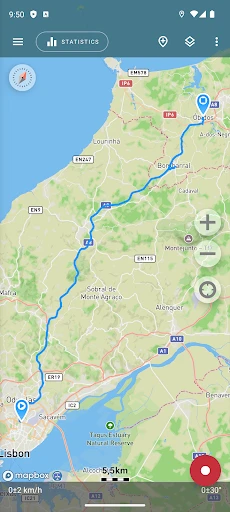
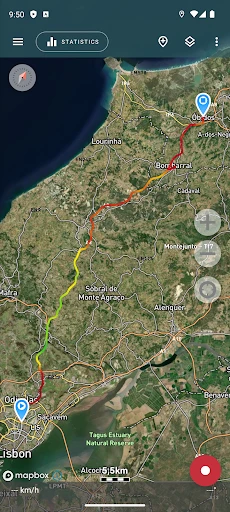
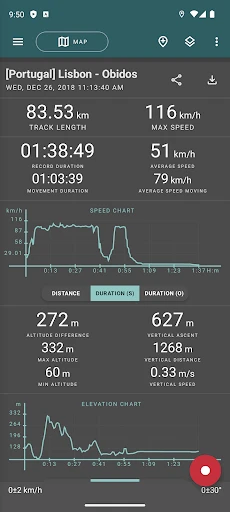
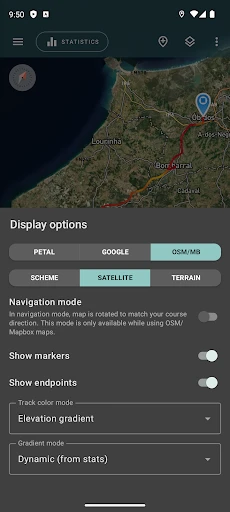
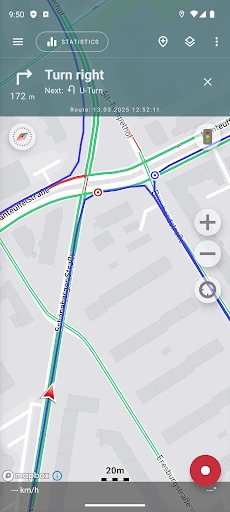
Geo Tracker - GPS tracker: Precision Location and Route Logging
Geo Tracker - GPS tracker is a mobile application designed for accurate GPS location tracking, route recording, and activity logging. The app leverages satellite positioning to capture real-time coordinates, elevation changes, and movement patterns. It is intended for outdoor enthusiasts, field workers, and anyone requiring detailed spatial data. The app stores historical tracks and allows users to export data for analysis or sharing. Its core purpose is to provide reliable, battery-efficient tracking without unnecessary complexity.
Chapter 1: Function
Geo Tracker operates by using the device's built-in GPS sensor to record a user's position at set intervals. The core functions include starting, pausing, and stopping a track recording session. Once activated, the app continuously logs latitude, longitude, altitude, speed, and time stamps. Users can view their current path on an interactive map and see real-time metrics such as distance traveled and average speed. The app supports save, rename, and delete functions for recorded tracks. It also offers automatic pause when the user stops moving to conserve battery and reduce data noise. Exported track files can be in GPX or KML formats for use in other mapping software. The interface is minimalistic, prioritizing essential controls for outdoor use.
Chapter 2: Value
The primary value of Geo Tracker lies in its accuracy and efficiency combined with a zero-cost core model. Unlike many competitors that require subscriptions for basic features, this app offers unlimited track recording, full export capabilities, and no advertisements in the core tracking experience. Its battery optimization is a standout advantage, as the app intelligently adjusts GPS polling frequency based on movement speed and signal stability, allowing for extended recording sessions without draining the device. The data ownership model is also a key benefit: all recorded tracks reside solely on the user's device unless manually exported, ensuring privacy and control over geographic information. For users comparing tools, the app provides a robust offline functionality, meaning it does not require a constant internet connection to record GPS data; the map tiles can be cached for later viewing. The simplicity of the user interface reduces learning curve, making it accessible for both casual hikers and professional surveyors. Furthermore, the open data format support ensures long-term compatibility with different platforms and analytic tools. The app delivers a reliable, low-overhead solution for capturing and preserving movement history.
Chapter 3: Scenarios
The primary target user groups include outdoor recreationalists such as hikers, runners, cyclists, and trail runners who need to record their routes for fitness tracking or navigation memory. Field professionals like geologists, foresters, utility inspectors, and agricultural surveyors use the app to log waypoints and document field visits with precise coordinates. Another key user base is travelers exploring unfamiliar areas who want to mark their path to find their way back or create a log of their journey. Daily use cases include recording morning jog routes, verifying travel distances for tax reporting, marking parking locations in large lots, and tracking off-road vehicle trails. Parents may also use it to monitor a child's school route by setting a known trajectory. The app is particularly valuable in areas with poor cellular coverage, where offline GPS recording remains uninterrupted. A typical session might involve starting a track before a two-hour hike, automatically pausing during rest stops, and then saving the full GPX file for later upload to a community mapping project.
Advantages
- pauses tracking when battery saver kicks in
- exports GPX and KML for offline editing
- works in airplane mode with preloaded maps
- shows real-time speed and altitude logs
- runs silently in background with minimal CPU use
Disadvantages
- no live cloud sync between devices
- cannot import custom map tile layers
- tracking accuracy drops inside tunnels or dense cities
- route editing requires manual waypoint insertion
- notification controls lack granularity for each track
Frequently Asked Questions
Q: What does Geo Tracker do?
A: Geo Tracker is a GPS tracking app that records your routes, speed, distance, and elevation in real time using your device’s built-in GPS. It supports offline map caching, waypoint marking, and export of tracks in GPX/KML formats. No external hardware is required, and it functions as a standalone tracker for hiking, cycling, or driving activities.
Q: Is Geo Tracker free to use?
A: Geo Tracker offers a free version with core features like route recording, speed display, and basic map views. In-app purchases unlock advanced functions such as offline maps, detailed statistics, and ad-free experience. There are no subscription fees, and the app does not require additional equipment or external sensors to operate.
Q: Does Geo Tracker work offline?
A: Yes, Geo Tracker works offline. You can download map tiles for specific regions while connected to the internet, and then the app will use GPS signals to record tracks without mobile data. However, real-time map rendering requires cached maps, and background tracking may be limited on some Android devices due to battery optimization settings.
Q: How accurate is the GPS tracking?
A: GPS accuracy depends on your device’s hardware and environmental conditions. Under open sky, Geo Tracker typically achieves 3-10 meter accuracy. In dense forests, urban canyons, or near tall buildings, accuracy may degrade to 15-30 meters. The app does not support external Bluetooth GPS receivers, so it relies solely on your phone’s internal sensor.
Q: Can I export my recorded tracks?
A: Yes, Geo Tracker allows you to export recorded routes as GPX, KML, or CSV files. You can share tracks via email, cloud storage, or direct file transfer. The app also supports importing GPX files for viewing. There is no built-in social sharing feature, and exported files include timestamp, latitude, longitude, elevation, and speed data.
Technical Information
Recommended for You

Chic Me - Chic in Command

NOAA Weather & Tides

FloSports: Watch Live Sports

Greeting Cards All Occasions

Royal Caribbean International

Easy Downloader - Video Hub

Live Football TV Streaming HD

Emoji Maker: DIY Emoji Merge

Radar, HUD, Map, Speed Camera

Chirp Audiobooks

Denny's

3D Modeling App: Sculpt & Draw

Bojangles

PREMIER Credit Card

PhotoTune Video

OsmAnd — Maps & GPS Offline

AARP SafeTrip™

Mark - AI Logo Generator

Google Home

Cleaner Junk & Photo Recovery

PressReader: News & Magazines

Inoreader: News & RSS reader

TracFone My Account