LED Scroller - LED Banner App

LED Scroller - LED Banner App
LED Scrolling Text Maker for Signs and Events
Screenshots

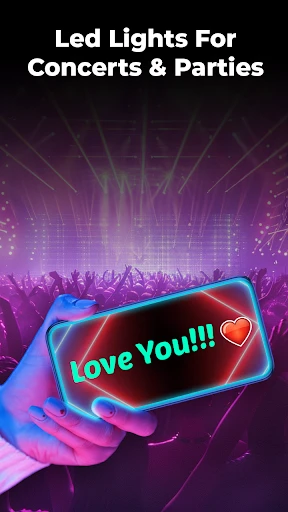
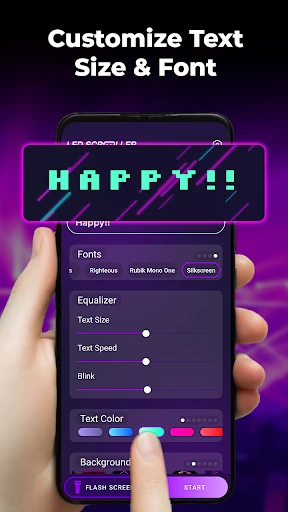
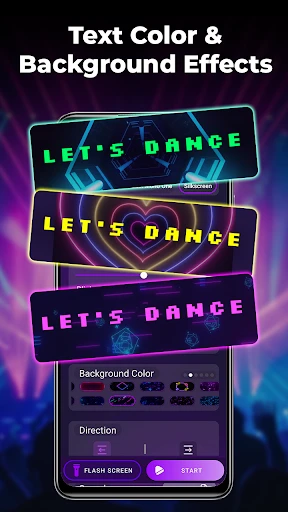
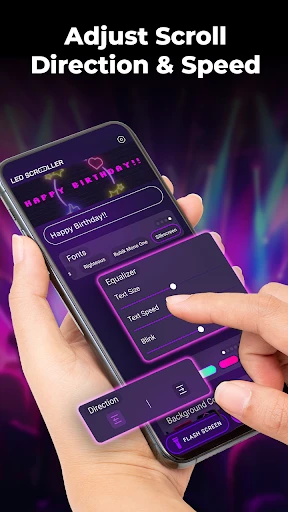
LED Scroller - LED Banner App: Dynamic Digital Signage at Your Fingertips
LED Scroller - LED Banner App is a mobile application designed to transform your smartphone or tablet into a customizable digital signage display. It enables users to create scrolling text banners, animations, and visual alerts that mimic the look of traditional LED marquees. The app leverages the device's screen brightness and orientation to produce vivid, eye-catching messages that can be used for personal expression, advertising, or information sharing in various settings. With an intuitive interface, it supports multiple text styles, colors, scrolling speeds, and effects, making it accessible for both casual and professional users. The app operates offline for basic functions and offers advanced features through in-app purchases, such as custom graphics or scheduled messages.
Chapter 1: Function
The core function of LED Scroller is to generate real-time scrolling text banners. Users can input custom messages, adjust font size, color, and background styles, and choose from a variety of animation effects like horizontal scroll, vertical roll, or flashing. The app includes a built-in text editor with support for multiple lines, symbols, and emoji alternatives. It also provides speed control to match the reading pace of viewers. For practical use, the app allows users to set the banner as a persistent overlay on the screen or to run it in full-screen mode. Additionally, it features a scheduler function for timed message displays, making it suitable for repetitive announcements. The app supports landscape and portrait orientations, ensuring compatibility with different device holders or stands. Basic functions are available without internet connectivity, while premium features like custom fonts or removal of watermarks require a purchase.
Chapter 2: Value
LED Scroller offers significant value by providing an accessible and cost-effective alternative to physical LED signboards. Its key advantage is the elimination of hardware costs, as it leverages existing mobile devices. The app transforms any smartphone into a portable communication tool, enhancing visibility in low-tech environments. For small business owners, it serves as a dynamic storefront sign to attract customers with promotions or opening hours, without the expense of professional installation. The customization options allow users to tailor messages instantly, adapting to changing needs such as events, sales, or emergencies. Another critical value is the app's ability to operate offline, ensuring reliability in areas with poor internet access. Its simple design reduces learning time, enabling quick deployment. For personal use, the app adds a creative layer to parties, protests, or social gatherings, where eye-catching messages can engage audiences. The scheduler feature adds operational convenience, enabling automated updates. Overall, the app democratizes digital signage by making it affordable, portable, and highly adjustable to diverse environments, from retail spaces to classrooms.
Chapter 3: Scenarios
The primary target users for LED Scroller include small business owners, event organizers, educators, and retail staff. Small shop owners use it to display daily deals or operating hours on countertops or windows, attracting walk-in customers. Event organizers deploy the app at conferences or markets to show session schedules or directional information, often mounting devices on tripods. Educators employ it in classrooms to highlight key lesson points or countdown timers for exams. For everyday scenarios, individuals use the app at parties to display greeting messages or at sports events to cheer for teams. Retail employees utilize it behind glass counters to announce inventory restocks or seasonal promotions. The app is also used in offices for quick internal announcements, such as meeting reminders or safety alerts. In public transport, it can act as a temporary station indicator. The flexibility supports both fixed displays and handheld signaling, making it suitable for impromptu announcements or structured digital signage needs.
Advantages
- scrolls custom text across screen like a digital banner
- supports multiple colors and speed adjustments for visibility
- works offline without internet connection required
- simple interface for quick message setup and display
- uses phone screen as LED board for events or signs
Disadvantages
- limited text length per display without auto-scrolling
- brightness not adjustable beyond phone’s max screen setting
- no real-time clock sync for scheduled message changes
- lacks animation effects beyond basic left-to-right scroll
- ad-supported free version may interrupt display sessions
Frequently Asked Questions
Q: What core functions does LED Scroller offer?
A: LED Scroller allows users to create scrolling text banners that mimic LED displays. It supports custom text, colors, speed, and animation effects. The app is designed for eye-catching signage in public spaces, events, or personal use, with no additional hardware required. Real-time preview is available before saving or sharing.
Q: Is LED Scroller free to use with in-app purchases?
A: The app is free to download with basic features included. Premium features like advanced animations, custom fonts, and ad removal require a one-time in-app purchase. No subscription is mandatory, and all core scrolling banner functions work without payment. Additional templates may be unlocked via purchase.
Q: What devices and systems are compatible with this app?
A: LED Scroller is compatible with iOS and Android devices, including smartphones and tablets. It requires iOS 12.0+ or Android 6.0+ for optimal performance. No external LED hardware or accessories are needed, and the app supports both portrait and landscape orientations for flexible display.
Q: How do I fix text not scrolling smoothly?
A: Ensure your device’s screen refresh rate is set to default, and close background apps to reduce lag. Within the app, adjust the scroll speed slider to a lower value for smoother movement. If the issue persists, restart the app or update to the latest version from your app store.
Q: Can I share my LED banner directly to social media?
A: Yes, LED Scroller includes a share button that exports your banner as a video or GIF. Direct sharing is supported to platforms like Instagram, TikTok, Facebook, and WhatsApp. You can also save the file to your device for later upload. Note that sharing may adjust resolution based on platform limits.
Technical Information
Recommended for You

AdBlock for Samsung Internet
UsA Minimalist Digital -USA159

Dabble - DFS & Player Props

Zello PTT Walkie Talkie

PeakFinder

Period Tracker and Calendar

Binance.US: Buy BTC, DOGE, XRP

aiMail - Al Email Accounts

GPS Location Tracker Phone App

Sprouts

UKG Pro

My6 - Book & Save on Motel6

Moultrie Mobile

Baby Monitor 3G - Video Nanny

ArtRage Vitae Mobile Painting

Samsung Print Service Plugin

Pill Identifier - Pro

SpotHero - Find Parking

Go Fly Drone Camera Controller

TrueCar Used Cars and New Cars

Applebee's

Quick Clean - Space Cleaner
Nest