Nest

Nest
Nest smart home app simplifies control for modern families
Screenshots
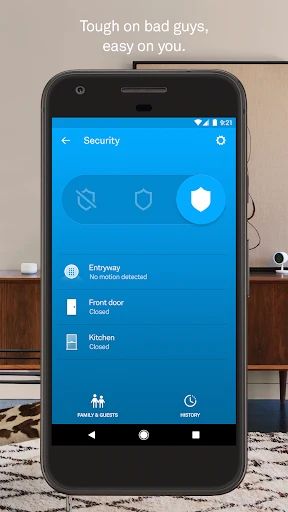
Nest: Smart Home Management Redefined
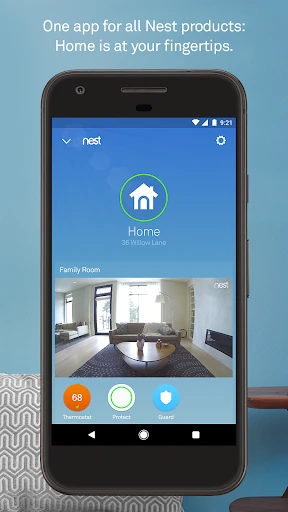
Nest is a comprehensive smart home application designed to centralize control over a wide range of connected devices, including thermostats, cameras, doorbells, locks, and smoke detectors. The app serves as the primary interface for the Nest ecosystem, allowing users to monitor their home environment, adjust settings, and receive real-time alerts from anywhere. By integrating artificial intelligence and learning algorithms, Nest aims to automate household routines, optimize energy usage, and enhance security without requiring constant manual input. The app’s clean interface and intuitive navigation make it accessible for both tech-savvy users and those new to home automation, bridging the gap between complex hardware systems and everyday usability.
Chapter 1: Function
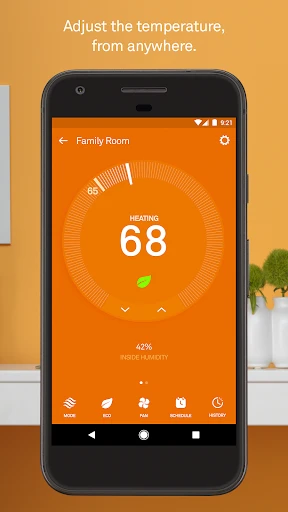
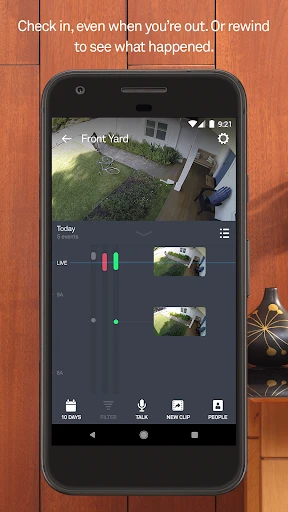
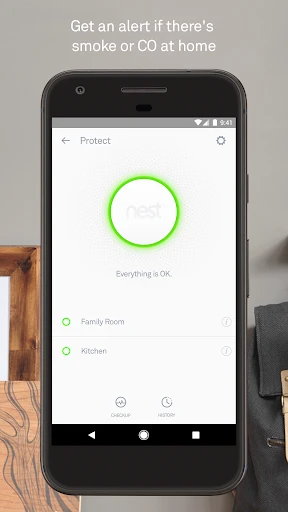
The core functions of Nest revolve around device control, environmental monitoring, and automated scheduling. Users can remotely adjust their thermostat temperature, view live feeds from Nest Cam indoor or outdoor cameras, and answer the door via the Nest Hello video doorbell with two-way audio. The app provides a unified dashboard showing real-time status, energy history, and activity alerts. A key functional feature is the Home/Away Assist, which uses sensors and phone location to automatically switch devices between energy-saving and active modes. The Nest app also supports creating custom routines and schedules for lighting, temperature, and security systems. Additionally, it delivers instant push notifications for smoke or carbon monoxide alarms from Nest Protect, as well as motion or sound detection from cameras. The app integrates with Google Assistant for voice commands and offers multi-user access, allowing family members to control settings from their own devices.
Chapter 2: Value
The primary value of Nest lies in its potential to reduce energy costs, increase home security awareness, and simplify daily routines. By learning user habits over time, the app’s thermostat can automatically program itself to lower heating or cooling when no one is home, leading to significant savings on utility bills. According to Nest’s own data, users save an average of 10 to 12 percent on heating and 15 percent on cooling costs annually. The security aspect provides peace of mind through continuous video monitoring, facial recognition alerts for familiar versus unknown visitors, and instant notifications for critical events like smoke detection or forced entry. These features allow users to respond quickly to emergencies, even when away on vacation. Another key advantage is interoperability: Nest works with over 600 third-party smart home products, enabling users to build a cohesive system without being locked into a single brand. The app’s geofencing capabilities ensure that the home adapts automatically as users come and go, removing the need for manual adjustments. Furthermore, Nest’s commitment to privacy includes encrypted video feeds and user-controlled data retention, addressing common concerns about smart home surveillance. For families, the multi-user access and activity logs provide transparency, allowing parents to monitor children’s arrivals or elderly relatives’ daily patterns without intrusive check-ins.
Chapter 3: Scenarios
Nest serves a broad demographic, from busy professionals to families and environmentally conscious homeowners. A typical use case involves a working parent who leaves home in the morning: the Nest app’s Home/Away Assist sets the thermostat to eco mode and arms the security cameras. During the day, the user receives a push notification if the doorbell rings, allowing them to see and speak to a delivery driver via the app. In another scenario, a homeowner on vacation uses the Nest app to check live camera feeds periodically, ensuring their property remains secure. If the Nest Protect smoke alarm detects elevated carbon monoxide levels, the app immediately alerts the user and provides guidance on next steps. For energy-conscious users, the app’s monthly energy report highlights usage patterns and suggests adjustments, such as lowering the temperature during peak hours. Families with young children use the app to set schedules for bedroom temperatures at bedtime and monitor the arrival of kids from school via geofencing alerts. The app is also popular among renters who want temporary security solutions without permanent wiring, as the Nest Cam can be easily placed on a shelf and controlled entirely through the app. Overall, Nest addresses everyday needs for convenience, safety, and efficiency in a range of living environments.
Advantages
- detects motion via built-in radar for presence sensing
- integrates with Matter protocol for cross-platform smart home
- auto-adjusts temperature based on home occupancy patterns
- supports voice commands via Google Assistant without extra hub
- hardware encryption for offline data processing
Disadvantages
- requires stable Wi-Fi for remote access away from home
- no native Apple HomeKit support without extra bridge
- radar may misread pets as humans in small spaces
- initial setup demands app account and network pairing
- geofencing triggers occasionally delayed on battery saving modes
Frequently Asked Questions
Q: What does Nest App do for smart homes?
A: Nest App centralizes control of Nest thermostats, cameras, doorbells, and smoke alarms. It allows remote monitoring, scheduling, and alerts via Wi-Fi. No additional hub is required; setup uses your home network.
Q: Is Nest App free to use or requires subscription?
A: The basic app download and local controls are free. For cloud video storage and advanced features like intelligent alerts, a Nest Aware subscription is required. Pricing varies by region and storage plan.
Q: Does Nest App work with Apple HomeKit?
A: Nest App does not natively support Apple HomeKit. It integrates with Google Assistant and Amazon Alexa. For HomeKit, you would need a third-party bridge like Starling Home Hub. Check device compatibility.
Q: Can Nest App work without internet connection?
A: Internet is required for full functionality, including remote access and alerts. Without internet, on-screen controls on the device itself may still operate, but the app cannot connect or transmit live video.
Q: How to fix Nest App offline camera error?
A: First check your camera’s power and Wi-Fi signal strength. Reboot your router and the camera. Ensure the app is updated. If the issue persists, remove and re-add the device in the app. Contact Nest support if offline status continues.
Technical Information
Recommended for You

Ulta Beauty: Makeup & Skincare

Valley Metro

FL STUDIO MOBILE

Photo Collage Maker - FunPic

Aura: Security & Protection

Polycam: 3D Scanner & Editor

Hudl

MP3 Converter - Video to MP3

Sweet Camera Selfie

Fidelity Investments

Literie-Endless Stories Await

WiZ Connected

Speak & Learn English: Learna

DayComics

Creati AI Photo Generator

Baby Tracker App | Glow

Desygner: Graphic Design Maker

BackCountry Navigator GPS PRO

Smart & Final

Mangamello - مانجاميلو

Portable WiFi - Mobile Hotspot

AndroPods - Airpods on Android

Lemon8 - Lifestyle Community
