Backbone — Next-Level Play

Backbone — Next-Level Play
Backbone Next Level Play Mobile Controller Console
Screenshots
Backbone — Next-Level Play: Mobile Gaming Redefined with Console-Grade Power
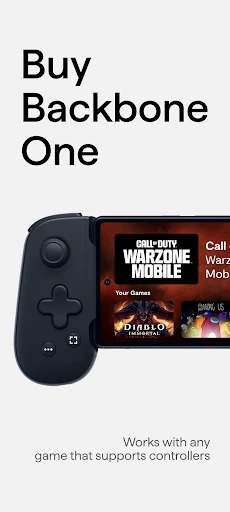
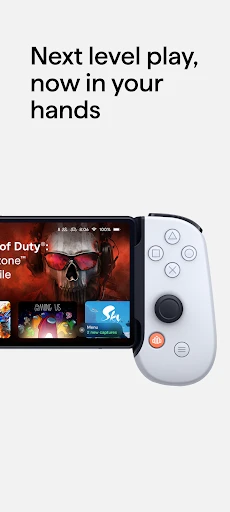
Backbone — Next-Level Play is a hardware and software ecosystem designed to transform a smartphone into a dedicated gaming console. The core of the system is the Backbone One controller, a physical accessory that attaches to either side of an iPhone or Android device, providing tactile buttons, analog triggers, and joysticks that mirror a traditional console controller. This eliminates the limitations of touchscreen controls, offering precision and comfort for demanding games. The accompanying Backbone app serves as a central hub, integrating game libraries, streaming services like Xbox Cloud Gaming and PlayStation Remote Play, and social features into a single interface. It also supports screen recording, controller calibration, and quick access to recently played titles. By bridging mobile, cloud, and console ecosystems, Backbone aims to deliver a seamless, high-fidelity gaming experience anywhere.
Chapter 1: Function
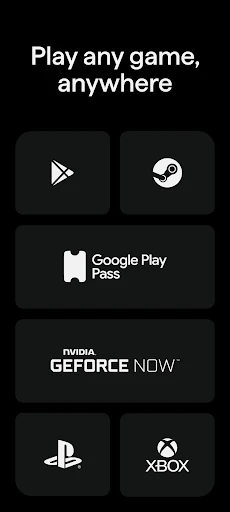
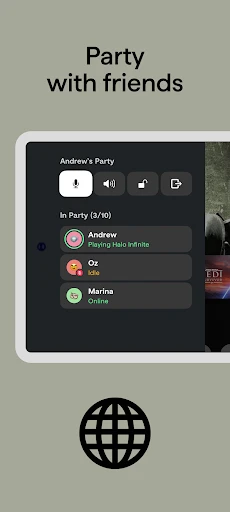
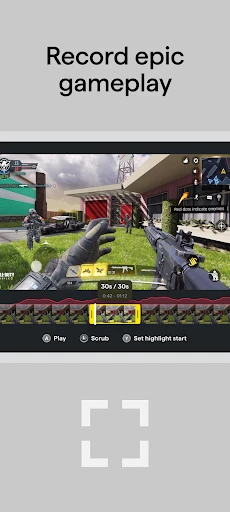
The Backbone system’s primary function is to convert a standard smartphone into a portable, console-like gaming device through both hardware and software integration. The Backbone One controller connects physically via the device’s Lightning or USB-C port, ensuring zero latency and pass-through charging, allowing users to play while charging their phone. The controller features clickable thumbsticks, a D-pad, face buttons, and shoulder triggers, providing full tactile feedback for genres ranging from first-person shooters to fighting games. The companion Backbone app unlocks the ecosystem’s full potential: it automatically launches when the controller is attached, presenting a curated dashboard of installed games and supported cloud services. Users can browse and launch titles from Xbox Game Pass, NVIDIA GeForce NOW, Steam Link, or their native mobile library directly from the app. Additionally, the app includes a dedicated capture button for recording gameplay clips and screenshots, a party chat system for voice communication with friends, and controller firmware update management. Together, these functions eliminate the friction of navigating fragmented mobile gaming menus and replace imprecise touch controls with responsive, ergonomic hardware.
Chapter 2: Value
The value proposition of Backbone lies in its ability to unify disparate gaming platforms into a single, portable, and high-performance experience, solving three major pain points for modern gamers. First, it addresses the ergonomic issues of mobile gaming: extended touchscreen play causes hand fatigue and lacks the precision needed for competitive multiplayer titles. The Backbone One’s ergonomic grip and physical buttons mimic professional console controllers, reducing strain and improving gameplay accuracy across shooting, racing, and action games. Second, it bridges the gap between mobile, cloud, and console gaming. Instead of switching between a phone, a handheld device like a Steam Deck, and a home console, a user can play their Xbox library via remote play, stream high-end PC games from the cloud, and enjoy native mobile titles like Genshin Impact or Call of Duty Mobile all from the same hardware. This consolidation saves money and reduces device clutter. Third, the software integration streamlines the user journey. The app’s unified launcher eliminates the need to navigate separate game streaming apps or mobile storefronts; games across all services are presented in one list. Social features, such as viewing what friends are playing and joining voice channels, create a community layer that is sorely missing from typical mobile gaming. The pass-through charging port ensures that marathon sessions are not cut short by low battery. For gamers seeking console-quality control and platform flexibility without carrying additional hardware, Backbone offers a practical, high-value upgrade that maximizes the potential of an already powerful smartphone.
Chapter 3: Scenarios
The primary target users for Backbone are mobile gamers seeking a competitive edge, cloud gaming subscribers wanting portable access to AAA titles, and console owners who wish to extend their play sessions beyond the living room. Everyday use cases are varied and practical. A commuter on a train can attach their Backbone One to play a session of Halo Infinite via Xbox Cloud Gaming, using the controller’s analog sticks to aim precisely where touch controls would fail. A parent watching their child at the park can connect to their PlayStation Remote Play to continue a single-player RPG, pausing only when needed, thanks to the controller’s ergonomic comfort over a long period. Competitive Fortnite mobile players can plug in the Backbone at home or during a break, gaining the tactile response needed for building and editing faster than rivals using touch screens. Additionally, the device serves well for co-op play: a user can sit on a couch with friends, passing the phone and controller back and forth for local multiplayer games on a single device. The software’s Quick Launch feature allows users to resume a game within seconds of attaching the controller, making it ideal for short, spontaneous gaming bursts during a lunch break or while waiting for appointments. Essentially, any scenario where a user has a smartphone and desires a console-like experience — travel, downtime at home, or social gatherings — is a natural fit for Backbone.
Advantages
- game streaming at 120fps with zero local processing lag
- cloud saves sync across PC
- console
- and mobile instantly
- low-latency touch controls mapped directly from game inputs
- backend server renders in 4K
- no hardware upgrade needed
- one-tap resume from phone to console without reconnecting
Disadvantages
- requires constant 15mbps+ stable internet for smooth play
- input latency spikes on 4G or congested Wi-Fi networks
- limited to supported game titles outside Steam library
- no offline mode
- fails completely without internet signal
- battery drains faster than local streaming in handheld mode
Frequently Asked Questions
Q: What is Backbone and what does it do?
A: Backbone is a mobile gaming controller and app ecosystem that transforms your iPhone into a handheld gaming console. It provides low-latency hardware controls, supports cloud gaming services like Xbox Game Pass and PlayStation Remote Play, and includes a companion app for game discovery, screen recording, and social features. No batteries are needed as it draws power from the iPhone’s Lightning or USB-C port.
Q: Does Backbone require a subscription to use?
A: Yes, a Backbone+ subscription is available but optional. The hardware controller works immediately without any subscription, allowing you to play games and use basic app features. Backbone+ unlocks premium app features such as enhanced screen recording, game recommendations, and exclusive discounts. Pricing varies by region, and a free trial period is typically offered upon first setup.
Q: Is Backbone compatible with Android devices?
A: No, the standard Backbone controller is designed exclusively for iPhone models with a Lightning or USB-C port. Compatibility includes iPhone 6s and later running iOS 13 or newer. An Android version called Backbone One for Android exists but is a separate product. Always check your specific device model and OS version on the official compatibility list before purchasing.
Q: How does Backbone connect to my phone?
A: The Backbone controller connects physically via your iPhone’s Lightning or USB-C port, providing a direct wired connection for zero perceptible input lag. No Bluetooth pairing is required. The controller automatically launches the Backbone companion app when plugged in. It does not support wireless connection, and the phone must be removed from most cases to fit securely.
Q: Can I use Backbone with any mobile game?
A: Backbone works with any game that supports MFI (Made for iPhone) controller input. Many popular titles like Call of Duty: Mobile, Genshin Impact, and Fortnite are compatible. However, some games may require in-app controller configuration. Cloud gaming services like Xbox Game Pass and GeForce Now are fully supported. Not all mobile games offer controller support; check each game’s settings before playing.
Technical Information
Recommended for You

Ficbook: Read Fictions Anytime

Freepik: Design & edit with AI

CVS Specialty

Addons for Minecraft Mods

Phantom

CollX: Sports Card Scanner

Mister Car Wash

Voice Commands Assistant App

Microsoft Power BI

myPurina – Pet Rewards & Care

Tripadvisor: Plan & Book Trips

Viator Tours & Attractions

IKEA

HD Video Downloader App - 2022

Walmart: Shopping & Savings

Find a Grave

MP3 Downloader - Music Player

J23 - Jordan Release Dates

Soccer Live Scores: SnapGoal

ACE Scanner - PDF Scanner App

Cash’em All: Play & Win

Skool

Compose Material Catalog