OtterAI Transcribe Voice Notes

OtterAI Transcribe Voice Notes
OtterAI transcribes speech to text for meetings students and professionals
Screenshots

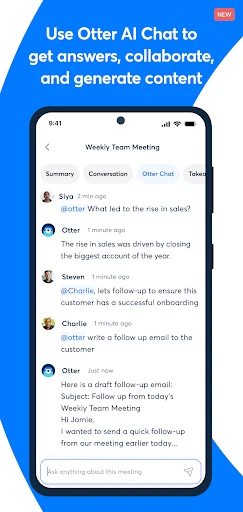
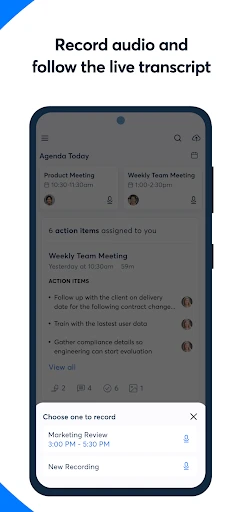
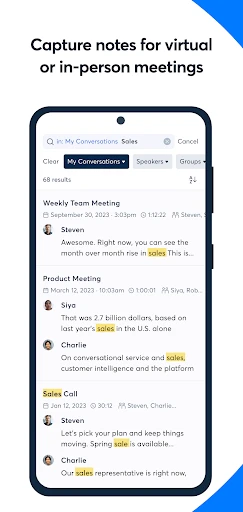
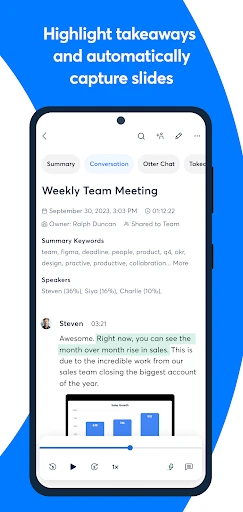
OtterAI Transcribe Voice Notes: Real-Time Voice Transcription and Collaboration Tool
OtterAI is a mobile and web application that leverages artificial intelligence to automatically transcribe spoken conversations into text in real time. Designed primarily for meetings, lectures, interviews, and personal voice notes, the app provides a searchable, shareable, and editable transcript. It integrates with popular video conferencing platforms to capture both live and recorded audio, offering users a powerful way to capture, organize, and revisit verbal information without manual note-taking.
Chapter 1: Function
OtterAI’s core function is real-time speech-to-text transcription. It listens to spoken audio through the device microphone or via imported audio files and generates a synchronized written transcript as the conversation progresses. The app identifies different speakers, timestamps each segment, and highlights key phrases. Users can edit transcripts, add comments, and insert images during live recording. The built-in search feature allows instant retrieval of specific words or topics across all saved conversations. Additionally, OtterAI offers automatic summarization for lengthy meetings, producing concise bullet-point summaries. It also supports direct integration with services like Zoom, Google Meet, and Microsoft Teams, automatically joining scheduled meetings to generate transcripts without manual intervention.
Chapter 2: Value
The primary value proposition of OtterAI lies in its ability to eliminate the cognitive and administrative burden of manual note-taking, while significantly enhancing information retention and accessibility. For professionals, it ensures that no critical detail is missed during fast-paced discussions, enabling participants to focus entirely on conversation rather than writing. The speaker identification feature adds contextual clarity, making it easy to attribute ideas and action items. The searchable transcript library transforms unstructured audio into a structured, queryable database, which is invaluable for researchers, journalists, and project managers who need to revisit specific points weeks or months later. Automatic summarization further reduces information overload by distilling hour-long meetings into actionable takeaways. The integration with video conferencing tools means users can automate the entire workflow, from joining a meeting to receiving a searchable transcript in their inbox. From a cost perspective, the free tier offers a generous monthly transcription quota, making advanced AI transcription accessible to students and freelancers, while team plans facilitate collaborative editing and shared folders, supporting organizational knowledge management. By converting ephemeral spoken words into permanent, shareable text, OtterAI improves accountability, reduces miscommunication, and creates a verifiable record of verbal agreements or instructions.
Chapter 3: Scenarios
The primary target users for OtterAI include business professionals, students, journalists, researchers, and remote teams. In corporate settings, it is used during daily stand-ups, client meetings, and brainstorming sessions to capture decisions and action items. Students employ the app to transcribe lectures and study group discussions, enabling them to search for concepts and review material later. Journalists and podcasters use it for interviewing sources, automatically generating accurate quotes and saving hours of manual transcription work. Researchers employ OtterAI to document focus groups, user testing sessions, or conference talks, with the search function allowing them to quickly locate thematic references. Remote and hybrid teams benefit from its integration with calendar and conferencing tools, ensuring that even absent members can catch up on meeting content. A typical use case involves a project manager scheduling a client call: the app automatically joins, captures the entire conversation, generates a summary, and shares the transcript link with stakeholders, thereby reducing follow-up email traffic and ensuring alignment across the team.
Advantages
- real-time transcription with speaker labels in meetings
- syncs audio and text for instant playback correction
- generates live slide capture alongside spoken notes
- exports searchable transcripts across multiple platforms
- works offline for recorded lectures without internet
Disadvantages
- free tier caps monthly transcription minutes at 300
- accuracy drops significantly with heavy accents or jargon
- requires constant microphone access
- draining battery fast
- no native desktop app for macOS
- only web and mobile
- background noise often creates garbled text segments
Frequently Asked Questions
Q: What does OtterAI Transcribe Voice Notes do?
A: OtterAI is a voice transcription app that converts spoken conversations, meetings, and lectures into searchable text in real time. It uses AI to identify speakers, generate timestamps, and summarize key points. The app integrates with platforms like Zoom and Google Meet for automatic transcription of recorded calls. Basic playback and editing features are included for reviewing notes.
Q: Is OtterAI free to use or does it require a subscription?
A: OtterAI offers a free tier with 300 monthly transcription minutes per account, limited to 30-minute recording sessions per file. Paid plans (Pro and Business) provide extended limits, advanced search, export options, and team collaboration features. No additional equipment is needed beyond a smartphone or computer with a microphone.
Q: Does OtterAI work on both iOS and Android devices?
A: OtterAI is available as a mobile app on iOS (iPhone and iPad) and Android devices, as well as a web app for desktop browsers. It requires a stable internet connection for real-time transcription. Offline mode is not supported for live recording, but you can upload pre-recorded audio files for processing when online.
Q: How accurate is OtterAI transcription in noisy environments?
A: Accuracy in noisy environments is moderate. OtterAI performs best with clear speech and minimal background noise, achieving around 85-95% accuracy for standard English. Heavy accents, overlapping speakers, or poor audio quality can reduce accuracy. There is no built-in noise cancellation; users are advised to use an external microphone for better results.
Q: Can I edit and export transcripts from OtterAI?
A: Yes, transcripts can be edited directly within the app to correct errors or add notes. Export options include text files, PDFs, and sharing via link. For paid plans, you can export to Google Docs or Dropbox. The free tier limits exports to text-only and does not include bulk export features. After a session, deleted transcripts are permanently removed without recovery options.
Technical Information
Recommended for You

Whitetail Deer Calls Pro

Ibotta: Save & Earn Cash Back

Lanetalk

TapRead - Romance Stories

Black Light

Tandem: Language exchange

Ai Browser - Smarter & Safer

Proton Mail: Encrypted Email

ReS61 - Christmas Lights

Praktika – AI Language Tutor

Messages
GPS+ Maps, Navigation, Traffic

Aura: Security & Protection

family locator - Locator 24

GPS Voice Navigation: Live Map

All video downloader and saver

Circuit Route Planner

Ubigi: Travel eSIM & data plan

Resident Center
Free VPN Super™ -Fast & Secure

Merkury Smart

HiWaifu: AI Friend & Waifu Hub

Contacts