Microsoft To Do: Lists & Tasks

Microsoft To Do: Lists & Tasks
Manage tasks lists daily planner for productivity
Screenshots

Microsoft To Do: Lists & Tasks - Smart Task Management
Microsoft To Do is a personal task management application designed to help users organize their daily life and work. It integrates seamlessly with Microsoft 365 services, offering a clean interface for capturing, prioritizing, and completing tasks across devices. The app replaces Wunderlist and serves as the core task engine for Outlook Tasks, providing a unified experience for planning both professional and personal activities.
Chapter 1: Function
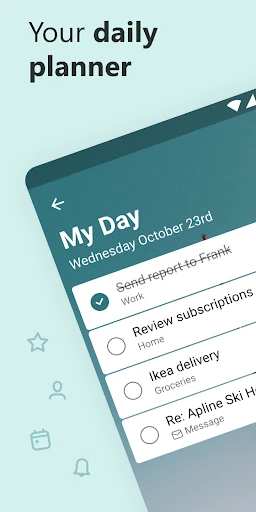
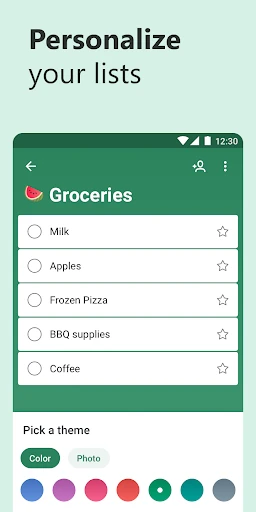
Microsoft To Do provides a comprehensive set of core functions for task management. Users can create simple lists for groceries, projects, or goals. Each task supports rich features including due dates, reminders, recurring schedules, and file attachments. The My Day feature enables daily planning by allowing users to select tasks to focus on, with intelligent suggestions based on deadlines and past behavior. Steps subdivide tasks into checklists, while notes and attachments provide context. Lists can be color-coded and organized into Groups for projects. The built-in search function quickly locates any task across all lists. Integration with Microsoft Planner and Outlook allows tasks created in these platforms to sync automatically into To Do. The app also supports natural language input, enabling users to type pick up milk tomorrow at 5pm and have the app parse the date and time automatically. Cross-platform availability on Windows, macOS, iOS, Android, and web ensures tasks are always accessible.
Chapter 2: Value
The core value proposition of Microsoft To Do lies in its seamless integration with the Microsoft ecosystem and its simplicity-driven design philosophy. For users already relying on Office 365 or Microsoft 365, the app provides a native task synchronization bridge between Outlook, Planner, and Teams. This eliminates data silos, meaning a task created in Outlook Web Access appears instantly on an iPhone. The My Day feature reduces cognitive load by encouraging focused daily planning rather than overwhelming users with a monolithic task list. Intelligent suggestions based on past completion patterns help users prioritize effectively. The app adopts a minimalistic interface that prioritizes clarity over complexity, making it accessible to users who find tools like Asana or Trello overwhelming. Its reliability is bolstered by enterprise-grade data security and cloud sync through Microsoft Graph, ensuring task data is backed up and accessible even after device loss. For managers, the ability to create shared lists with others enables lightweight team coordination without requiring a full project management tool. The free version offers nearly full functionality, removing financial barriers. Compared to standalone apps, its strength is the unified experience across personal and work contexts, supported by the same account infrastructure used for email and calendars.
Chapter 3: Scenarios
Microsoft To Do serves a wide range of user groups and scenarios. Primary users include busy professionals managing both work projects and personal errands, such as a marketing manager tracking campaign deadlines alongside grocery lists. Students benefit from organizing assignments, exam schedules, and extracurricular tasks in separate groups. Home users utilize shared lists for family chores, moving tasks, or holiday planning. Daily use cases include morning planning with My Day, where a user reviews suggested tasks from the previous day and adds new ones for a dentist appointment. During work, users create tasks directly from Outlook emails using the flag feature, which automatically syncs to To Do. Long-term projects, like planning a wedding, can be structured with nested lists and checklists for venue booking and vendor payments. The app is also used for habit tracking, such as setting recurring daily tasks for exercise or reading. In retail management, store supervisors create shared checklists for opening and closing procedures. The cross-platform nature supports scenarios like starting a task list on a Windows PC at the office, adding details on an Android phone during commute, and checking items off on an iPad at home. Non-technical family members can adopt the app easily due to its straightforward interface, enabling intergenerational task sharing.
Advantages
- syncs instantly across Windows
- iOS
- Android
- and web
- integrates Outlook tasks and flagged emails automatically
- ‘My Day’ suggests tasks based on due date and pattern
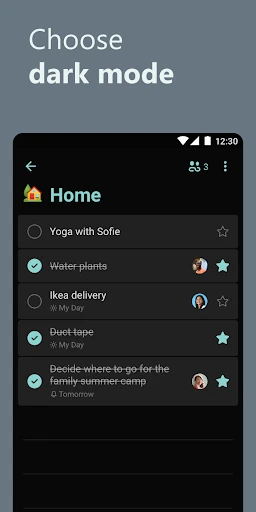
- collaborative lists allow real-time sharing with family or team
- offline access edits tasks without internet connection
Disadvantages
- gmail or third-party service integration is not supported natively
- no native pomodoro or focus timer feature for task sessions
- smart list filters like ‘flagged only’ are limited compared to Notion
- subtask depth is capped at two levels
- hindering complex projects
- widget on Android refreshes slowly and often misses live updates
Frequently Asked Questions
Q: What core functions does Microsoft To Do offer?
A: Microsoft To Do is a task management app that lets you create, organize, and prioritize daily to-do lists. Core functions include adding tasks with due dates, reminders, and notes, grouping tasks into custom lists, and using 'My Day' for daily focus. It also supports subtasks, file attachments, and recurring tasks to help users track personal and work-related activities efficiently.
Q: Is Microsoft To Do free to use or require a subscription?
A: Microsoft To Do is completely free for individual users on iOS, Android, Windows, and web. No subscription or in-app purchases are needed for core features like unlimited lists, reminders, and file attachments. However, if you need advanced collaboration or integration with Microsoft 365 business tools, a Microsoft 365 subscription may be required for certain enterprise features.
Q: What devices and systems is Microsoft To Do compatible with?
A: Microsoft To Do is available on iOS (iPhone, iPad), Android phones and tablets, Windows 10/11 (as a native app), and through any web browser. It supports seamless sync across all these platforms. There is no Mac or Linux native desktop app, but users can still access it via the web version. All features work without extra equipment or permissions beyond internet connectivity.
Q: Does Microsoft To Do support collaboration with other users?
A: Yes, Microsoft To Do allows you to share lists with others. Once you share a list via email, recipients can view and edit tasks in real time. Each collaborator needs a free Microsoft account. This is ideal for shared grocery lists or small project coordination. Note that the free version limits sharing to 5 lists per account, but task count per list is unlimited.
Q: How can I recover a deleted task or list in Microsoft To Do?
A: Microsoft To Do does not offer a visible recycle bin or trash folder for deleted tasks or lists. Once you delete an item, it cannot be recovered through the app's interface. If you accidentally remove important data, Microsoft Support may not guarantee recovery. To avoid data loss, regularly export your lists via the web version's settings (export as Excel) or sync with Outlook for backup.
Technical Information
Recommended for You

Google Gemini

TotalAV Mobile Security

Lenskart : Eyeglasses & More

stats.fm for Spotify

Conservative News Pro

UsA Minimalist Digital -USA159

2nd Line - Second Phone Number

Depop - Buy & Sell Clothes App

GolfNow: Golf Tee Times

Zepp

AiGo - Chat with AI Girlfriend

All Video Downloader App

Artistry Virtual Beauty

AntiVirus Toolkit

Tapas – Comics and Novels

Tattoo Design & Tattoo Maker

YotePya

MyMCI

Target

Дом с Алисой

MyQuest for Patients

TickTock-TikTok Live Wallpaper

Moon Calendar Watch